Imagine logging in one morning to discover sensitive customer data has been stolen, not through a complex cyber heist but through a flaw you did not even know existed. This is where vulnerability scanners step in. These automated tools act as early warning systems, continuously probing your network, applications, and devices for weaknesses before attackers can exploit them. But how does a vulnerability scanner work behind the scenes?
At its core, a vulnerability scanner systematically evaluates systems for known security flaws by comparing configurations, software versions, and network settings against comprehensive databases of documented vulnerabilities. It is not just about finding problems. It is about prioritizing risks and guiding action. Whether it is spotting an outdated web server, an open port, or a misconfigured firewall, scanners deliver actionable intelligence that helps organizations stay ahead of threats.
Vulnerability Scanning Process Explained
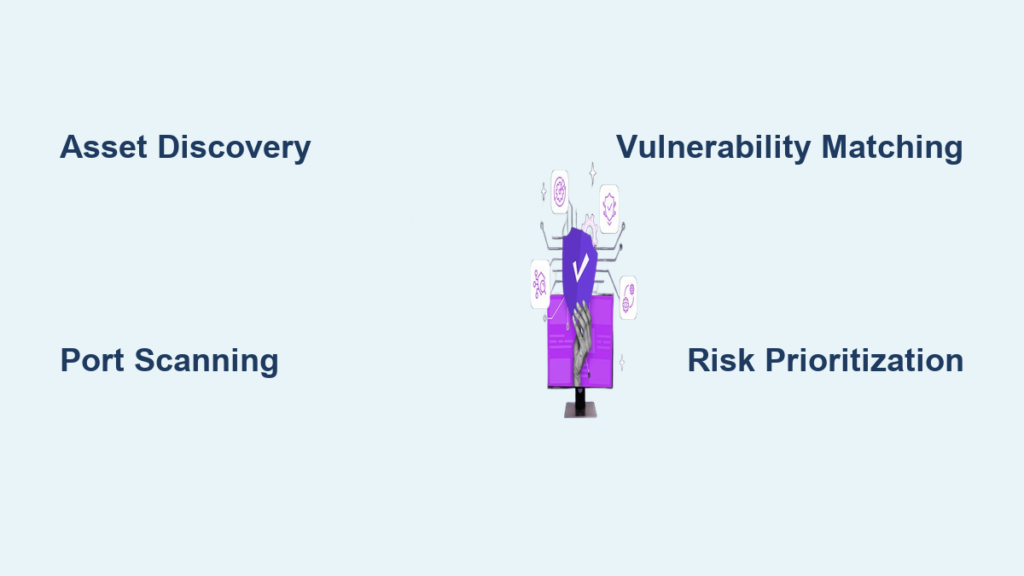
A vulnerability scanner does not guess. It follows a structured, repeatable process to uncover security gaps. This process typically includes four key stages: discovery, assessment, risk evaluation, and reporting. Each phase builds on the last to deliver a clear picture of your security posture.
By automating what would otherwise be a manual and time consuming task, these tools allow IT teams to maintain consistent oversight across complex environments, including cloud infrastructures, remote endpoints, and third party applications.
Identify All Network Assets
Before a scanner can detect vulnerabilities, it must first know what to scan. The initial step is asset discovery, locating every device connected to the network. This includes servers, workstations, mobile devices, routers, firewalls, and IoT devices.
The scanner sends out discovery packets like ICMP pings or ARP requests to map live hosts. Once devices respond, the tool logs their IP addresses, hostnames, and basic system details. Without complete visibility, critical assets may go unscanned, leaving blind spots attackers can exploit.
What to look for: Ensure your scanner detects both persistent and transient devices, especially laptops that connect intermittently or bring your own device equipment.
Pro tip: Use endpoint agents or adaptive scanning tools that automatically detect new devices when they join the network, ensuring no asset slips through the cracks.
Detect Open Ports and Services
Once assets are identified, the scanner probes each device to determine which ports are open and what services are running. This is done through port scanning techniques such as TCP SYN scans or full connect scans.
Each open port represents a potential entry point. For example, port 80 indicates a web server while port 22 suggests SSH access. The scanner logs service banners, information returned by services upon connection, which often include software names and versions.
Why it matters: Attackers target outdated services. Knowing that a server runs Apache 2.4.29, a version with known CVEs, gives them a direct path to exploitation.
Warning: Aggressive scanning can disrupt unstable systems. Schedule scans during off peak hours to avoid performance issues.
Match Against Known Vulnerabilities
Now comes the intelligence phase. The scanner compares collected data, software versions, configurations, and patch levels, against a continuously updated vulnerability database.
These databases, such as the National Vulnerability Database or vendor specific feeds, contain detailed records of known flaws including exploit methods and severity scores. For instance, if the scanner detects OpenSSL 1.1.1a, it checks whether this version is affected by Heartbleed or other critical vulnerabilities.
This correlation allows the tool to generate a list of confirmed security weaknesses, each linked to real world threats.
Expert note: Scanners do not test for zero day exploits. They rely on known patterns, making regular database updates essential.
Risk Evaluation After Scanning
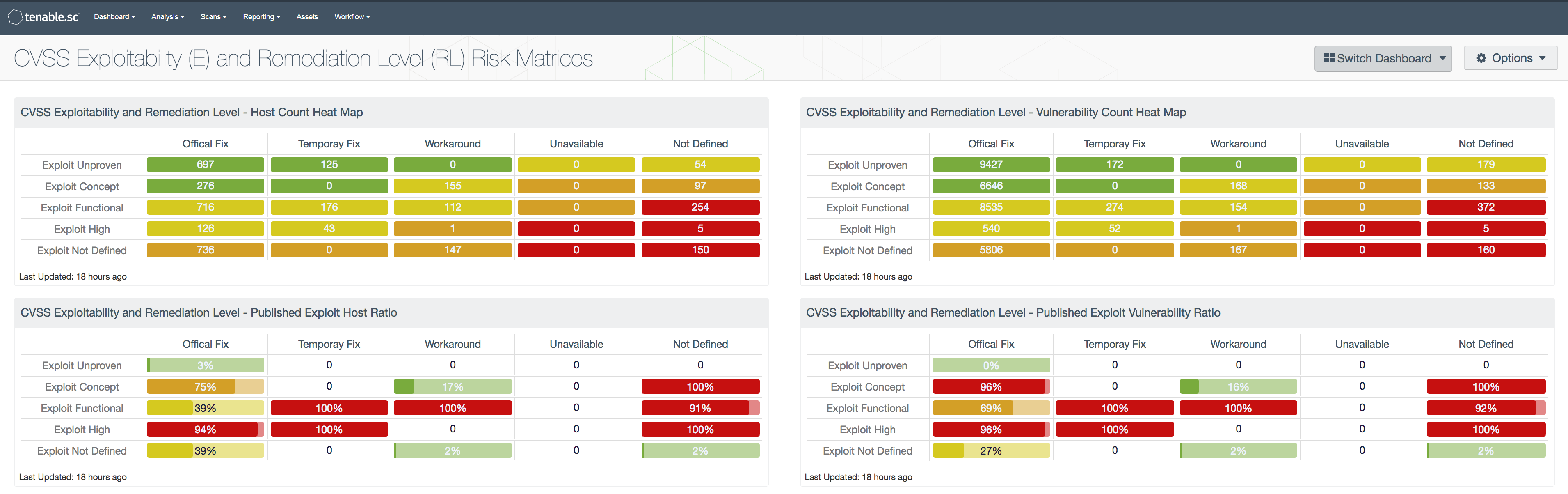
Finding vulnerabilities is only half the battle. A typical scan might return dozens or even hundreds of issues. Fixing them all at once is not practical. That is why risk evaluation is crucial.
Scanners use scoring systems like CVSS to rank flaws by severity, ranging from low to critical. But technical severity alone is not enough.
Prioritize Based on Exploitability
Not all critical vulnerabilities pose equal risk. A flaw rated critical may be irrelevant if the affected system is isolated or not exposed to external traffic.
The scanner evaluates factors like whether the service is internet facing, whether it requires authentication, and whether there are known public exploits. For example, a remote code execution flaw in a public facing web server demands urgent attention. The same flaw in an internal test server with no external access might be deferred.
Actionable insight: Focus on vulnerabilities that are both high severity and exploitable from outside your network.
Contextualize with Business Impact
Security teams must also consider business context. A moderate risk vulnerability in a payment processing system may warrant faster remediation than a critical flaw in a decommissioned test environment.
Scanners often allow tagging assets by importance so risks can be weighted accordingly. This ensures IT efforts align with organizational priorities.
Common mistake: Treating all vulnerabilities equally leads to wasted resources and missed critical threats.
Treatment of Identified Vulnerabilities
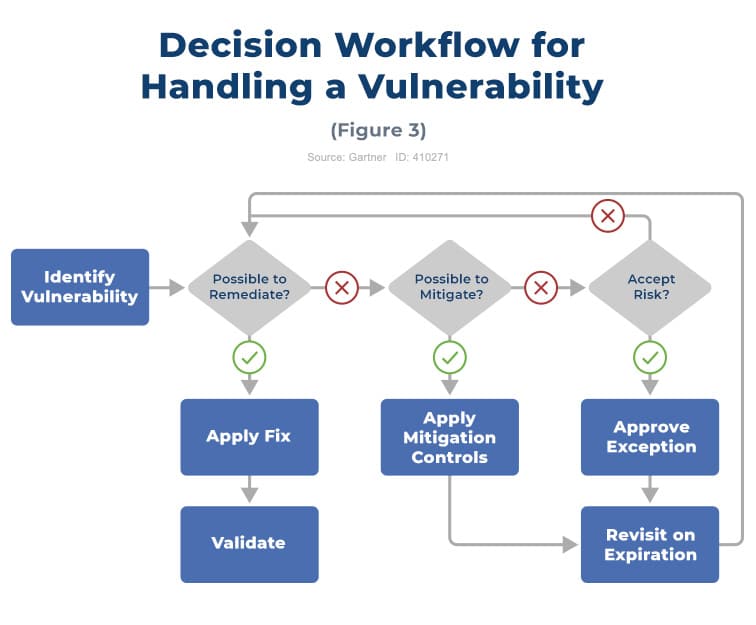
Once risks are ranked, the next step is treatment, deciding how to respond. There are four standard approaches: remediate, mitigate, accept, or defer.
Apply Security Patches
The most effective treatment is remediation, applying vendor released patches to eliminate the vulnerability. For example, updating Windows to close a SMBv1 exploit.
Scanners often integrate with patch management systems to automate corrections. However, patching is not always immediate. Some systems require downtime or compatibility testing.
Best practice: Establish a patching schedule for critical systems, for example within 72 hours for critical flaws.
Implement Mitigation Controls
When a patch is not available or cannot be applied immediately, mitigation reduces the risk. This includes blocking malicious IPs via firewall rules, disabling unnecessary services, and enforcing stricter access controls.
For instance, if a legacy application cannot be updated, restrict its network access to only essential users.
Reality check: Mitigation is not permanent. Track mitigated vulnerabilities and revisit them when patches become available.
Accept or Defer Risk
Sometimes the cost of fixing a vulnerability outweighs the potential damage. In such cases, organizations may formally accept the risk after documenting the decision.
Deferral is used when remediation is planned but delayed due to resource constraints. Both require approval and periodic review.
Compliance note: Regulatory frameworks like PCI DSS or HIPAA often require documented risk acceptance procedures.
Reporting and Compliance Tracking
After treatment, documentation is key. Scanners generate detailed reports that serve multiple purposes: internal tracking, executive summaries, and audit compliance.
Generate Actionable Reports
Modern vulnerability scanners offer customizable reporting dashboards. These can show trend analysis over time, top affected assets, and remediation progress.
Reports help justify security budgets, demonstrate compliance, and improve response times in future scans.
Pro tip: Share executive summaries with leadership, highlighting risk reduction metrics, while providing technical teams with granular data.
Monitor Vulnerability Trends
Continuous scanning enables trend monitoring. For example, if SQL injection flaws keep appearing in web apps, it may indicate a need for developer training or better input validation processes.
Tracking these patterns helps shift from reactive fixes to proactive prevention.
Long term benefit: Regular reporting turns vulnerability scanning into a strategic asset, not just a compliance checkbox.
Internal vs External Scanning Approaches
Vulnerability scanners operate differently depending on their scope: inside or outside the network perimeter. Both are essential for full coverage.
Scan from Outside the Network
External vulnerability scans simulate an attacker is perspective, probing your public facing infrastructure from the internet.
They target public IP ranges, websites and APIs, and email and DNS servers. These scans reveal what attackers can see and exploit without needing internal access. Think of it as checking if your front doors and windows are locked.
Key benefit: Identifies exposure to the outside world, critical for preventing initial breaches.
Scan from Inside the Network
Internal scans run from within the corporate network, revealing risks that external scans miss.
They detect lateral movement opportunities, insider threats, and misconfigurations in internal systems. Even if an attacker gains access through phishing, internal segmentation and hardening can stop them from spreading.
Real world scenario: An employee is infected laptop connects to the network. An internal scan could detect the compromised system before it spreads malware.
Authenticated vs Unauthenticated Scans
The level of access a scanner has dramatically affects its findings. Two modes define this: authenticated and unauthenticated.
Use Credentials for Deeper Insights
Authenticated scans log in using valid user or admin credentials, allowing the scanner to inspect installed software and patch levels, registry settings, user permissions, and configuration files.
This depth reveals vulnerabilities hidden behind authentication, like missing OS updates or weak password policies.
Why it matters: Many critical flaws like privilege escalation only appear with internal access.
Scan Without Login Access
Unauthenticated scans operate like an outsider, no login required. They detect what is visible through open ports and services.
While less detailed, they are useful for testing perimeter defenses, validating firewall rules, and simulating real world attack surfaces.
Limitation: May produce false negatives, missing vulnerabilities only visible after login.
Best practice: Run both types regularly. Authenticated for completeness, unauthenticated for realism.
Complementary Security Testing Methods

Vulnerability scanning is powerful but not enough on its own. Pair it with other techniques for stronger defense.
Combine with Penetration Testing
While scanners automate detection, penetration testing involves ethical hackers manually exploiting vulnerabilities to assess real world impact.
Think of it this way. A scanner says there is a broken lock on the door. A pen tester says I walked through the door, accessed the safe, and copied the documents.
Pen tests validate scanner findings and reveal chained attacks, multiple flaws used together.
Recommended frequency: Quarterly or after major infrastructure changes.
Integrate Web Application Scanning
Standard network scanners may miss application layer flaws. Web application scanners focus specifically on web apps, detecting SQL injection, cross site scripting, insecure APIs, and session management flaws.
These tools mimic user interactions, crawling sites to find hidden inputs and test for injection points.
Critical for: E commerce platforms, customer portals, Ssewing27-20S applications.
Enforce Configuration Management
Misconfigurations cause many breaches. Configuration scanning checks systems against security baselines like CIS Benchmarks.
It detects default passwords, unnecessary services enabled, and improper file permissions. Automated configuration checks ensure consistency across hundreds or thousands of devices.
Proactive move: Integrate config scanning into deployment pipelines to catch issues before production.
Key Takeaways for Understanding Vulnerability Scanners
Understanding how a vulnerability scanner works is the first step toward building a resilient security posture. These tools do not just find flaws. They enable organizations to prioritize, act, and prove compliance. From asset discovery to risk scoring, from internal audits to external validation, vulnerability scanners form the backbone of modern cybersecurity.
But remember, scanning is not a one time event. To stay protected, run regular scans, both authenticated and unauthenticated, internal and external, and pair them with penetration testing and configuration monitoring. The goal is not perfection. It is continuous improvement.
Stay ahead of threats. Scan often. Act decisively.
Frequently Asked Questions About Vulnerability Scanners
What is the main purpose of a vulnerability scanner?
A vulnerability scanner is an automated tool that identifies security weaknesses in networks, applications, and devices by comparing system configurations against known vulnerability databases. It helps organizations detect flaws before attackers can exploit them.
How does a vulnerability scanner identify risks?
The scanner first discovers all network assets, then probes for open ports and services, and finally matches the collected data against known vulnerabilities in databases like the National Vulnerability Database. It evaluates severity using scoring systems like CVSS.
What is the difference between authenticated and unauthenticated scans?
Authenticated scans use login credentials to examine internal system details like patch levels and configurations. Unauthenticated scans operate from an outsider perspective, detecting only what is visible through open ports and services.
Can vulnerability scanners detect zero day exploits?
No, vulnerability scanners cannot detect zero day exploits. They rely on known vulnerability databases and can only identify flaws that have been documented. Regular database updates are essential for effective scanning.
How often should organizations run vulnerability scans?
Organizations should run vulnerability scans regularly, at minimum quarterly, but many conduct them monthly or even weekly for critical systems. Scans should also run after major infrastructure changes or after applying new patches.
What happens after a vulnerability is identified?
After identification, the vulnerability goes through risk evaluation to determine its severity and exploitability. Organizations then choose a treatment approach: remediation through patching, mitigation through controls, or formal risk acceptance if the cost of fixing exceeds the potential damage.