A Scotch laminator that suddenly stops rolling can derail any project in seconds. This issue is especially common on the Scotch TL901, where the two-roller system can seize from a jam, adhesive buildup, or misalignment. When the motor hums but nothing feeds through, or a pouch gets stuck mid-laminate, productivity grinds to a halt. The good news: most fixes take under 30 minutes and require only basic tools.
In this guide, you’ll learn how to diagnose the exact cause of your Scotch laminator not rolling, remove stubborn plastic jams, clean sticky residue, and prevent future failures. Whether you’re dealing with fused laminate or slipping rollers, these model-specific solutions will get your machine working again.
Immediate Safety Steps Before Servicing Your Laminator
Before touching any internal component, follow these critical safety protocols to avoid injury or further damage to your Scotch laminator.
Unplug and Power Down Completely
Always turn off the laminator and disconnect it from the electrical outlet. Even when the machine appears dead, internal components can activate unexpectedly during servicing. This step is non-negotiable, especially when inserting tools near the roller assembly.
Let the Machine Cool or Warm Strategically
If your laminator was recently running, allow it to cool fully before inspection. However, if plastic has melted inside, controlled reheating may be necessary later to loosen adhesive bonds. Never work on a hot machine unless following a specific thermal release procedure.
Use Non-Metal Tools Only on Roller Surfaces
Never use metal tweezers, screwdrivers, or picks directly on roller surfaces. The coating is delicate, and scratches lead to recurring jams. Use plastic spudgers, wooden picks, or nylon tools for safe extraction instead.
Diagnose Why Your Scotch Laminator Is Not Rolling
Identifying the root cause determines your next move. Here’s how to tell exactly what’s stopping your machine.
Motor Hums but Rollers Stay Stuck
If the machine powers on and you hear a low hum but the rollers don’t turn, a physical jam is the likely culprit. This often happens when a pouch feeds crookedly or exceeds thickness limits. The motor engages, but the gear train is blocked by lodged material.
Rollers Spin but Don’t Grip the Pouch
When the rollers rotate but the pouch doesn’t pull through, adhesive buildup is the problem. Over time, hot laminate glue accumulates and creates a slick, sticky surface that loses traction entirely.
No Sound and No Movement at All
If there’s no power or motor noise, check the outlet and power cord first. If those test fine, the issue may be deeper: a blown thermal fuse, motor failure, or voltage damage from using a non-grounded 120V outlet.
Clear Physical Jams in 5 Steps
A jammed sheet or melted plastic is the most common reason your Scotch laminator won’t roll. Follow this method to extract it safely.
Open the Jam Release Lever
Locate the manual jam release lever on the left side of the Scotch TL901. Gently pull it outward to unlock the roller housing. This gives you access to the internal pathway and allows manual roller rotation.
Inspect the Roller Pathway
Look inside the feed slot and rear exit. Is a corner of a pouch visible? Is plastic fused around the last roller? Shine a flashlight if needed and identify whether the jam sits near the entry, middle, or exit point.
Extract With Plastic Tools
Use a plastic spatula or non-metallic pick to gently lift the edge of the stuck sheet. Work slowly and never force it. Pull in the direction of normal feed when possible. For tight spots, back the roller up by hand while lifting.
Pro Tip: Rotate the rollers manually by turning the exposed ends. This helps “walk” the jammed material out gradually without damaging the gear train.
Cut Stubborn Plastic With Caution
If the plastic is torn or deeply lodged, use flush cutters or a razor blade to trim small sections. Slide the blade under the edge and slice incrementally. Avoid contact with the roller surface at all costs.
Remove All Fragments Before Reassembly
Even tiny plastic shards can cause re-jams. After pulling out the main piece, inspect the entire path. Run a dry, lint-free cloth through the rollers to catch any remaining debris.
Fix Melted Plastic With Controlled Heat
Sometimes plastic melts and bonds directly to the roller, especially if a pouch was fed too slowly or the machine overheated. Cold removal can damage the roller, so use heat to soften the glue instead.
Preheat the Laminator to Ready State
Plug the machine back in and power it on. Let it warm up until the green “Ready” LED illuminates. This heats the rollers and softens the adhesive holding the plastic in place.
Engage Slow Backward or Manual Rotation
Keep the jam release lever open for visibility. If your model has a reverse function, activate it. The Scotch TL901 does not have automatic reverse, so manually rotate the rollers backward by hand while the machine is warm and powered.
Pull or Scrape Gently as Plastic Softens
As the plastic loosens, use plastic tweezers or a nylon tool to peel it away from the roller. Do not use metal under any circumstances. If it resists, let it heat longer; forcing it can strip internal gears.
Power Off and Cool Before Cleaning
Once the material is removed, turn off the machine and unplug it. Let it cool completely before moving on to the cleaning phase.
Clean Sticky Rollers to Restore Grip
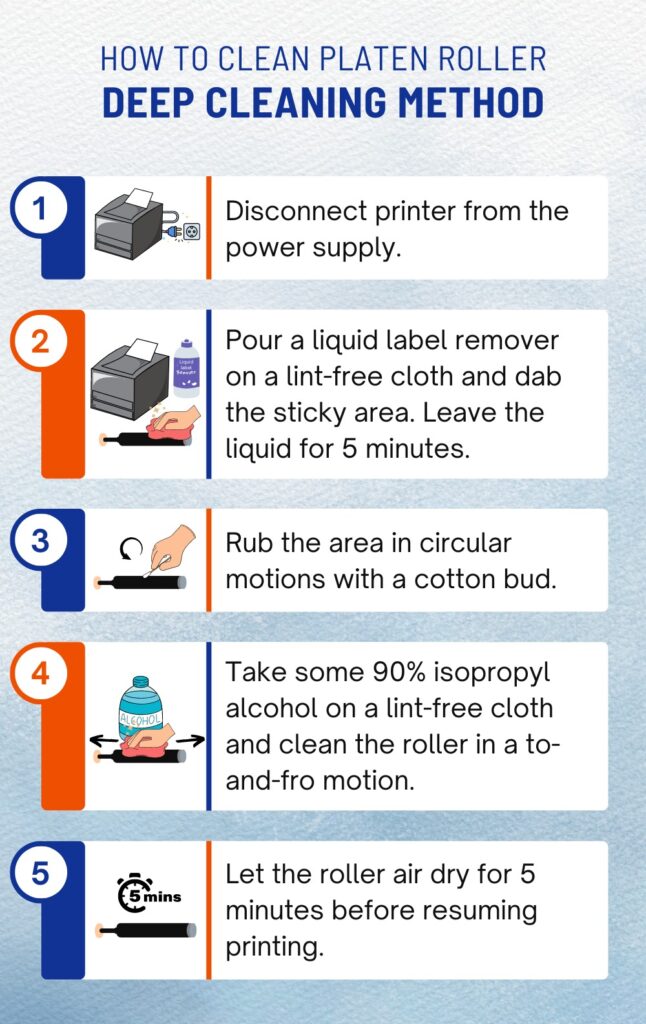
Adhesive buildup causes rollers to slip, leading to failed feeds. Proper cleaning restores traction and prevents future jams.
Use Isopropyl Alcohol Only
Dampen a lint-free cloth with 70% or higher isopropyl alcohol. Never spray liquid directly into the machine, as this can damage electronics and internal wiring.
Wipe While Rotating the Rollers
With the laminator unplugged, gently rub the roller surface while turning it by hand. Cover the full circumference and focus on areas that feel tacky or look glazed.
Avoid: Metal scrubbers, paper towels (they leave fibers), or household cleaners that can degrade rubber components.
Dry Completely Before Testing
Let the rollers air dry for at least 5 minutes. Residual moisture can cause steam or poor lamination quality. Test with a blank sheet of paper first before running actual pouches.
Check Roller Alignment for Binding Issues
Misaligned rollers bind and stop rotation. This often happens if the top roller was removed for cleaning and reinstalled incorrectly.
Verify Roller Seating in Housing
Ensure both rollers are fully inserted and seated evenly in their housings. On the TL901, the ends should fit snugly into the side slots without any wobbling.
Test by Hand Rotation
Spin each roller manually. They should turn smoothly with no grinding or resistance. If one sticks, reposition it or check for debris underneath.
Avoid Forced Reassembly
If rollers don’t slide in easily, don’t force them. Something is misaligned. Double-check orientation and housing guides before attempting installation again.
Electrical and Voltage Checks for Power Failures
If your Scotch laminator shows no signs of power, the issue may not be mechanical at all.
Confirm a 120V Grounded Outlet
The Scotch TL901 requires a grounded 120-volt outlet. Using a voltage converter, extension cord, or ungrounded adapter can fry the motor or thermal fuse.
Warning: Never plug into 220V or use international converters. This causes irreversible damage to internal components.
Test the Outlet With Another Device
Plug in a lamp or phone charger to confirm the outlet works. If not, the problem is electrical and unrelated to your laminator.
Inspect for Internal Damage
If power is confirmed but the machine remains dead, internal components may be damaged:
- Thermal fuse blown from overheating
- Motor burnout from forced feeding
- Wiring disconnect from physical shock
Note: Repairing these issues requires a soldering iron and technical skill. Use a FixHub or Hakko 503F station if attempting DIY fixes.
Prevent Future Rolling Issues With Simple Habits
Keep your Scotch laminator running smoothly with these preventative practices.
Use Correct Pouch Sizes and Thickness
Only use 3mm or 5mm thermal pouches up to 9 inches wide. Oversized or thick materials strain the rollers and cause recurring jams.
Feed Straight, Flat Sheets Every Time
Always align the document and pouch squarely. Never force a curled or wrinkled sheet through the feed. Start slowly to let the rollers grab the edge properly.
Clean Rollers Monthly After Heavy Use
After extended sessions, wipe rollers with isopropyl alcohol. This prevents adhesive buildup that leads to slippage and overheating.
Never Force a Jammed Sheet
If a sheet sticks, stop feeding immediately. Use the release lever instead of mashing the button repeatedly. Forcing jams damages gears and the release mechanism permanently.
When to Seek Professional Repair Help
Some issues go beyond DIY fixes. If you’ve tried everything and your Scotch laminator is still not rolling, watch for these signs.
Stripped Internal Gears
If rollers turn freely by hand but the motor doesn’t drive them, gears may be stripped. This requires full disassembly and replacement.
No Power After Outlet Check
If the red “Power” LED doesn’t light, the internal fuse or power board may be dead. Test with a multimeter or consult a qualified technician.
Persistent Slipping After Thorough Cleaning
If rollers are clean but still won’t grip, the rubber coating may be worn out. Replace the roller set entirely.
Contact Scotch/GBC Support: Visit gbcconnect.com for warranty claims, replacement parts, or authorized repair centers.
TL901 Model-Specific Tips for Faster Troubleshooting

The Scotch TL901 has unique features that affect how you approach repairs.
No Never Jam Technology
Unlike some newer models, the TL901 does not have automatic jam detection or reverse. You must manually release and clear all jams yourself.
Two-Button Control System
The right-side buttons control power and heat setting (Low/High). LEDs indicate status: Red means Power On, Green means Ready to Laminate.
Two-Roller System Design
Only two rollers means simpler construction but more prone to seizing if jammed. Regular cleaning is essential for long-term reliability.
Frequently Asked Questions About Scotch Laminator Not Rolling
Why does my Scotch laminator hum but not roll?
A humming motor with stuck rollers usually indicates a physical jam. A pouch fed crookedly, or material exceeding thickness limits, blocks the gear train. Open the jam release lever and extract the obstruction with non-metal tools.
Can I use metal tools to remove a jammed pouch?
No. Metal tools scratch the delicate roller coating, which causes recurring jams. Use plastic spudgers, wooden picks, or nylon tools for safe extraction instead.
What causes rollers to slip without gripping the pouch?
Adhesive buildup from repeated lamination creates a slick surface that loses traction. Clean rollers with isopropyl alcohol and a lint-free cloth to restore grip.
How do I remove melted plastic stuck to the roller?
Preheat the laminator until the green Ready LED lights. Keep the release lever open and manually rotate rollers backward while gently prying with plastic tweezers. The heat softens the adhesive bond.
Is the Scotch TL901 safe to use with a voltage converter?
No. The TL901 is designed strictly for grounded 120V outlets. Using converters or 220V power causes motor failure or thermal fuse burnout, resulting in permanent damage.
When should I contact professional support instead of DIY repair?
Contact Scotch support if rollers turn freely by hand but won’t engage with the motor, if the power LED stays dark despite a working outlet, or if slipping persists after thorough cleaning. These signs indicate stripped gears, blown fuses, or worn roller coatings.
Key Takeaways for Fixing a Scotch Laminator That Won’t Roll
A Scotch laminator not rolling is usually fixable in under 30 minutes with basic tools. Start with safety by unplugging the machine, then diagnose the jam type based on symptoms: humming motor means physical blockage, spinning-but-slipping rollers mean adhesive buildup, and complete silence means electrical failure. Use non-metal tools for extraction, apply controlled heat for melted plastic, and clean rollers monthly with isopropyl alcohol to prevent recurrence.
Your next step: identify which symptom matches your machine, then follow the corresponding section above. If problems persist after trying all fixes, visit gbcconnect.com for warranty support or authorized repair options.