You have a stack of printed pages that need to look professional, but loose sheets simply will not impress your clients or colleagues. A binding machine solves this by transforming loose paper into a polished document using specific mechanical or thermal methods. Understanding exactly how does a binding machine work helps you select the right tool for your project.
These devices follow a universal four-step process involving setup, punching, insertion, and finalization to secure your pages. Whether you choose plastic combs, metal wires, or heat-activated glue, the core logic remains consistent across different models. This guide details every major binding type and reveals the mechanics behind their operation.
Essential Setup and Calibration Steps
Proper calibration ensures your holes align perfectly with your chosen binding element. Misaligned holes lead to crooked spines and documents that look unprofessional. You must adjust the side margin control and paper stop before punching any sheets.
Adjust Side Margin and Paper Stop
Set the paper stop to match your document size, typically 9 inches for letter paper. This ensures every stack is punched in the exact same position. Next, adjust the side margin control so the holes align with your binding element spacing. Most machines include a scale or template for quick reference.
Perform a Test Punch Cycle
Never skip a test punch on a single sheet before running your full job. If holes appear too close to the edge or look misaligned, recalibrate the paper stop immediately. For non-standard sizes like legal paper, disengage outer punch pins so only active pins match your document width.
Clear the Chip Tray Regularly
Paper chips accumulate inside the machine during the punching process. A full chip tray can cause jams or create uneven pressure on your punch mechanism. Empty the tray before starting long runs to ensure consistent hole quality and extend machine life.
Punching Mechanics and Paper Preparation
The punching phase creates the attachment points that hold your document together. Success depends on respecting machine limits and preparing your paper stack correctly. Rushing this step often results in torn holes or difficult threading.
Match Capacity to Machine Limits
Every binding machine has a rated punch capacity, usually between 5 and 20 sheets per stroke for standard systems. Exceeding this limit tears paper around the holes and weakens the final bind. Always check your specific machine specs because overpunching is a top cause of ragged holes.
Align Pages Before Inserting
Misaligned pages result in slanted holes that make threading impossible. Before punching, jog the stack by tapping it firmly on a flat surface to square all edges. Hold pages tightly and slide them side-to-side to eliminate air pockets for uniform punching.
Use Smooth Full-Pressure Strokes
For manual machines, press the handle in one firm motion without hesitation. Partial strokes create incomplete punches that ruin the paper edge. Electric models control pressure automatically but still require proper alignment and consistent batch sizes.
Comb Binding Mechanics and Process
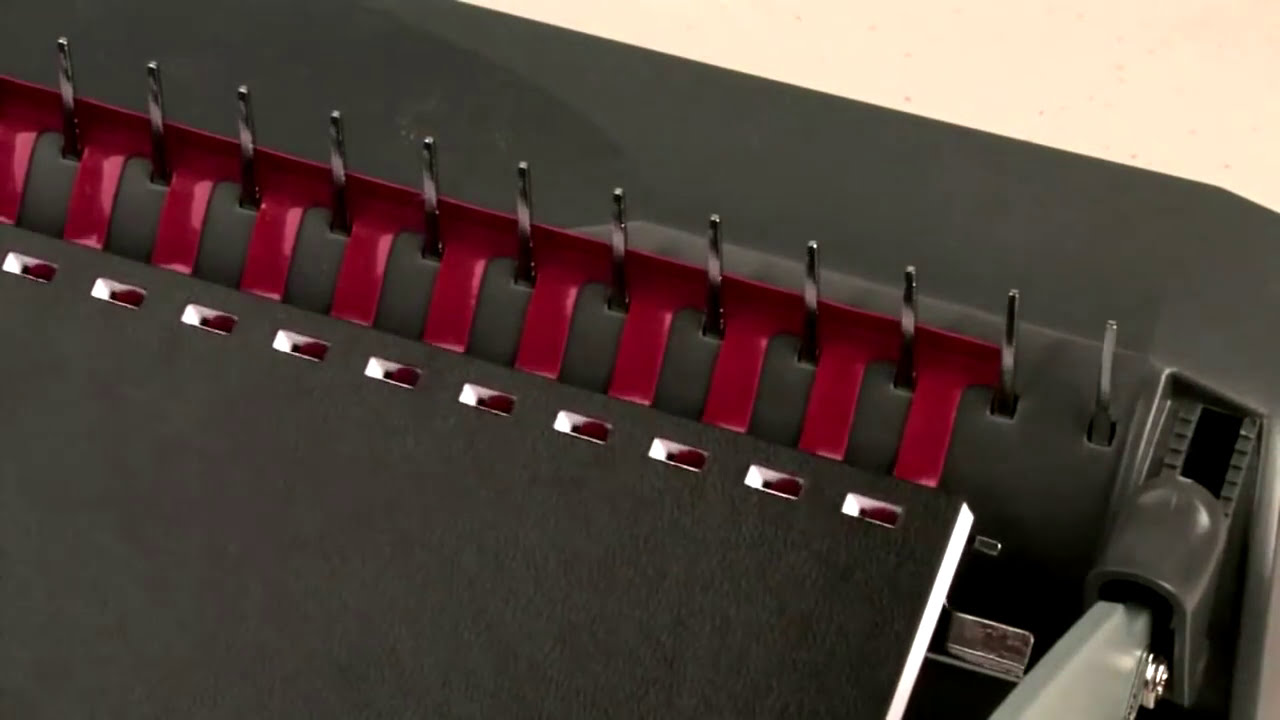
Comb binding uses a plastic spine with curved tines that thread through rectangular holes. The machine features a built-in opener mechanism that spreads these tines wide enough to accept the paper. Once threaded, releasing the opener lets natural tension snap the rings closed.
How the Plastic Comb Opens and Closes
The machine pulls the plastic tines apart mechanically rather than by hand. Critical rule: Never open the comb by hand because forcing it over-stretches the rings. This damage causes the comb to pop open later, ruining your document.
Choose the Right Comb Size
Combs range from 3/16 inch to 2 inches in diameter and support up to 425 pages. Use this reference to select the correct size:
- 3/16 inch holds up to 20 pages
- 1/2 inch holds 81 to 120 pages
- 1 inch holds 226 to 300 pages
- 2 inch holds up to 425 pages
If your page count falls between sizes, always choose the larger comb. A slightly oversized comb closes cleanly while an undersized one will not close at all.
Why Comb Binding Is Fully Editable
This system offers full editability as its biggest advantage. You can reopen the comb, remove or insert pages, and close it again instantly. This saves time and money since you do not need to reprint entire manuals for minor updates.
Wire Binding Strength and Precision

Wire binding functions similarly to comb binding but uses metal wires for a more rigid finish. It requires round holes punched at a different pitch than comb binding systems. You cannot bind wire without changing the punch die on standard comb machines.
Crimping Secures the Wire Spine
After threading the metal wire through the holes, the machine crimps the ends tightly. This prevents the wire from unspooling and keeps the document secure. Unlike plastic combs, wire spines are rigid and hold their shape permanently.
Best for High-End Durable Reports
Wire-bound documents are stronger and more durable than comb-bound options. They are ideal for client presentations and annual reports that see frequent use. The polished look justifies the slightly higher cost for formal applications.
Spiral and Coil Binding Durability
Spiral binding uses a long plastic or metal coil that threads continuously through round holes. The coil is cut to match the document spine length, then the ends are crimped or twisted to prevent unraveling.
Continuous Coil Threads Through Holes
The machine helps thread the coil through every hole in a smooth spiral motion. This continuous loop provides superior strength compared to individual tines. The ends are secured permanently to ensure the coil stays in place.
360-Degree Rotation Without Damage
Coil-bound documents open flat to 360 degrees without stressing the spine. Pages rotate fully, making this perfect for cookbooks and workbooks. Users can lay the book flat while writing or referencing materials easily.
More Durable Than Plastic Combs
Coil binding is significantly stronger than standard comb binding. Plastic coils resist tearing and last longer under heavy daily use. Metal coils offer even more durability for high-traffic environments like field manuals.
Thermal Binding and No-Hole Finish
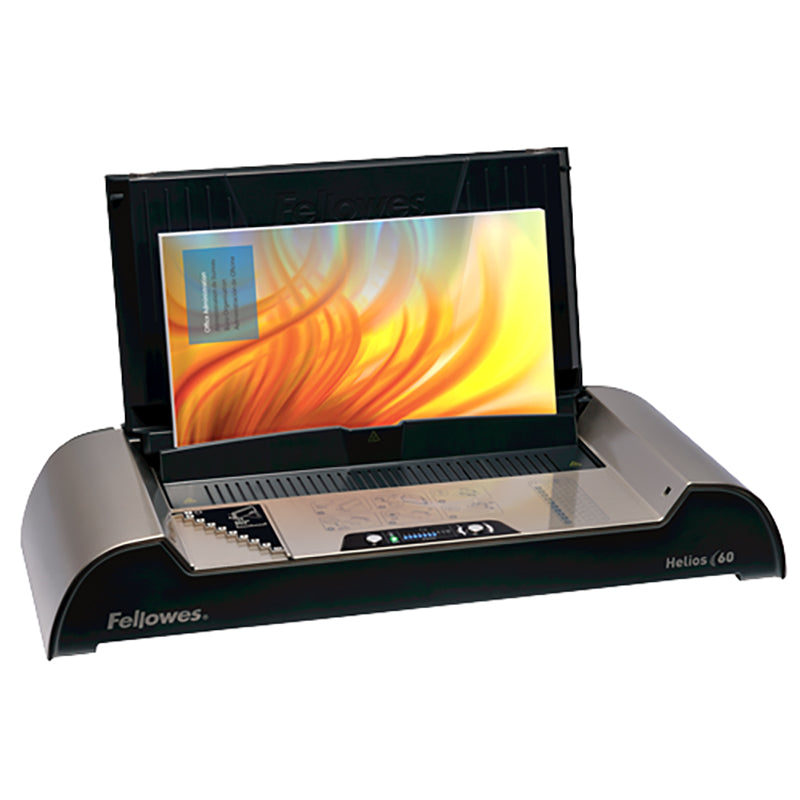
Thermal binding requires no punching and uses heat to activate adhesive. Pages are inserted into a cover with a glue strip on the spine. The machine applies heat to melt the adhesive, bonding pages as it cools.
Heat Activates Spine Glue
The process relies entirely on temperature control to activate the bonding agent. High-end models like the Fellowes Helios 60 offer 1-step binding for speed. You insert the document, press a button, and the machine handles heating and cooling automatically.
Permanent Tamper-Resistant Results
Once bound, thermal documents cannot be edited or changed. The glue creates a permanent seal that looks like a professional paperback book. This makes it perfect for legal documents where integrity is paramount.
Troubleshooting Common Binding Issues
Even with proper setup, issues can occur if you ignore machine limits. Knowing how to diagnose problems saves time and materials. Most issues stem from incorrect settings or user error.
Fix Ragged or Torn Holes
Cause: Too many sheets punched per stroke.
Solution: Reduce batch size to match your machine’s rated capacity. Stick to 10 to 20 sheets for standard 20 lb paper.
Stop Comb from Popping Open
Cause: Comb was manually over-opened before use.
Solution: Always use the machine’s opener mechanism. Never force rings apart by hand to preserve tension.
Correct Misaligned Pages
Cause: Paper not jogged or stop not set correctly.
Solution: Square the stack firmly before punching. Lock the paper stop in place to ensure consistency.
Prevent Document from Not Laying Flat
Cause: Comb diameter is too small for the page count.
Solution: Replace with the next size up. Use a 1/2 inch comb for 100+ pages to allow proper rotation.
Fix Ring Missing a Hole
Cause: Misalignment during the punching phase.
Solution: Re-punch affected pages after checking settings. Double-check paper stop and margin guides.
Choosing the Right Binding Type
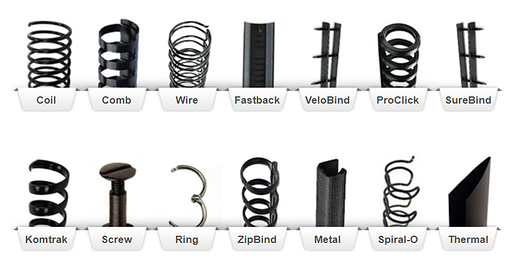
Selecting the correct method depends on your document goals. Each type offers unique benefits regarding durability, editability, and appearance. Consider your specific needs before starting your project.
Comb Best for Editable Documents
Use plastic comb binding for training manuals and price lists. It offers low cost and full editability for documents needing frequent updates. However, it is less durable than wire or coil options.
Wire Best for Professional Reports
Choose wire binding for client proposals and marketing brochures. It provides a strong, professional look that reusable combs cannot match. The cost is moderate but justified by the premium appearance.
Coil Best for High-Use Handbooks
Use spiral or coil binding for cookbooks and field guides. It offers superior durability and 360-degree lay-flat ability. Supply costs are higher than comb binding but the lifespan is much longer.
Thermal Best for Final Presentations
Use thermal binding for executive summaries and legal submissions. It creates a book-like finish quickly without holes. Remember that results are permanent and cannot be edited once bound.
Maintenance Tips for Longevity
Regular care keeps your binding machine performing at peak efficiency. Simple habits prevent mechanical failures and ensure consistent results. Follow these steps to maximize your investment.
Clean Dies and Punch Mechanism
Paper dust builds up in punch dies and leads to dull cuts over time. Wipe dies monthly with a dry cloth to remove debris. Use a small brush for trapped particles if you have heavy usage.
Lubricate Moving Parts Annually
Apply machine oil sparingly to hinges, handles, and sliders once a year. Over-lubrication attracts dust so use only what the manual recommends. Check your specific model guide for lubrication points.
Store Combs Flat and Cool
Heat and stacking can warp plastic combs before use. Store them in a cool, dry place away from direct sunlight. Lay them flat rather than hanging them by the rings to maintain shape.
Replace Worn Dies Promptly
If holes become inconsistent or require excessive force, the die may be worn. Replace it immediately to maintain performance and protect your machine. Ignoring worn dies damages both paper and mechanism.
Frequently Asked Questions About Binding Machines
How does a binding machine actually work?
A binding machine transforms loose sheets into a secured document by punching holes or applying heat. It follows a four-step process: setup, punching, inserting the binding element, and finalizing the bind.
Can I bind wire documents with a comb machine?
No, you cannot bind wire without changing the punch die first. Wire binding requires round holes at a different pitch than the rectangular slots used for comb binding.
What happens if I punch too many pages at once?
Punching too many sheets tears the holes and weakens the paper around them. This leads to ragged edges and a bind that may fall apart during use.
Is thermal binding editable after the process?
No, thermal binding creates a permanent bond using heat-activated glue. You cannot add or remove pages once the document has cooled and set.
Why does my plastic comb pop open after binding?
This usually happens when the comb is opened by hand instead of using the machine opener. Manual forcing over-stretches the rings and destroys their natural tension.
Key Takeaways for How a Binding Machine Works
Understanding how does a binding machine work empowers you to produce professional documents efficiently. Proper setup, adherence to capacity limits, and regular maintenance ensure crisp results every time. Whether you choose comb, wire, coil, or thermal, knowing the mechanics helps you avoid common errors.
Select the binding type that matches your document needs for the best outcome. Comb offers editability while thermal provides a permanent finish. With the right technique and care, your machine will deliver high-quality binds for years.