You’re ready to laminate an important document, but your laminator won’t pull in the pouch. The rollers stay still, the film slips, or worse, it jams halfway through. A laminator not feeding is one of the most common office equipment frustrations, but the fix is usually simpler than you think.
Most feeding problems come from wrong film use, skipped warm-up time, dirty rollers, or mishandled jams. In this guide, you’ll learn how to diagnose the exact cause, remove jams safely, reset digital models, and keep your laminator running smoothly for years.
Verify Film Compatibility Before Anything Else
Before touching the machine, confirm your laminating film matches your laminator’s specifications. Using the wrong pouch is the leading cause of feed failure.
Match Pouch Thickness to Your Machine
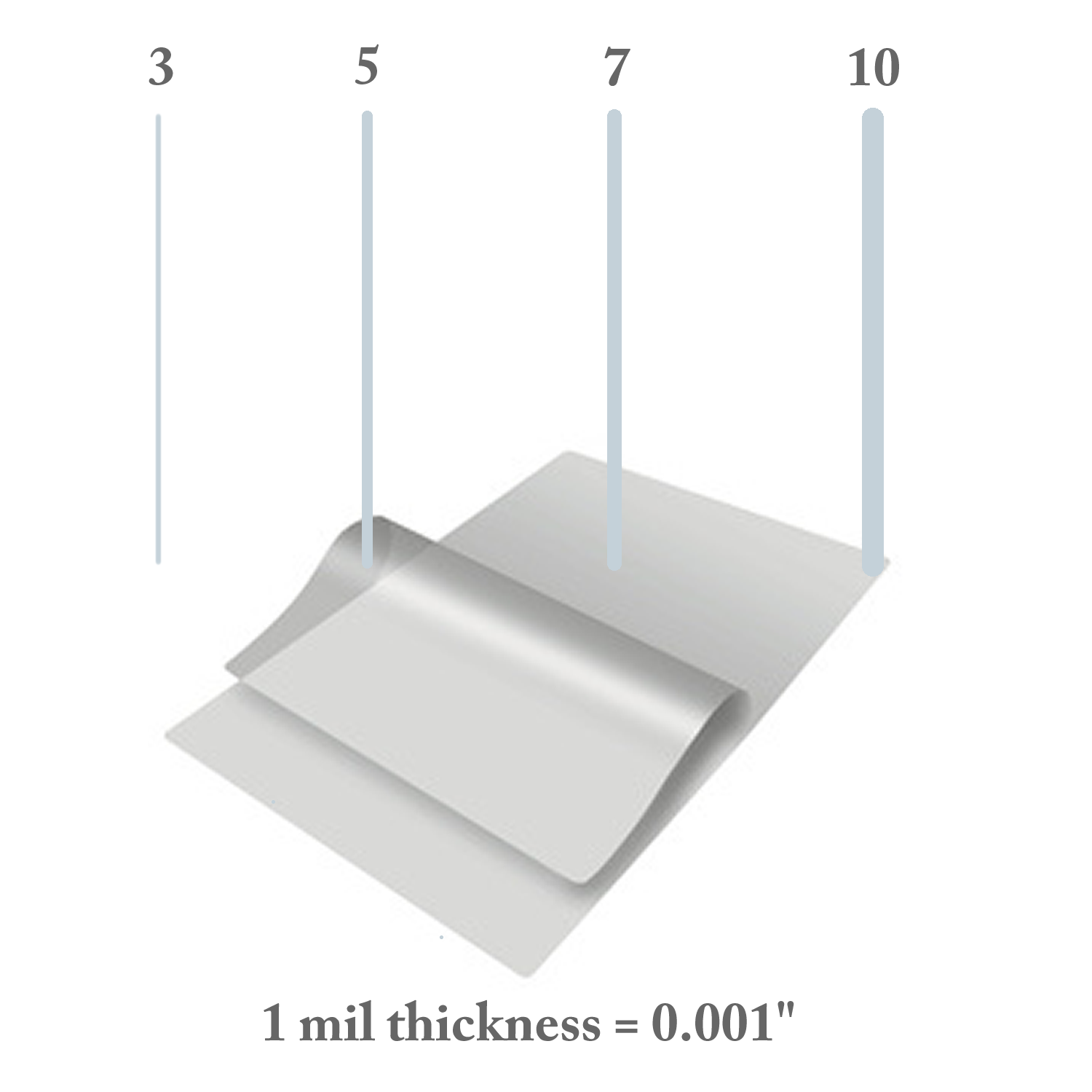
Every laminator has a maximum mil rating, typically between 3 and 10 mils. Exceeding this rating forces the rollers to work harder than designed, which causes the motor to stall or the film to slip.
- Thin pouches (3 to 5 mil): Ideal for documents, ID cards, or light-duty use
- Thick pouches (7 to 10 mil): Require high-heat, heavy-duty machines
- Check the label: If your pouch says 10 mil but your laminator only supports up to 8 mil, it won’t feed properly
Pro Tip: When in doubt, start with a thinner pouch to test feed function.
Size Pouches Correctly
A pouch that’s too small or improperly loaded causes edge catching and jams.
- The document must be 1/4 inch smaller than the pouch on all sides
- This ensures the film seals completely and feeds evenly
- A document flush with the pouch edge creates a weak seal that curls and snags
Choose Quality Pouches
Cheap pouches often have uneven adhesive layers or inconsistent thickness, leading to slipping, wrinkling, or partial feeding. Stick with trusted brands like Fellowes, Scotch, or Avery for reliable results.
Wait for Full Warm-Up Every Time
A laminator must reach full operating temperature before feeding. Skipping this step is a top cause of film refusal.
Watch for the Ready Light
Never insert a pouch immediately after powering on. The rollers need time to heat so the adhesive activates smoothly.
- Most models take 3 to 10 minutes to warm up
- Older units (10+ years) may need 30+ minutes to feed reliably
- If the machine heats but won’t feed, a power cycle after warm-up may help
Fix Extended Warm-Up Delays
Some digital models heat fully but still won’t feed until reset. For example, the XRX-LM1910 sometimes exhibits this behavior.
Perform a Digital Reset:
- Hold OK and Cancel (or Start and Stop) for 30 seconds
- Power off, wait 30 seconds, then restart
- Let it warm up fully again
This clears firmware glitches that block the feed motor.
Clean the Rollers on a Regular Schedule
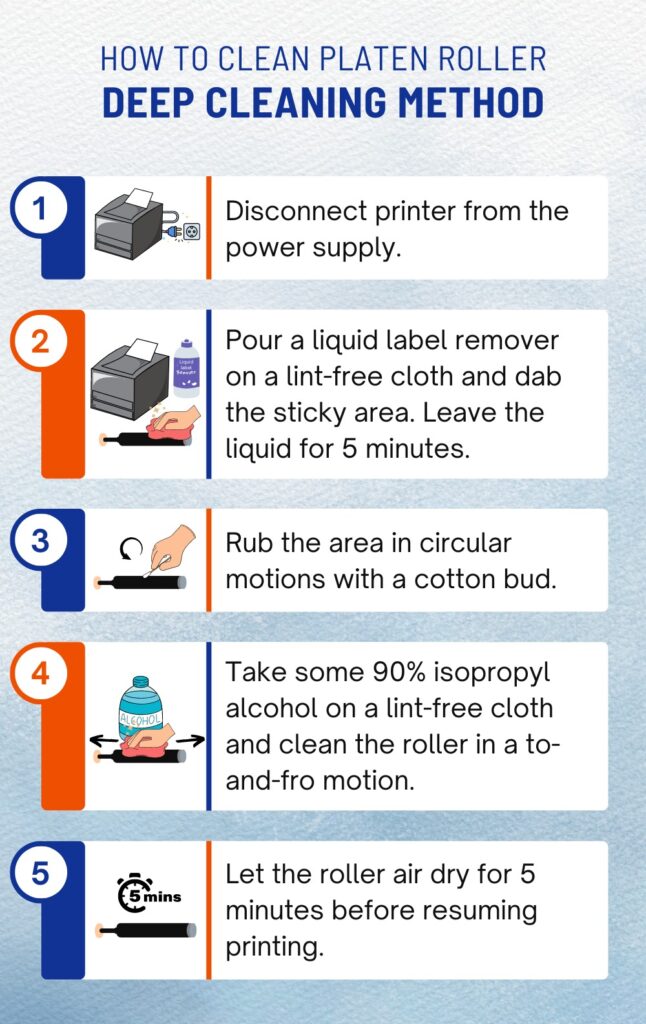
Dirty or glazed rollers can’t grip the film, causing slippage, partial feeding, or complete refusal.
Signs of Roller Problems
- Film slides but doesn’t enter
- Output has streaks or marks
- Wrinkles appear even with correct settings
Clean Rollers Safely
- Power off and cool completely
- Dampen a lint-free cloth with isopropyl alcohol
- Wipe rollers gently in a circular motion
- For stubborn residue, use laminator cleaning sheets:
– Run 3 to 5 sheets through the warm machine
– Stop when a clean sheet exits without residue
Never use acetone or strong solvents, steel wool or abrasive pads, or metal tools. These damage the roller coating permanently.
Use a Carrier with Every Job
Even with the right pouch, feeding without a carrier leads to jams, especially with thin films.
Why Carriers Matter
- Provide stiffness for smooth entry
- Prevent curling at the feed point
- Distribute even pressure across rollers
Replace Damaged Carriers
- Look for creases, warping, or melted spots
- A bent carrier feeds at an angle, causing jams
- Keep 2 to 3 spares on hand
Remove Jams Without Ruining the Rollers
Improper jam removal is the leading cause of permanent laminator damage. Follow this safe process every time.
Stop and Reverse Immediately
- Hit reverse if your machine has it
- If it doesn’t clear in 2 to 3 seconds, stop and don’t force it
- Turn off the machine
Cool Down Completely
- Wait 20 to 45 minutes until cool to the touch
- Hot adhesive bonds to rollers. Pulling while hot ruins the roller coating
Extract the Jam Safely
- Open the top cover if available
- Use fingers or a plastic card or spatula only
- Never use metal tools. They leave permanent grooves
- Peel slowly from the edge, working around the roller
Stuck? Apply roller cleaner, wait 2 to 3