A constant beep from your GBC laminator can stop your workflow in seconds. The gbc laminator beeping problem affects popular models like the Fusion 1100L and RSC-1401HW, and the cause ranges from simple safety switch triggers to serious thermal failures. Understanding what each sound means saves you time, money, and frustration.
This guide breaks down every beep pattern, light indicator, and error code you might encounter. You will learn how to perform a proper reset, clear hidden jams, reseat safety components, and know when to stop troubleshooting and call a technician. Let us silence that beep and get your laminator running smoothly again.
Decode the Beep Pattern

Two Beeps Signal Normal Readiness
When your GBC laminator produces two short beeps and the green light next to the checkmark symbol illuminates, the machine has reached operating temperature. This is intentional feedback, not an error. The Fusion 1100L typically warms up in about three minutes, and the double beep confirms the cycle is complete.
If you hear additional beeps or the green light never appears, the startup cycle has not finished. Do not force a pouch through the rollers during this state. Forcing it can cause jams or damage the drive system. Wait for the proper signal or begin troubleshooting if the expected beeps fail to occur.
Single or Repeated Beeps Indicate Safety Switch Activation
A lone beep or repeated beeping during operation usually means a safety switch has been triggered. On models like the GBC Ultima series, lifting the upper heat shield or removing the lower feed tray cuts power. Reinstalling these parts triggers a beep when power returns.
Even slight misalignment of the shield or tray can cause rapid power cycling, producing continuous beeping. To resolve this:
– Fully lower the upper heat shield until it clicks into place.
– Reinstall the lower feed tray firmly until it locks.
– Check for gaps or obstructions preventing full seating.
If the beeping stops after reseating, your safety system is functioning correctly. If it continues, deeper diagnostics are required.
Check for Overheating and Errors
Blinking Orange and Green Lights

Continuous beeping combined with blinking orange and green lights means your laminator is in error mode. This pattern typically signals:
– The machine has overheated.
– A sensor detected an obstruction.
– An internal fault has occurred.
This issue is common on the Fusion 1100L during extended sessions or in poorly ventilated spaces. The thermal protection system activates automatically to prevent component damage.
Take these immediate steps:
1. Turn off the laminator and unplug it.
2. Let it cool for at least 30 minutes.
3. Clear surrounding areas to improve airflow.
4. Plug it back in and restart.
If the lights continue blinking and beeping returns, you may be facing a blown thermal fuse or sensor blockage.
Flashing Yellow Light with the “×” Symbol
A flashing yellow light next to the “×” symbol means the machine is not heating. Possible causes include:
– Power supply instability
– Standby mode failure
– Sensor or control board error
Start by testing the outlet with another device. Then confirm the laminator is not stuck in standby mode. Perform a full power reset by unplugging for five minutes, plugging directly into a wall outlet (never a power strip), and turning the machine on to observe the warm-up cycle.
If the yellow light persists, inspect internal connections or consider component failure.
Perform a Hard Reset
Power Down and Unplug Completely
The first response to any unexplained beeping should be a hard reset. This clears temporary faults and resets thermal protection circuits.
Follow these steps:
1. Switch the laminator off using the power button.
2. Unplug the power cord from the wall outlet.
3. Wait five to ten minutes to discharge internal components.
4. Plug the machine back in.
5. Turn it on and observe the light sequence.
This straightforward fix resolves many intermittent beeping issues caused by power surges or software glitches.
Allow 30 Minutes for Full Cooling
If the machine was actively laminating before the beeping started, overheating is the likely culprit. Even if the exterior feels cool, internal sensors may still register high temperatures.
Leave the laminator unplugged for a full 30 minutes to ensure complete thermal reset. Restarting too early can lock the error state and prevent recovery.
After cooling:
– Plug the unit back in.
– Turn it on.
– Watch for the orange light (heating phase) followed by the green light (ready state).
If the green light never appears, proceed to mechanical checks.
Inspect for Jams and Obstructions
Clear Visible and Hidden Debris
Even when no paper is visible, microscopic debris or adhesive residue can trigger sensors and cause beeping. The machine may detect a phantom jam and shut down as a precaution.
To inspect thoroughly:
– Open the feed tray and examine the roller path.
– Look for small scraps of laminating film, curled paper edges, or sticky buildup.
– Gently remove debris with tweezers. Never use metal tools that can scratch rollers.
If a jam occurred earlier, the machine may remain in lockout mode until cleared. After removal, perform a full reset.
Clean Rollers with Isopropyl Alcohol
Adhesive buildup on rollers interferes with sensors and triggers beeping errors. Regular cleaning prevents these issues.
Use this safe cleaning process:
1. Turn off and unplug the laminator.
2. Dampen a lint-free cloth with isopropyl alcohol (70 percent or higher).
3. Gently wipe the rollers in the direction of rotation.
4. Never pour liquid directly into the machine.
5. Allow complete drying before use.
Avoid acetone, window cleaner, or harsh solvents. These products damage rubber rollers permanently.
Verify Safety Components

Reinstall the Feed Tray and Heat Shield
Misaligned safety components rank among the top causes of beeping. The lower feed tray and upper heat shield contain built-in switches that cut power when removed.
If either component sits slightly loose, the machine believes it is open and beeps repeatedly.
Fix the issue by:
– Removing the lower feed tray completely.
– Reinserting it firmly until it clicks into place.
– Lifting and lowering the upper heat shield to reset the switch.
Test the machine afterward. If beeping stops, the problem was simple mechanical misalignment.
Check the Emergency Stop on RSC-1401HW
On industrial models like the RSC-1401HW, a constant beep at startup often points to the emergency stop (E-stop) being engaged or faulty.
Diagnose this issue by:
– Checking both E-stop buttons to confirm neither is pressed.
– Inspecting the front E-stop knob. If it spins freely, the internal mechanism may be loose.
– Opening the side panel (only if trained) and tightening the E-stop mounting screw.
A loose E-stop sends a false stop signal, causing continuous beeping. Tightening the connection typically resolves the problem.
Test Internal Connections
Reseat Control Panel Connectors
Loose wiring is a hidden cause of beeping, especially on the RSC-1401HW. Control panel connectors can vibrate loose over time.
Locate the connectors behind the right-side cover, then:
1. Unplug the laminator completely.
2. Remove the right-side panel.
3. Find the ribbon cables connecting the control pad and temperature sensor.
4. Gently unplug and reconnect each cable to ensure a firm fit.
This simple step fixes many phantom errors and restores normal operation.
Reset the Infeed Table Sensor
The infeed table on industrial models contains a position sensor. If the table is not fully reseated, the sensor fails to trigger and causes constant beeping.
Resolve this by:
– Removing the infeed table entirely.
– Checking for debris or misalignment.
– Reinstalling it firmly until it clicks into place.
This often clears the error. However, if the top roller begins spinning uncontrollably afterward, a relay or logic board issue may have been exposed.
Diagnose Hardware Failures
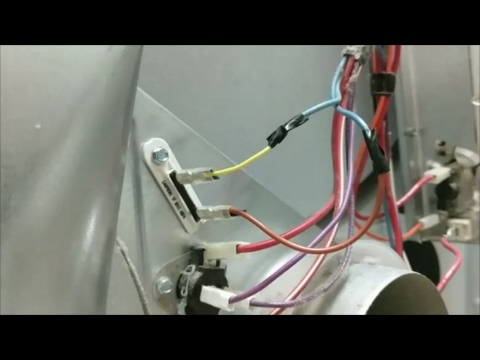
Test for a Blown Thermal Fuse
Continuous beeping with no heating usually means the thermal fuse has blown. This safety device cuts power when the machine overheats. Once blown, it cannot reset and requires replacement.
Watch for these symptoms:
– No heating after multiple reset attempts.
– Orange light stays on or fails to illuminate.
– Burning smell (stop use immediately if detected).
Warning: Replacing the thermal fuse requires opening the casing. This may void your warranty. Contact GBC support or a certified technician unless you have proper training.
Check Heating Element Function
If the machine powers on but never heats, the heating element may have failed. This triggers error beeps from the control board.
Look for these signs:
– Pouches emerge cold or only partially sealed.
– No warmth after five or more minutes of operation.
– Green ready light never appears.
Heating elements wear out with heavy use. Replacement is possible but requires technical expertise.
Rule Out Control Board Malfunction
A faulty control board can send false error signals, causing beeping even when no actual problem exists.
Indicators include:
– Random beeping with no recognizable pattern.
– Lights flashing erratically.
– Machine responding unpredictably to button presses.
If all other checks pass, the board may need replacement. This is not a user-serviceable repair.
Prevent Future Beeping
Use the Correct Pouch Thickness
Using the wrong pouch thickness confuses the machine. The Fusion 1100L adjusts speed based on the thickness setting.
Match your setting to the pouch:
– 3 mil (75 µm): Low heat setting
– 5 mil (100 µm): Medium heat setting
– 7 mil (125 µm): High heat setting
If the setting does not match the pouch, the motor struggles and triggers a jam error followed by beeping. Always verify the correct setting before laminating.
Maintain Proper Ventilation
Overheating is largely preventable. Keep your laminator in a well-ventilated area with at least six inches of clearance on all sides.
Avoid these common mistakes:
– Placing the machine near heaters or in direct sunlight.
– Using it on carpet or soft surfaces that block vents.
– Running it continuously for more than 30 minutes without breaks.
Allow the machine to cool between batches to extend its lifespan.
Run Cleaning Cycles Regularly
Prevent residue buildup with routine maintenance every month.
Follow this schedule:
– Run a cleaning card or blank paper through the machine.
– Wipe rollers with isopropyl alcohol.
– Inspect all visible components for wear or damage.
A clean machine runs quieter and lasts significantly longer.
Frequently Asked Questions About GBC Laminator Beeping
Why does my GBC laminator keep beeping and not heating?
Continuous beeping paired with no heating typically indicates a blown thermal fuse or failed heating element. The thermal protection system has shut down the machine to prevent damage. Try a 30-minute cooling reset first, then check for error lights. If the problem persists, the thermal fuse likely needs professional replacement.
What does two beeps mean on a GBC laminator?
Two short beeps accompanied by a green light signal that the laminator has reached operating temperature and is ready to use. This is normal behavior, not an error. The Fusion 1100L takes about three minutes to warm up, and the double beep confirms completion.
How do I stop my GBC laminator from beeping constantly?
Start with a hard reset by unplugging the machine for 30 minutes. After reconnecting, check that the feed tray and heat shield are fully seated. Inspect for jams and clean the rollers with isopropyl alcohol. If beeping continues, test internal connectors or contact GBC support.
Is beeping normal when I open the feed tray?
Yes, on models like the GBC Ultima series, removing and reinstalling the feed tray triggers an intentional beep. This confirms the safety switch is functional. However, if beeping occurs without touching the tray, the switch may be misaligned or faulty.
Can a wrong pouch thickness cause beeping?
Absolutely. Using a pouch thickness that does not match the heat setting forces the motor to work harder, triggering jam sensors and error beeps. Always match your setting to the pouch: 3 mil for low, 5 mil for medium, and 7 mil for high heat.
When should I stop troubleshooting and call for service?
Stop immediately if you detect a burning smell, see runaway rollers that ignore emergency stops, or experience continuous beeping after multiple reset cycles. These symptoms indicate serious electrical or control board failures. Continuing to use the machine risks fire or permanent damage.
Key Takeaways for Fixing GBC Laminator Beeping
The gbc laminator beeping issue is usually solvable with a methodical approach. Start with simple resets and safety component checks before moving to deeper diagnostics. Most beeping problems stem from overheating, misaligned parts, or minor jams that you can resolve in minutes.
Remember these critical points: always allow 30 minutes for cooling before restarting, never force pouches through a non-ready machine, and stop use immediately if you smell burning or see runaway rollers. Regular cleaning with isopropyl alcohol and proper ventilation prevent most issues before they start.
For persistent problems beyond basic troubleshooting, contact GBC customer support or a certified technician. Attempting internal repairs without proper training can void your warranty and cause further damage. With proper care and timely maintenance, your laminator will run quietly and reliably for years.