You’re ready to plug into the pulse of your community. Firefighters responding to emergencies, pilots coordinating with air traffic control, or ham radio operators chatting across counties. But your scanner is silent. Why? Because without the right frequencies programmed, even the most advanced radio is just a paperweight. The good news: finding scanner frequencies is easier than ever if you know where to look. With tools like RadioReference, government databases, and software like CHIRP, you can build a custom, up-to-date list of active, unencrypted channels in your area. This guide walks you through the exact steps to locate, verify, and program real-world scanner frequencies using trusted sources and field-tested techniques.
Start with RadioReference for Accurate Frequency Data
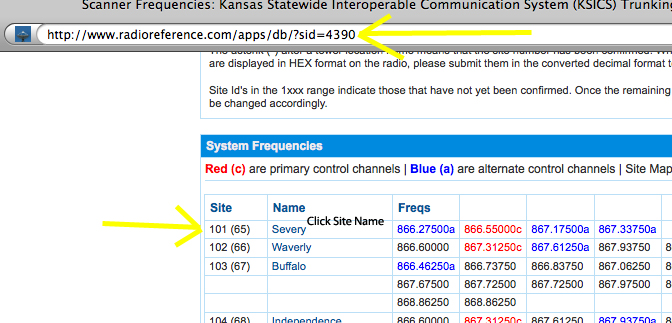
RadioReference.com is the gold standard for scanner frequency databases in North America. With over 224,000 frequencies and 7,100 trunked systems, it provides the most reliable starting point for any scanning project.
Search by Location and Agency Type
Enter your ZIP code, city, or county on RadioReference to pull up all known radio systems in your area. Filter results by agency type including police, fire, EMS, transportation, utilities, aviation, and amateur radio. Each entry includes control channels, talk groups, and encryption status, which is critical for avoiding wasted effort on locked-down systems.
Understand System Types and Modulation
RadioReference lists key technical details so you can confirm scanner compatibility. P25 Phase I and II are common for police and fire departments. DMR and NXDN are used by utilities and businesses. Analog FM remains active in rural fire and EMS. If your scanner doesn’t support P25, you won’t hear digital public safety traffic even with the correct frequency.
Check Encryption Warnings
Look for red alerts or user notes indicating encryption. Many urban police departments now use encrypted systems, making them unmonitorable. RadioReference users often post warnings like “Only fire and EMS are unencrypted here,” which saves time and sets realistic expectations.
Access UK Frequencies via RadioReference UK
For users in the United Kingdom, RadioReference UK is the most comprehensive and actively maintained database. It pulls from official licensing data and user field reports to deliver accurate, real-time information.
Filter by Postcode or Service Type
Enter your UK postcode to see all licensed transmitters within range. Narrow results by airband (118-137 MHz), military airfields, amateur radio repeaters, and Private Mobile Radio (PMR) systems. Each listing includes latitude, longitude, radio horizon, and CTCSS tone codes essential for programming handhelds.
Cross-Check with Ofcom Data
Verify entries against the Ofcom Licensing Portal. While RadioReference UK is highly accurate, Ofcom provides the legal record of who owns a frequency and where it’s authorized. This helps confirm whether a listed channel is still active or just a legacy entry.
Verify Frequencies with Official Government Databases
Community databases are powerful but not infallible. Always verify frequencies using official government licensing registries to confirm technical specifications and legitimacy.
Use FCC ULS for U.S. Frequencies
Visit the FCC Universal Licensing System at wireless2.fcc.gov. Search by city or county, licensee name, or frequency range. Results show transmitter locations, power output, antenna height, and emission types. This helps determine if a signal will reach your location and whether it’s analog or digital.
Use ISED Canada for Canadian Users
For Canadian scanners, ISED Canada’s Equipment Search provides the same level of detail. It includes frequency assignments, license status, and technical parameters, ideal for confirming scanner compatibility in rural or border regions.
Choose a Compatible Scanner with Digital Support
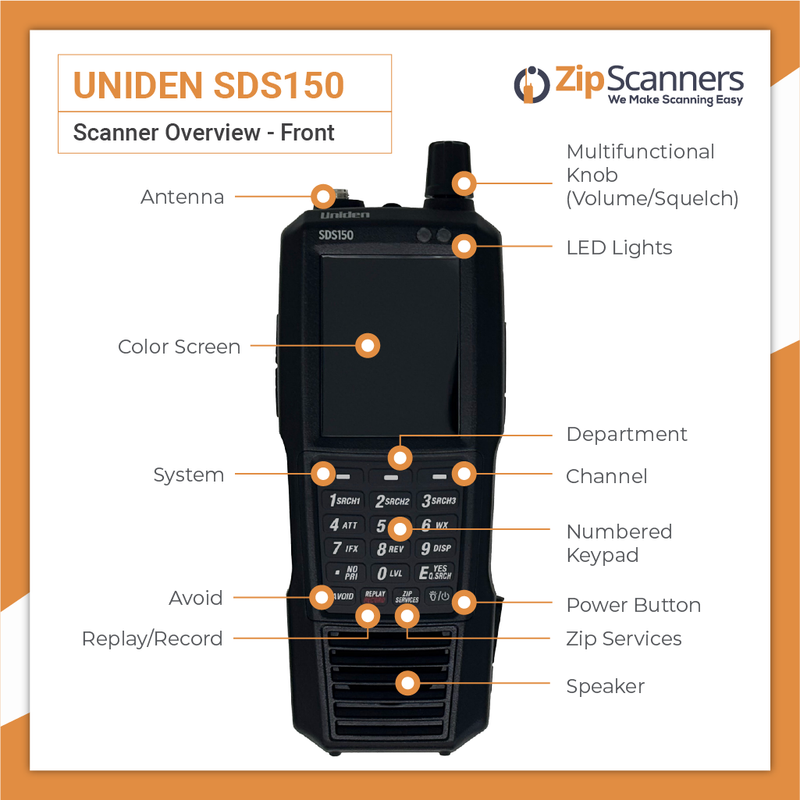
Having the right frequency data is useless if your scanner can’t receive it. Many modern systems use digital trunking, which basic scanners cannot decode.
Pick a Scanner with Digital Capabilities
Ensure your radio supports P25 Phase I and II for public safety, trunk tracking, GPS-based location programming, and SD card recording. Recommended models include the Uniden SDS150 and SDS200 with built-in RadioReference database, the Whistler TRX-1 and TRX-2 with full trunking support, and the Uniden BCD536HP for high-performance handheld use.
Confirm Frequency Coverage
Check your scanner’s receive range. Most cover VHF (136-174 MHz), UHF (400-520 MHz), and the 800 MHz band critical for P25 systems. If your scanner doesn’t cover 800 MHz, you’ll miss major public safety networks.
Program Frequencies Using CHIRP Software
Manual entry is slow and error-prone. CHIRP is a free, powerful tool that lets you program dozens of frequencies at once.
Download and Connect Your Radio
Install CHIRP from chirp.danplanet.com, then connect your scanner via programming cable. Select your manufacturer and model in CHIRP, then click Radio > Download from Radio to back up existing channels before making changes.
Import Frequencies from RadioReference
On RadioReference, go to your area’s page and click Download for CHIRP if available. Open the CSV file in CHIRP, then edit channel names to be descriptive like “Fire Dispatch” instead of raw frequencies. Set correct mode (NFM, AM) and tones (CTCSS/DCS) for each entry.
Upload to Your Scanner
Click Radio > Upload to Radio and confirm the overwrite warning. Switch your radio to Channel Mode, and channels will appear by name. Pro Tip: In CHIRP, go to Radio > Channel Display Type > Name so your radio shows labels instead of frequencies.
Monitor Key Unencrypted Services
Even in heavily encrypted areas, many agencies still broadcast openly. Focus on these reliable sources for consistent monitoring.
Fire and EMS Dispatch
Fire departments are less likely to encrypt than police. Look for VHF (154-156 MHz) and UHF (450-460 MHz), which carry fire alarms, mutual aid requests, and rescue operations.
Airband and Aviation
Monitor local airports with AM mode on 118-137 MHz. You’ll hear pilots, ground control, and tower communications, ideal for aviation enthusiasts.
NOAA Weather Radio
Stay alert during storms with NOAA channels on 162.400-162.550 MHz. These broadcast severe weather alerts, flood warnings, and emergency bulletins 24/7.
Amateur Radio Repeaters
Ham radio operators use open repeaters on 144-148 MHz (VHF) and 420-450 MHz (UHF). These are great for testing scanner performance and learning radio etiquette.
Understand Trunked Systems and Digital Modes
Many agencies use trunked radio systems where frequencies change dynamically. To monitor them, you need more than a single frequency.
Program Control Channels and NACs
For P25 systems, you must program the control channel frequency, NAC (Network Access Code), and talk groups like Fire Dispatch or EMS Tactical. RadioReference provides all this data. Without it, your scanner won’t follow the conversation.
Enable Trunk Tracking
Ensure your scanner has trunk tracking enabled in settings. Without it, you’ll only hear static or partial transmissions. This feature is essential for monitoring modern public safety systems.
Improve Reception with Better Antennas

Even with the right frequencies, poor signal means silence. Most handheld scanners have weak stock antennas that limit performance.
Use External Antennas
Upgrade to a discone antenna for omnidirectional wideband coverage across VHF, UHF, and 800 MHz. Use a Yagi antenna for directional, high-gain reception of distant towers. Mount in the attic or rooftop for best results, and avoid indoor placement near Wi-Fi routers or LED lights that cause interference.
Test Signal Strength
Use your scanner’s signal strength meter if available to fine-tune antenna position. Walk around your home or vehicle to find the clearest reception before settling on an antenna location.
Join Scanner Communities for Local Insights
No database replaces real-world experience. Scanner forums offer insights you won’t find elsewhere, including local encryption status and antenna recommendations.
Participate in RadioReference Forums
The RadioReference Forums are organized by state, county, and system. Ask specific questions like “Is Sacramento County fire still unencrypted?” or “What’s the best antenna for 800 MHz reception?” Active contributors include retired technicians and long-time scanners who know local quirks.
Avoid Oversharing Sensitive Data
Never post color codes, talk group mappings, or slot assignments publicly. Agencies monitor these forums, and if they see their internal communications exposed, they may encrypt the system, cutting off access for everyone.
Follow Legal and Ethical Guidelines
Scanning is legal in most places but with limits. Know the laws before you begin.
Know the Laws
In the U.S., scanners are legal, but some states ban use in vehicles during crimes. In the UK, monitoring is legal, but transmitting or interfering is not. In Canada, scanning is legal under the Radiocommunication Act. Never use scanner information for illegal activity.
Respect Privacy
Don’t share personal details like names, addresses, or medical information heard on EMS or fire channels. Ethical scanning means being a responsible listener, not a voyeur.
Don’t Transmit
Your scanner is for receiving only. Transmitting on public safety frequencies without a license is a federal offense.
Frequently Asked Questions About Finding Scanner Frequencies
What is the best website to find scanner frequencies?
RadioReference.com is the best website for finding scanner frequencies in North America. It contains over 224,000 frequencies and 7,100 trunked systems, with regular updates from a global community of contributors. For UK users, RadioReference UK provides comprehensive coverage of licensed transmissions.
How do I find frequencies for my specific location?
Enter your ZIP code, city, or county on RadioReference to see all known radio systems in your area. Filter by agency type like police, fire, EMS, or transportation. Cross-check findings with official databases like the FCC ULS or Ofcom for verification.
Can I monitor encrypted police frequencies?
No, encrypted frequencies cannot be monitored legally or technically. Standard scanners cannot decode encryption protocols like AES or DES. Focus on unencrypted services like fire, EMS, airband, and amateur radio, which remain accessible in most areas.
What scanner do I need for digital frequencies?
You need a scanner that supports P25 Phase I and II for digital public safety systems. Recommended models include the Uniden SDS150, SDS200, BCD536HP, or Whistler TRX-1 and TRX-2. Ensure your scanner covers the 800 MHz band, which most modern public safety networks use.
Is it legal to listen to scanner frequencies?
Yes, scanning is legal in most jurisdictions including the U.S., UK, and Canada. However, you cannot transmit on these frequencies without a license, and some states restrict scanner use in vehicles during criminal activity. Always check local laws before monitoring.
Key Takeaways for Finding Scanner Frequencies
Finding scanner frequencies requires systematic research rather than guessing. Start with RadioReference or RadioReference UK for authoritative databases, then verify findings with FCC, Ofcom, or ISED government registries. Use CHIRP software to program frequencies into a modern digital-capable scanner with trunk tracking support. Focus on unencrypted services like fire, EMS, airband, and amateur radio for consistent monitoring. Improve reception with external antennas mounted in high locations, and join scanner forums for local insights and encryption status updates. Keep detailed logs of your discoveries, update your frequency list regularly as systems change, and always scan ethically and legally. With the right approach combining data, technology, and community, you’ll have a powerful real-time window into the world around you.