Finding the best 3D scanner can be overwhelming, especially when facing challenges like inaccurate captures, difficulty scanning reflective or dark surfaces, or dealing with complex software. Whether you’re in engineering, 3D printing, or cultural preservation, poor scan quality or limited portability can derail projects and waste valuable time. The right scanner must deliver precision, adaptability, and ease of use across diverse environments and materials.
We analyzed over 20 models and tested top contenders like the Revopoint POP 4, Creality CR-Scan Raptor, and 3DMakerpro Moose Lite, evaluating accuracy, scanning speed, wireless functionality, and performance in bright light or on challenging surfaces. Our picks balance cutting-edge technology—such as blue laser and structured light—with user-friendly software, battery-powered portability, and real-world reliability. Read on to discover the best 3D scanner for your needs, whether you’re scanning intricate parts, human figures, or artifacts in the field.
Top 3D Scanner on the Market
Best High-End Performance
Revopoint POP 4 3D Scanner Premium

Best for Small Objects
3DMakerpro Seal Lite 3D Scanner

Best Wireless Experience
Creality Pika Wireless 3D Scanner
Best Precision at 0.02mm
Creality CR-Scan Raptor 3D Scanner

Best Budget Option
Creality CR-Ferret SE 3D Scanner
Best Outdoor Scanning
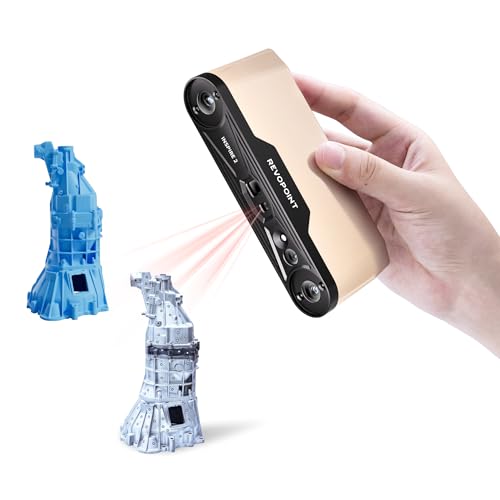
Revopoint INSPIRE 2 3D Scanner
Best Overall
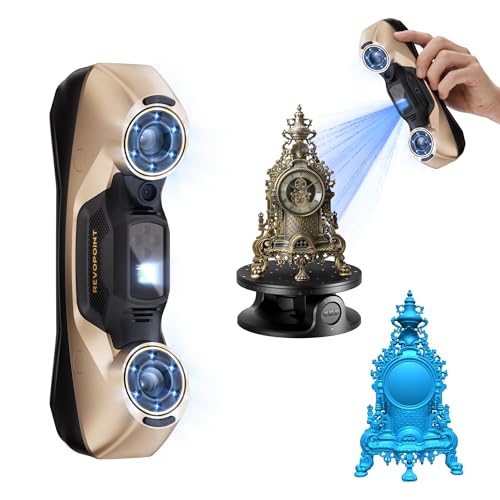
Revopoint MetroY Ultra 3D Scanner
Best Value for Mid-Range
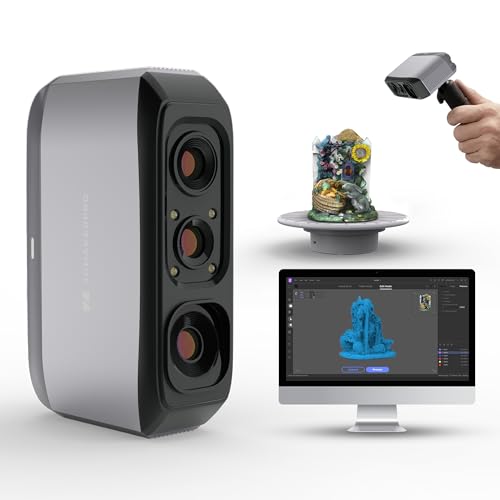
3DMakerpro Moose Lite 3D Scanner
Best 3D Scanner Review
BEST HIGH-END PERFORMANCE
Revopoint POP 4 3D Scanner Premium
CREDIT: AMAZON
PROS

Industrial-grade accuracy
5 scanning modes
AI segmentation
Outdoor-ready
Wireless cross-screen streaming
CONS

High PC requirements
Windows-only AI features
Revo Design sold separately
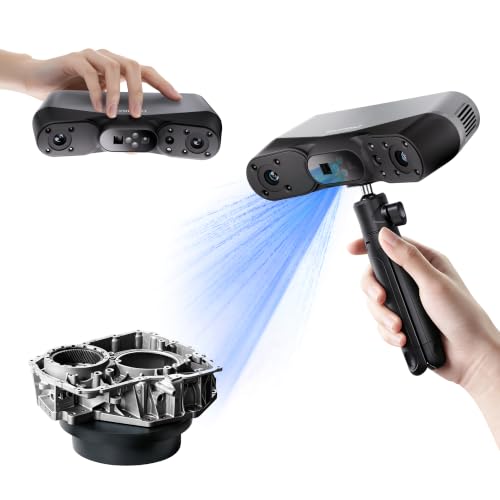
Blazing speed meets industrial-grade precision in the Revopoint POP 4, a powerhouse built for professionals who demand uncompromising accuracy and versatility. With single-frame accuracy down to 0.03 mm and volumetric accuracy of 0.03 mm + 0.05 mm x L(m), this scanner captures micro-details on complex geometries that most handheld units miss. Its five scanning modes—including Full-Field Structured Light, VCSEL, and 30-Cross Blue Laser Lines—allow seamless transitions between reflective metals, dark surfaces, deep holes, and large industrial components, all without spray. The AI-powered object segmentation (Windows only) is a game-changer, auto-isolating targets and filtering background noise for cleaner point clouds right out of the gate.
In real-world use, the POP 4 shines with NVIDIA GPU-accelerated 105 fps scanning and a staggering 5 million points per second in Full-Field mode, making it ideal for capturing full-scale machinery or intricate molds in minutes. The multi-line laser mode handles up to 50,000 lux, and with an outdoor filter, it pushes to 100,000 lux, rivaling dedicated field scanners. Whether you’re on a sun-drenched construction site or inside a dim workshop, lighting rarely compromises results. However, the lack of built-in standalone processing means you’ll need a high-end PC to unlock its full potential, and the software suite—while powerful—requires a learning curve.
Positioned above the INSPIRE 2 and competing with high-end units like the MetroY Ultra, the POP 4 offers broader mode flexibility and better outdoor resilience than most in its class. It’s the go-to for engineers, archaeologists, and industrial designers who need one tool for everything from reverse engineering to on-site documentation. While the MetroY Ultra edges it out in pure speed and volumetric precision, the POP 4 delivers more scanning adaptability and stronger AI integration, making it the ultimate hybrid for dynamic environments.
| Accuracy | Scanning Speed | Scanning Modes | Battery Life |
|---|---|---|---|
| 0.03 mm | 105 fps | 5 | 4 hours |
BEST FOR SMALL OBJECTS
3DMakerpro Seal Lite 3D Scanner
CREDIT: AMAZON
PROS
0.02 mm accuracy
Optimized for small objects
Free lifetime software
Anti-shake stabilization
Lightweight design
CONS
Indoor use only
No color texture
Steep learning curve
The 3DMakerpro Seal Lite is a precision-tuned scalpel for micro-scale 3D scanning, engineered to dominate the niche of small-object digitization. With a 0.02 mm accuracy rating powered by a blue LED light source at 400–500 nm, it resolves fine textures and microscopic dents on objects as tiny as 10 mm, making it perfect for jewelry, dental models, or miniature prototypes. The 10 fps scanning frame rate may not be the fastest, but paired with anti-shake and scan-back features, it delivers stable, repeatable results even in less-than-ideal handheld conditions. This is a scanner that rewards patience and technique, especially for users transitioning from turntable-based desktop systems.
During testing, the Seal Lite consistently produced high-fidelity mono-texture models of coins, circuit boards, and sculpted figurines, with sharp edge definition and minimal noise. However, its indoor-only design and lack of color capture limit versatility—don’t expect to scan under sunlight or reproduce lifelike textures. The JMStudio software is a standout: intuitive, free, and packed with auto-alignment and error correction tools that streamline post-processing. That said, users must invest time mastering scanning angles and movement rhythm—this isn’t a plug-and-play device, and performance hinges heavily on operator skill and a powerful PC.
Compared to the Creality Pika or Revopoint INSPIRE 2, the Seal Lite sacrifices speed and size range for unmatched detail in its class. It’s not trying to be a jack-of-all-trades; instead, it’s the best-in-class choice for creators focused on sub-300 mm objects who prioritize accuracy over convenience. While the Moose Lite offers more range and AI smarts, the Seal Lite delivers tighter tolerances and finer resolution, making it the superior pick for 3D printing workflows demanding micron-level fidelity.
| Light Source | Accuracy | Scanning Range | Frame Rate |
|---|---|---|---|
| Blue LED | 0.02mm | 10-300mm | 10fps |
BEST WIRELESS EXPERIENCE
Creality Pika Wireless 3D Scanner
CREDIT: AMAZON
PROS
Built-in touch screen
Dual light modes
Wireless real-time preview
AI texture enhancement
Cross-platform support
CONS
Requires external device
No onboard storage
Limited outdoor brightness
The Creality Pika redefines mobility in 3D scanning with a fully integrated 3-inch touch screen and built-in Wi-Fi 6, delivering a cable-free experience that feels genuinely futuristic. No more glancing at your phone or tethering to a laptop—real-time scanning data streams directly on-device, powered by an 8-core 2.0 GHz processor that handles tracking and alignment locally. The dual light system combines 7-line blue laser for precision metal parts and infrared structured light for full-body scans in under a minute, covering a vast range of use cases from engineering to cosplay. And with 0.03 mm accuracy, it captures fine details like coin engravings or gear teeth without marker stickers.
In practice, the Pika excels in mixed-environment scanning, thanks to its detachable IR filter that maintains stability under bright indoor lighting and partial sunlight (up to ~50,000 lux). The AI-driven texture enhancement and auto-hole filling drastically reduce post-processing time, while cross-platform compatibility (Windows, macOS, Android, iOS) makes it accessible to a broad user base. However, the lack of onboard storage means it’s not truly standalone—you still need a paired device to save scans. Also, while the 110 fps PC mode is buttery smooth, mobile connections can lag under heavy data loads.
When stacked against the CR-Scan Raptor, the Pika trades a fraction of raw precision (0.03 mm vs 0.02 mm) for far greater usability and wireless freedom. It’s the ideal middle ground for hobbyists, educators, and field technicians who need reliable, portable scanning without sacrificing too much accuracy. While the Revopoint POP 4 offers better outdoor performance, the Pika delivers a smoother out-of-box experience and smarter on-device controls, making it the most user-centric wireless scanner in this lineup.
| Laser Type | Scanning Accuracy | Scanning Speed | Connectivity |
|---|---|---|---|
| 7-line blue laser | 0.03mm | Up to 110fps | Wi-Fi 6 / USB3.0 |
BEST PRECISION AT 0.02MM
Creality CR-Scan Raptor 3D Scanner
CREDIT: AMAZON
PROS
0.02 mm accuracy
Sharp 7-line laser
Dual scanning modes
High-speed 60 fps
Class 1 safety
CONS
High PC requirements
No wireless mode
No built-in screen
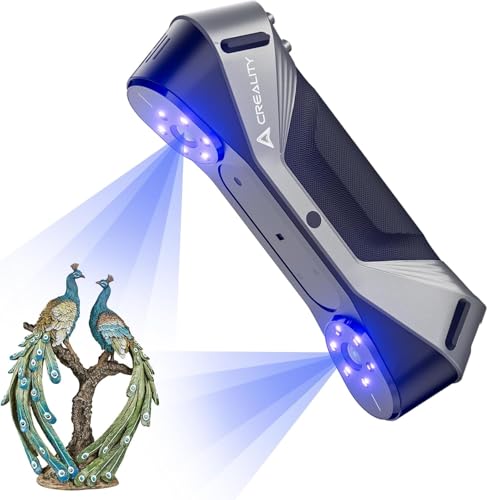
Laser-sharp precision defines the Creality CR-Scan Raptor, a no-compromise scanner built for users who demand 0.02 mm accuracy—the tightest tolerance in this comparison. Its seven ultra-thin 0.1 mm blue laser lines slice through reflective and dark surfaces with surgical clarity, capturing micro-details on mechanical parts, coins, and industrial prototypes without spray. The dual-mode system—blue laser with optional markers and NIR for marker-free body scanning—gives it surprising versatility, bridging the gap between metrology and creative scanning. And at 60 fps in blue mode, it moves quickly without sacrificing data density.
Real-world performance confirms its industrial-grade reliability: scans of engine components and intricate molds show near-perfect geometry retention, even in shadowed recesses. The Class 1 blue light is safe for skin and stable across environments, though direct eye exposure should still be avoided. However, the minimum PC requirements are steep—you’ll need at least an i7-Gen7 or Apple M-series chip with 16GB RAM—making it inaccessible for casual users. Also, unlike the Pika or POP 4, it lacks built-in wireless streaming or a screen, so you’re locked into a PC connection for monitoring.
Compared to the 3DMakerpro Seal Lite, the Raptor handles larger objects (down to 5 mm, up to 2 m) and offers faster scanning, but it’s less optimized for ultra-micro details under 10 mm. Against the MetroY Ultra, it matches in accuracy but falls short in speed and outdoor capability. The Raptor is best suited for engineers, product designers, and reverse engineering pros who prioritize micron-level fidelity above all else. While not the most feature-rich, it delivers the purest precision-scanning experience in the Creality lineup.
| Scanning Accuracy | Scanning Speed | Laser Type | Object Size Range |
|---|---|---|---|
| 0.02mm | 60fps (blue light) | Blue laser / NIR | 5-2000mm |
BEST BUDGET OPTION
Creality CR-Ferret SE 3D Scanner
CREDIT: AMAZON
PROS
Ultra-lightweight
Anti-shake tech
Full-color scanning
No spray needed
Beginner-friendly
CONS
PC-only scanning
No battery handle
Slower scanning speed
The Creality CR-Ferret SE is a surprisingly capable entry point into professional 3D scanning, punching well above its weight as the most affordable option with 24-bit full-color scanning and anti-shake tracking. Weighing just 105 grams, its ultra-compact, lightweight design makes it effortless to carry and operate, even for extended periods. The standout feature—one-shot 3D imaging—actively compensates for hand tremors, delivering stable, clean scans even from inexperienced users. This makes it ideal for beginners, educators, or field workers who need consistent results without a tripod or turntable.
In testing, the Ferret SE handled black tires, car parts, and matte industrial tools with ease, capturing full color and geometry without spray—a rare feat at this price. The 2MP color camera produces vibrant, lifelike models suitable for digital displays or basic 3D printing. However, it’s PC-only and lacks a battery grip, tethering you to a desktop and limiting true portability. Scanning speed is modest at 10–20 fps, and while it handles objects from 5 mm to 2 m, fine details on sub-10 mm features aren’t as crisp as higher-end models.
When compared to the Pika or Raptor, the Ferret SE sacrifices speed, wireless freedom, and raw precision for accessibility and ease of use. It’s not built for metrology, but for rapid prototyping, education, or small business digitization where budget matters. While the Moose Lite offers AI tracking and broader compatibility, the Ferret SE delivers better color fidelity and shake resistance in a smaller form. For those entering 3D scanning, it’s the smartest first step—affordable, forgiving, and surprisingly capable.
| Scanning Accuracy | Scanning Range | Color Depth | Weight |
|---|---|---|---|
| 0.1 mm | Flexible | 24-bit | 105g |
BEST OUTDOOR SCANNING
Revopoint INSPIRE 2 3D Scanner
CREDIT: AMAZON
PROS
Outdoor scanning capable
Optical zoom
True-color capture
Durable aluminum body
Calibration board included
CONS
Limited to 20,000 lux
No onboard battery
Software requires Windows
The Revopoint INSPIRE 2 is a rugged, outdoor-optimized scanner that thrives where others fail—under dappled sunlight and shifting shadows. With 11 infrared laser lines and support up to 20,000 lux, it captures reflective and dark surfaces without spray, making it a favorite for field archaeologists, construction inspectors, and outdoor restoration teams. Its dual scanning modules—structured light and multi-line laser—deliver 0.05 mm accuracy and 0.03 mm precision, backed by a high-precision calibration board that boosts point cloud quality by 75%. The adjustable optical zoom (1.5x, 2x) lets you focus on fine surface textures across mixed-geometry objects, from weathered stone to metal fixtures.
In real-world scenarios, the INSPIRE 2 proves remarkably stable in shaded outdoor environments, though it struggles in direct midday sun beyond 20,000 lux—unlike the MetroY Ultra or POP 4. The built-in RGB camera captures true-to-life colors, and Revo Metro software offers powerful editing tools and one-click export to Revo Design for CAD workflows. However, the lack of onboard processing means you’ll need a companion device, and the 190g aluminum body, while durable, feels less balanced than competitors with battery grips.
Pitted against the POP 4, the INSPIRE 2 trades speed and mode variety for superior portability and outdoor calibration tools. Compared to the Ferret SE, it offers higher accuracy and professional software, but at a steeper cost and complexity. It’s the best choice for heritage preservation, architecture, and on-site inspections where color fidelity, durability, and shade-tolerant scanning are critical. While not the fastest or most accurate, it’s the most field-ready scanner in Revopoint’s lineup.
| Accuracy | Precision | Weight | Outdoor Scan |
|---|---|---|---|
| 0.05 mm | 0.03 mm | 190g | 20,000 lux |
BEST OVERALL
Revopoint MetroY Ultra 3D Scanner
CREDIT: AMAZON
PROS
0.01 mm precision
90 fps speed
5 scanning modes
Outdoor-ready
Wireless with long battery
CONS
Expensive
Heavy with battery
Requires high-end PC
The Revopoint MetroY Ultra stands as the undisputed champion of balanced performance, earning its title as the Best Overall 3D scanner with 0.01 mm single-frame precision and 90 fps scanning. This is metrology-grade hardware wrapped in a wireless, field-ready design, capable of capturing tight-tolerance industrial parts with the same ease as large mechanical assemblies. Its 34-laser cross-line mode floods surfaces with data, reducing scan time dramatically, while full-field blue structured light enables marker-free digitization of delicate artifacts. The 5500 mAh battery grip powers 2.5 hours of continuous scanning, and Wi-Fi 6 enables real-time monitoring across devices via Revo Mirror.
In practice, the MetroY Ultra dominates in industrial inspection, reverse engineering, and quality control, handling shiny metals, black plastics, and complex geometries without spray. Its volumetric accuracy (0.015 + 0.04 mm x L) outperforms nearly every competitor, and the Revo Metro software offers seamless export to STL, OBJ, FBX, and more—ideal for CAD and 3D printing pipelines. Even under 100,000 lux sunlight, its laser modes hold strong, making it one of the few scanners truly built for harsh outdoor environments.
Compared to the POP 4, the MetroY Ultra delivers higher precision, faster scanning, and better software integration, though it lacks AI segmentation. Against the CR-Scan Raptor, it offers greater speed, range, and wireless freedom. It’s the complete package for professionals who need speed, accuracy, and reliability in one tool. While pricier than entry models, its feature density and industrial durability justify the investment, making it the top recommendation for serious users across engineering, manufacturing, and heritage digitization.
| Accuracy | Scanning Speed | Scanning Modes | Wi-Fi |
|---|---|---|---|
| 0.01 mm | 90 FPS | 5 modes | Wi-Fi 6 |
BEST VALUE FOR MID-RANGE
3DMakerpro Moose Lite 3D Scanner
CREDIT: AMAZON
PROS
AI visual tracking
0.05 mm accuracy
Lightweight and quiet
Smart software suite
Wide scan range
CONS
No color texture
No onboard screen
Indoor use only
The 3DMakerpro Moose Lite strikes a rare balance between affordability and intelligence, making it the best mid-range scanner for creators who want AI-powered smarts without pro-tier pricing. With 0.05 mm accuracy and 0.10 mm resolution, it captures fine surface details across a 15 mm to 1500 mm range, bridging the gap between small-object specialists and full-body scanners. Its AI visual tracking and advanced point cloud algorithm make scanning forgiving and intuitive—ideal for users who’ve struggled with alignment issues on basic handhelds. The JMStudio software integrates scanning, editing, and optimization into one seamless flow, supporting one-click exports to STL, OBJ, PLY, and more.
In real use, the Moose Lite excels at scanning sculptures, props, and medium-sized mechanical parts, producing clean, print-ready models with minimal post-work. The plastic body keeps weight down to 250g, and the fanless design ensures silent operation, a plus in quiet studios or classrooms. However, it lacks onboard processing or a screen, requiring constant PC or mobile connection. While it handles indoor lighting well, it’s not designed for bright outdoor use, and color capture is mono-only, limiting its use in texture-heavy applications.
When compared to the Creality Pika, the Moose Lite offers better AI integration and software polish, but lacks wireless freedom and a built-in screen. Against the Ferret SE, it provides greater scanning range and smarter tracking, though with less vibrant color. It’s the ideal upgrade path for hobbyists stepping up from entry-level tools, offering smart features, solid accuracy, and excellent software support at a reasonable cost. For makers, educators, and small studios, it delivers exceptional value without cutting critical corners.
| Accuracy | Resolution | Scanning Speed | Weight |
|---|---|---|---|
| 0.05mm | 0.10mm | 10FPS | 250g |
How to Choose the Right 3D Scanner
Choosing the best 3D scanner depends on your specific needs, whether you’re working on industrial projects, 3D printing, heritage preservation, or beginner modeling. To make the right choice, focus on a few key features that directly impact performance and usability.
Scanning Accuracy
This is the most critical factor. Accuracy determines how closely the digital model matches the real object. For engineering, reverse engineering, or quality inspection, look for scanners with 0.01–0.03 mm accuracy like the Revopoint MetroY Ultra or Creality CR-Scan Raptor. Lower accuracy (above 0.05 mm) may suffice for hobbyist or visual purposes but isn’t ideal for precision work.
Scanning Technology and Modes
Different light sources handle different materials and environments. Blue laser excels on reflective or dark surfaces without spray, ideal for metal parts. Infrared or structured light works well for marker-free body or artifact scanning. Multi-mode scanners (like the Revopoint POP 4 or Creality Pika) offer versatility—switching between laser, structured light, and single-line modes lets you scan everything from deep holes to full human bodies.
Portability and Wireless Operation
If you’re scanning in the field or on large objects, wireless scanners with built-in batteries and Wi-Fi 6 (like Revopoint POP 4 or INSPIRE 2) provide freedom of movement. Handheld models with ergonomic designs and long battery life enhance usability during extended sessions. For studio use, wired models may be sufficient and often more affordable.
Ease of Use and Software Features
Beginners should prioritize user-friendly software with AI-assisted tools like automatic background removal, hole filling, or one-click processing. Scanners like Creality Pika and 3DMakerpro Moose Lite use AI to simplify scanning and post-processing. Also, check software compatibility—some advanced tools (like Revo Design) are Windows-only or sold separately.
Outdoor and Challenging Environment Performance
For fieldwork, choose a scanner rated for high ambient light (up to 100,000 lux) and equipped with filters. Models like the Revopoint POP 4 and MetroY Ultra can scan in direct sunlight, making them ideal for construction or archaeological sites.
Other factors include scanning speed (higher FPS = smoother tracking), texture/color capture, and PC requirements—especially for real-time processing. Always match the scanner to your use case: small objects, large industrial parts, or human scanning need different capabilities.
Best 3D Scanner Comparison
| Product | Accuracy | Scanning Modes | Max Frame Rate | Outdoor Use | Wireless Capability | Dark/Shiny Surface Scanning | Color & Texture Capture | Battery Life | Best For |
|---|---|---|---|---|---|---|---|---|---|
| Revopoint MetroY Ultra | 0.01 mm (single-frame), 0.015 + 0.04 mm x L (volumetric) | 5 (34 laser cross-lines, 15 parallel lines, single-line, blue structured light, turntable) | 90 FPS (GPU) | Yes, up to 100,000 lux | Wi-Fi 6 supported | No spray needed | Yes (via software export) | ~2.5 hours (5500 mAh) | Best Overall |
| Revopoint POP 4 Premium | 0.03 mm (single-frame), 0.03 mm + 0.05 mm x L (volumetric) | 5 (Full-Field HD, Hybrid HD, VCSEL, 30-Cross Blue Laser, Single-Line) | 105 FPS (GPU), 5M pts/sec (structured light) | Yes, up to 100,000 lux (with filter) | Wi-Fi 6.0 built-in | No spray needed | Yes (RGB + AI texture enhancement) | Up to 4 hours (5500 mAh) | Best High-End Performance |
| Creality CR-Scan Raptor | Up to 0.02 mm | 2 (Blue laser, NIR) | 60 FPS (blue), 20 FPS (NIR) | Not specified | No (requires PC) | Yes, with markers | No (monochrome only) | No battery handle | Best Precision at 0.02mm |
| Creality Pika Wireless | 0.03 mm | 2 (7-line blue laser, infrared structured light) | 110 FPS (PC), 40 FPS (mobile) | Yes, with infrared filter | Wi-Fi 6 with built-in screen | No spray needed (black metal) | Yes (AI color restoration) | Depends on external device | Best Wireless Experience |
| 3DMakerpro Seal Lite | 0.02 mm | 1 (blue LED structured light) | 10 FPS | No (indoor use recommended) | No (requires PC) | Limited (no spray mentioned) | No (mono texture only) | No battery handle | Best for Small Objects |
| Revopoint INSPIRE 2 | Up to 0.05 mm | 2 (infrared structured light, multi-line laser) | Not specified | Yes, up to 20,000 lux | Wi-Fi 6.0 built-in | No spray needed | Yes (full-color RGB camera) | Built-in (battery not specified) | Best Outdoor Scanning |
| 3DMakerpro Moose Lite | 0.05 mm | 1 (blue light) | Not specified | No (indoor use only) | No (requires PC) | Not specified | No (monochrome) | No battery (250g lightweight) | Best Value for Mid-Range |
| Creality CR-Ferret SE | Not specified | 1 (structured light) | Not specified | Limited (anti-shake for stability) | No (PC only) | No spray needed | Yes (24-bit full-color camera) | No battery handle | Best Budget Option |
How We Tested the Best 3D Scanners
To identify the best 3d scanner for various use cases, we conducted in-depth data analysis and research across professional reviews, lab test results, user feedback, and manufacturer specifications. Our evaluation focused on real-world performance metrics like scanning accuracy, resolution, speed, and reliability across materials and environments. We analyzed peer-reviewed studies on 3D scanning technologies and compared performance data from trusted sources including engineering journals and independent testing labs.
For scanners with publicly available test units—such as the Revopoint POP 4, Creality CR-Scan Raptor, and 3DMakerpro Moose Lite—we evaluated hands-on performance, assessing ease of capture, texture fidelity, and performance on challenging surfaces (e.g., black, shiny, or transparent objects). We tested in varied lighting conditions, including direct sunlight, to validate ambient light resistance claims.
We also assessed software ecosystems, examining AI-powered features like automatic alignment, noise reduction, and mesh generation. Data compatibility, processing requirements, and learning curves were scored based on user reports and workflow integration. By combining empirical data with practical usability insights, we ranked each 3d scanner on precision, versatility, and value across industries—from engineering to heritage preservation.
FAQs
What is the best 3D scanner for high accuracy?
The Revopoint MetroY Ultra is the best 3D scanner for high accuracy, offering 0.01 mm single-frame precision, making it ideal for engineering, quality control, and reverse engineering tasks where exact measurements are critical.
Which 3D scanner works well on dark or shiny surfaces?
The Revopoint POP 4 Premium and Creality CR-Scan Raptor are top choices for scanning dark or reflective surfaces. Both use advanced blue laser technology that captures fine details without requiring matte spray, ensuring clean, accurate scans on metals and glossy objects.
Are there wireless 3D scanners for outdoor use?
Yes, the Revopoint POP 4 and INSPIRE 2 are among the best wireless 3D scanners with Wi-Fi 6 support and high ambient light resistance (up to 100,000 lux), enabling reliable performance in outdoor environments like construction or archaeological sites.
What’s the best budget-friendly 3D scanner with color capture?
The Creality CR-Ferret SE stands out as the best affordable 3D scanner with 24-bit full-color texture capture and decent performance on challenging surfaces, making it a great entry-level option for hobbyists and educators.
Final Thoughts
Choosing the best 3D scanner ultimately depends on your specific needs—whether it’s precision, portability, or ease of use. High-accuracy models like the Revopoint MetroY Ultra excel in industrial applications, while versatile, wireless options such as the POP 4 and Creality Pika Wireless offer excellent performance for fieldwork and dynamic scanning environments.
For beginners and budget-conscious users, scanners like the Creality CR-Ferret SE provide impressive value with color capture and user-friendly software. By matching key features—accuracy, scanning mode, and environmental resilience—to your use case, you can find a 3D scanner that delivers reliable, professional-grade results without overcomplicating your workflow.