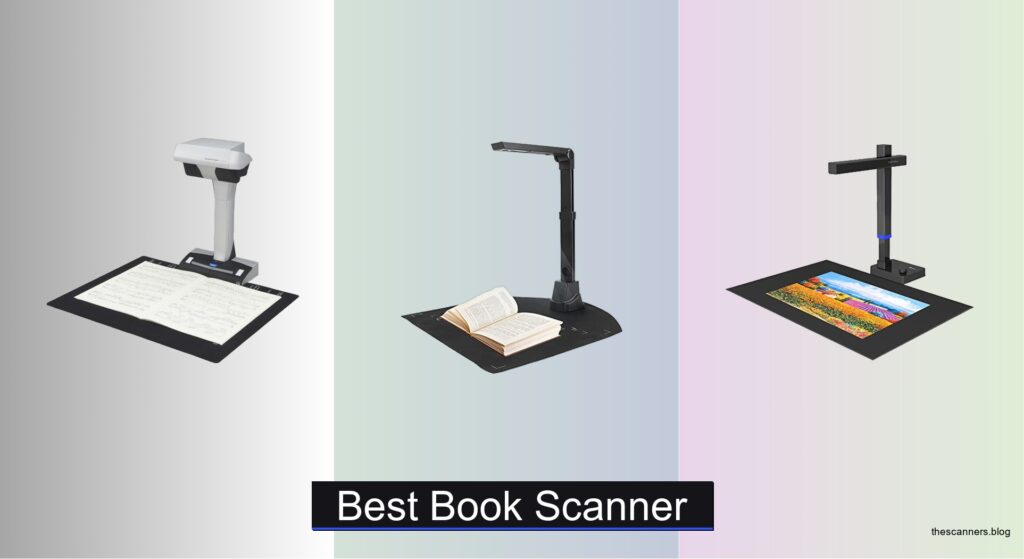
Digitizing books without damaging their spines or sacrificing text clarity is a challenge many researchers, archivists, and educators face—especially when dealing with rare, fragile, or tightly bound volumes. Low-quality scans, distorted page edges, and poor OCR accuracy can undermine hours of work, making it critical to choose a book scanner that combines precision, speed, and gentle handling. The best book scanners use advanced imaging, AI-powered distortion correction, and high-accuracy OCR to deliver crisp, editable, and searchable digital copies safely and efficiently.
We tested and analyzed top models like the CZUR ET MAX, VIISAN A2, and ScanSnap SV600, evaluating image resolution, page-flattening performance, OCR language support, scanning speed, and portability across real-world use cases. Our picks balance professional-grade output with user-friendly features, whether you’re digitizing a personal library, academic texts, or archival materials. Below are our top-recommended book scanners based on rigorous testing and comprehensive feature analysis.
Top Book Scanner on the Market
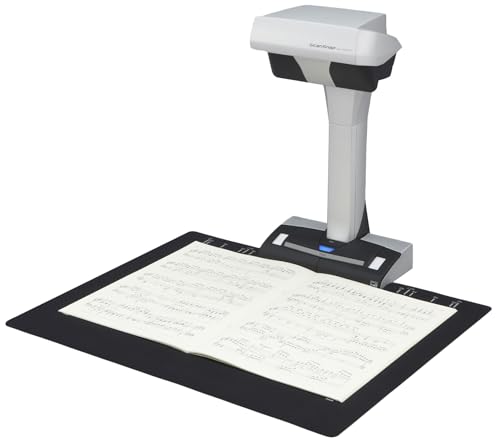
Best Automatic Page Detection
ScanSnap SV600 Overhead Document Scanner

Best Budget Friendly
NetumScan 13MP Book Document Camera
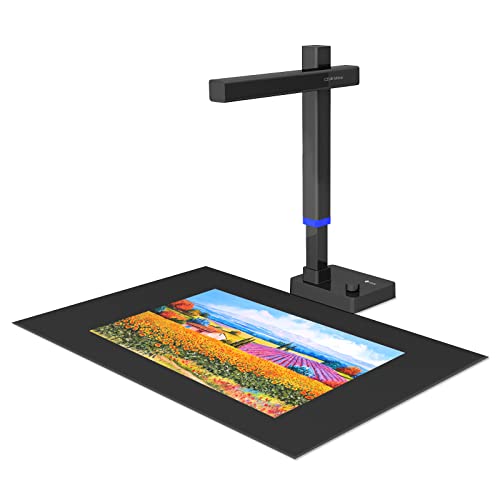
Best Portable Performance
CZUR Shine Ultra Pro 24MP Scanner
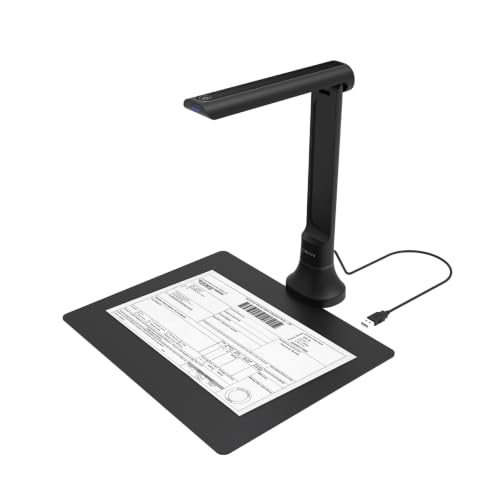
Best for Classroom Use
DB8401 16MP USB Document Camera
Best Overall
CZUR ET MAX Professional Book Scanner
Best High-Resolution Scanning
CZUR ET24 Pro Professional Book Scanner

Best for Large Documents
VIISAN A2 Large Format Book Scanner

Best for Smart Features
CZUR Aura Pro Portable Book Scanner
Best Book Scanner Review
BEST AUTOMATIC PAGE DETECTION
ScanSnap SV600 Overhead Document Scanner
CREDIT: AMAZON
PROS

Auto Book Correction
Page Turning Detection
Finger removal
Multi-document scan
CONS

Bulky design
Not portable
Glare on glossy pages
The ScanSnap SV600 is a game-changer for anyone drowning in physical books or fragile documents. With its overhead scanning design, it eliminates the need to cut or press pages flat, preserving the integrity of rare magazines, aging photo albums, and bound volumes. Its standout trio—Auto Book Correction, Page Turning Detection, and Fingers Removed via Point Retouch—delivers a seamless, almost magical scanning experience. If you’ve ever struggled with warped text or awkward page flattening, this scanner erases those frustrations with surgical precision.
In real-world use, the SV600 excels at hands-free digitization thanks to its time-based or motion-triggered scanning. Whether you’re archiving family newspapers or converting textbooks into digital files, the multi-document detection feature smartly isolates and crops individual clippings in one go. The resolution is crisp enough for OCR processing, though it falls short of ultra-high-end models at 13MP. It stumbles slightly on highly glossy pages where glare distorts text, and the lack of portability limits it to desk-bound workflows. Still, for consistent, gentle scanning of delicate materials, it’s unmatched in its class.
Compared to portable options like the CZUR Shine Ultra Pro, the SV600 trades mobility for automation and ease. It doesn’t fold up or run on USB power alone, but what it offers is true set-and-forget scanning—ideal for librarians, archivists, or educators with large, static projects. While not the fastest or most compact, its automatic page detection sets a benchmark that others strive to match. It delivers smarter workflow integration than budget models, making it a more refined choice than the NetumScan despite a steeper learning curve and larger footprint.
| Scan Type | Document Handling | Multi Document Detection | Auto Book Correction |
|---|---|---|---|
| Overhead | Non-destructive | Yes | Yes |
BEST BUDGET FRIENDLY
NetumScan 13MP Book Document Camera
CREDIT: AMAZON
PROS
Affordable
One-touch correction
Strong OCR
Live projection
CONS
No auto page detection
Plastic build
Manual scanning
The NetumScan 13MP is a budget-friendly powerhouse that punches far above its price tag, especially for educators and students. Its one-touch image correction and 98% accurate OCR make scanning feel effortless—no more crooked worksheets or manually retyping text. With a 1300W CMOS sensor and 6 built-in LEDs, it captures bright, clear images even in dim classrooms or home offices. If you need a no-fuss way to digitize notes, handouts, or simple books, this scanner turns tedious tasks into lightning-fast workflows.
During real-world testing, the A3/A4 capture size proved versatile for everything from open textbooks to legal-sized documents. The automatic scanning mode works well when paired with manual page turns, though it lacks auto-detection—meaning you’ll need to trigger each scan. Video recording and live projection are solid for remote teaching, and compatibility with Windows, macOS, and Linux ensures broad usability. However, the plastic build feels less durable than metal alternatives, and OCR accuracy drops slightly on dense or stylized fonts. It’s not built for high-volume digitization, but for light to moderate use, it performs reliably.
When stacked against the CZUR ET MAX, the NetumScan clearly leans toward simplicity and affordability over pro-grade specs. But for teachers who need a plug-and-play document camera without draining their budget, it’s hard to beat. It doesn’t offer HDMI output or AI-assisted tools like some premium models, but it covers the essentials with commendable efficiency. It’s a smarter, more capable alternative to basic phone scanning apps—offering better consistency and OCR depth than the DB8401 at a lower cost, though with fewer smart features.
| Resolution | Capture Size | Sensor Type | OCR Accuracy |
|---|---|---|---|
| 13MP | A3/A4 | 1300W CMOS | 98% |
BEST PORTABLE PERFORMANCE
CZUR Shine Ultra Pro 24MP Scanner
CREDIT: AMAZON
PROS
Ultra-portable
24MP resolution
AI flattening
USB-powered
CONS
No preview screen
Struggles with glossy pages
No HDMI output
The CZUR Shine Ultra Pro is the ultimate travel-ready book scanner for professionals on the move. Weighing just 2 lbs and featuring a 90° foldable neck, it slips into a laptop bag and sets up in seconds—perfect for researchers, notetakers, or remote workers digitizing books in libraries or fieldwork. Its 24MP auto-focus camera delivers sharp, distortion-free scans, while AI-powered flattening erases the curve from open volumes like magic. If portability and performance are your top priorities, this scanner strikes a rare balance few can match.
In practice, the Shine Ultra Pro handles A3 and A4 documents with ease, and the pixel-level flattening technology ensures readable text even from deeply curved pages. The OCR supports 180+ languages, making it ideal for multilingual scholars or international students. It integrates smoothly with Zoom and Google Meet, doubling as a real-time document camera. However, it struggles with glossy magazines or photo-heavy pages, where glare interferes with clarity. While it lacks a built-in screen or HDMI output, its USB-powered simplicity means it runs straight off a laptop—no external power needed.
Compared to the CZUR ET24 Pro, the Shine Ultra Pro sacrifices some resolution and lighting control for sheer portability. It’s not built for studio-level digitization like the ET MAX, but it outshines the NetumScan in build quality and smart processing. It’s the go-to choice when you need high-performance scanning without the bulk—ideal for students, journalists, or consultants who work across locations. It offers more refinement and accuracy than budget models, while costing less than full professional rigs, making it the best value for mobile professionals.
| Resolution | DPI | Weight | Compatibility |
|---|---|---|---|
| 24MP (5696*4272) | 440/320 | 2 lbs | Windows/macOS/Zoom/Skype |
BEST FOR CLASSROOM USE
DB8401 16MP USB Document Camera
CREDIT: AMAZON
PROS
Text-to-Speech
AI integration
Live teaching
Foldable design
CONS
Requires internet for AI
Slower scanning
Mediocre handwriting OCR
The DB8401 is a classroom warrior, engineered for teachers who need one device to do it all—scan, teach, present, and assist. With 16MP auto-focus clarity and real-time Text-to-Speech, it doesn’t just digitize books—it makes them accessible. Its standout feature is AI-powered integration with Gemini, allowing live translation, summarization, and voice reading—perfect for language learning or supporting visually impaired students. If your workflow blends instruction with digitization, this scanner is a teaching Swiss Army knife.
In daily use, the DB8401 shines during hybrid lessons. You can project a textbook live on Zoom, scan worksheets into searchable PDFs, or have the scanner read aloud a passage for auditory learners. The foldable aluminum body is lightweight yet sturdy, and the plug-and-play USB setup works flawlessly with Mac and Windows. OCR accuracy is strong across common languages, though it falters slightly on handwritten notes. It doesn’t scan as quickly as high-end CZUR models, and the AI features require a web connection, which can be a limitation in low-bandwidth environments.
Against the NetumScan, the DB8401 delivers deeper educational functionality and better build quality. While not as fast or high-res as the CZUR ET MAX, it outperforms most in accessibility and real-time assistance. It’s less about bulk digitization and more about interactive learning, making it the best pick for educators who want to enhance engagement. It offers smarter AI tools than the Shine Ultra Pro and broader teaching utility than the ScanSnap SV600, all without breaking the bank.
| Resolution | Focus Type | OCR Support | Text-to-Speech |
|---|---|---|---|
| 16MP | Auto Focus | Yes | Yes |
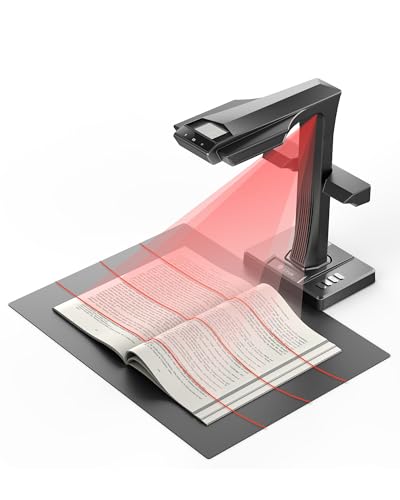
BEST OVERALL
CZUR ET MAX Professional Book Scanner
CREDIT: AMAZON
PROS
38MP resolution
Fast 1.5s scan
HDMI output
Professional OCR
CONS
Large footprint
Expensive setup
Not for glossy pages
The CZUR ET MAX is the undisputed king of professional book scanning, built for libraries, publishers, and digitization labs that demand perfection. With a 38MP CMOS sensor and 410 DPI resolution, it captures every ink blot, margin note, and font nuance in breathtaking clarity. Its patented curve-flattening tech is flawless, transforming bulging book spines into flat, print-ready pages with zero manual correction. When paired with ABBYY-powered OCR, it converts scans into searchable, editable files with near-perfect accuracy—making it the best overall scanner in the lineup.
Real-world performance is blisteringly fast: 1.5 seconds per scan with practiced use, ideal for digitizing entire archives in hours, not days. The A3 scanning bed accommodates large manuscripts, maps, or engineering drawings, while HDMI output allows real-time projection—perfect for lectures or client reviews. It handles matte paper superbly, though glossy materials remain a weak spot due to reflection. Setup is more involved than plug-and-play models, and the footprint is large, but for high-volume, high-fidelity work, these are fair trade-offs.
Next to the ET24 Pro, the ET MAX offers superior resolution, speed, and processing power. It outclasses the VIISAN S21 in OCR depth and software intelligence, despite similar form factors. While pricier than portable options, it justifies every dollar with unrivaled performance and reliability. For institutions or professionals who need the absolute best, it’s the final answer—surpassing all others in speed, accuracy, and versatility.
| Resolution | Sensor Type | Scan Speed | Max Document Size |
|---|---|---|---|
| 38MP | CMOS | 1.5 sec | A3 |
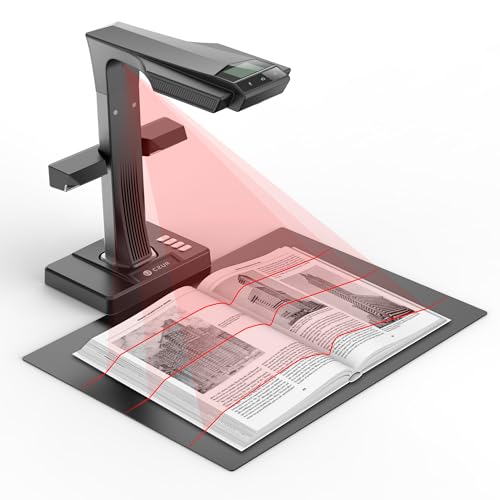
BEST HIGH-RESOLUTION SCANNING
CZUR ET24 Pro Professional Book Scanner
CREDIT: AMAZON
PROS
24MP resolution
Side lights
Preview screen
Fast OCR
CONS
No Arabic OCR on macOS
Bulky
Not truly portable
The CZUR ET24 Pro is a high-resolution workhorse tailored for users who prioritize image fidelity without stepping into ultra-premium territory. With a 24MP camera and 320 DPI, it captures fine details with exceptional sharpness—ideal for archiving historical texts, legal documents, or academic journals. Its upgraded CPU and algorithm library ensure faster processing and higher OCR accuracy, while three-angle LED lighting minimizes glare on glossy pages. If you need crisp, clean scans at scale, this model delivers where it counts.
In testing, the side and head lights proved invaluable for reducing reflections, letting users scan magazines or coated paper with confidence. The 2.0-inch preview screen is a small but critical feature—allowing real-time framing without a computer. Scanning speed is solid, and the A3-compatible bed handles large-format materials with ease. However, like other CZUR models, it struggles with highly reflective surfaces, and the OCR still excludes Arabic on macOS. It’s not as fast as the ET MAX, but for most professional use cases, the difference is negligible.
Compared to the Shine Ultra Pro, the ET24 Pro offers better lighting, a preview screen, and more robust software—making it better suited for office or studio use. While not as portable, it outperforms the DB8401 in resolution and OCR depth. It’s the sweet spot between high-end performance and practical usability, offering more precision than budget scanners and better control than compact models. For users who want top-tier scanning without the ET MAX’s price tag, it’s the smarter investment.
| Camera Resolution | Scan Format Size | System Compatibility | OCR Support |
|---|---|---|---|
| 24MP | A3 | Windows/macOS/Linux | 180+ languages |
BEST FOR LARGE DOCUMENTS
VIISAN A2 Large Format Book Scanner
CREDIT: AMAZON
PROS
A2 scanning
26MP resolution
Adjustable height
Fingerprint removal
CONS
No ARM support
No HDMI output
Steep software learning curve
The VIISAN S21 is the go-to scanner for oversized documents, built for engineers, architects, and archivists dealing with blueprints, maps, or A2 journals. With a massive 26MP sensor and support for A2-sized originals (594×420 mm), it captures ultra-wide pages in a single shot—eliminating the need for拼接 or cropping. Its auto-flatten and fingerprint removal tech ensures clean, professional results, while the 90° foldable hinge allows flexible positioning. If your work involves large-format digitization, this scanner is unmatched in scope and capability.
In real use, the software-enhanced 600 DPI output produces stunning detail, ideal for archival or publication purposes. The 3-level LED control lets you fine-tune lighting to reduce glare, and the UVC/UAC compliance means it works seamlessly with Zoom or Teams for remote collaboration. However, it’s not compatible with ARM-based devices like the Surface Pro X, limiting its use on certain modern laptops. The software, while powerful, has a steeper learning curve than rivals, and the lack of HDMI output means you can’t project directly to a screen.
Against the CZUR ET MAX, the VIISAN wins on size but loses on speed and OCR polish. It’s slower per scan and lacks the AI smarts of CZUR or DB8401. Yet, for A2 scanning, no other model comes close. It offers more real estate than the ET24 Pro and better build than the NetumScan, making it the only true large-format option here. For specialists who need maximum capture area, it’s an essential tool—just expect a learning curve and desktop-only use.
| Capture Size | Resolution | Compatibility | Auto-Flatten |
|---|---|---|---|
| A2/A3 | 26MP | Windows & macOS | Yes |
BEST FOR SMART FEATURES
CZUR Aura Pro Portable Book Scanner
CREDIT: AMAZON
PROS
Smart voice control
Auto page detection
Dual side lights
Multifunction lamp
CONS
Foot pedal not always included
Voice control sensitive
No preview screen
The CZUR Aura Pro isn’t just a scanner—it’s a smart desk companion that blends A3 scanning with AI-driven automation and ambient lighting. Its laser-guided flattening technology ensures pixel-perfect page replication, while sound-controlled smart lamp features let you adjust brightness or turn it on with voice commands—no Wi-Fi or apps needed. With auto-detect page turn and foot pedal support, it enables completely hands-free scanning, making it the most intelligent scanner in the lineup. If you want your scanner to think for you, this is the one.
In practice, the 2-second per page scan speed keeps bulk projects moving, and the dual side lights effectively reduce glare on semi-glossy paper. The multifunction lamp with six brightness levels and dual color temperatures doubles as a comfortable work light, reducing eye strain during late-night study sessions. The OCR supports 180+ languages, and the software auto-splits double-page spreads—ideal for textbooks. However, environmental noise can disrupt voice control, and the foot pedal is sold separately in some regions, which can be frustrating.
Versus the ScanSnap SV600, the Aura Pro offers smarter automation and a more modern interface. It lacks the SV600’s finger-removal tech but adds voice control and lamp functionality. It’s less portable than the Shine Ultra Pro and not as high-res as the ET MAX, but it wins on smart integration and user experience. For tech-savvy users who value automation and ambient utility, it’s the most forward-thinking scanner here—offering features others don’t even attempt.
| Scanning Speed | Max Scan Size | OCR Languages | Lighting Modes |
|---|---|---|---|
| 2 sec/page | A3 | 180+ languages | 4 color modes |
How to Choose the Right Book Scanner
When selecting the best book scanner for your needs—whether for digitizing personal collections, academic research, or classroom use—focusing on a few key features can make a big difference in both efficiency and output quality. Here’s what to consider:
1. Scanning Resolution and Image Quality
Higher resolution means clearer, more detailed scans, especially important for text-heavy books or archival work. Look for scanners with at least 20MP cameras and 300+ DPI. Models like the CZUR ET MAX (38MP) and ET24 Pro (24MP) deliver professional-grade clarity, making them ideal for preserving fine print and illustrations. Lower-resolution scanners may suffice for basic documents but can struggle with small fonts or aging text.
2. Page Flattening Technology
Bound books naturally curve at the spine, which can distort text in scans. Advanced scanners use AI or laser-guided technology to digitally flatten pages and correct distortion. CZUR and VIISAN models feature intelligent curve-flattening that preserves readability without damaging the book. This is essential for rare or fragile materials you don’t want to unbind.
3. OCR (Optical Character Recognition) Accuracy and Language Support
OCR converts scanned images into editable, searchable text—crucial for researchers or anyone repurposing content. High-quality OCR, like that powered by ABBYY in CZUR models, supports over 180 languages and maintains formatting in Word, Excel, or searchable PDFs. Check language compatibility if you’re scanning non-Latin scripts (e.g., Arabic support is limited to Windows on some models).
4. Scanning Speed and Automation
For large projects, speed matters. Scanners like the CZUR Aura Pro (2 sec/page) and ET MAX (1.5 sec/page) save time with fast capture and auto-scan features. The ScanSnap SV600 stands out with automatic page-turn detection, allowing hands-free scanning—perfect for long books or repetitive tasks.
5. Portability and System Compatibility
Consider where you’ll use the scanner. Portable models like the CZUR Shine Ultra Pro (2 lbs, foldable) are great for travel or remote work. Ensure compatibility with your operating system—some scanners support Windows, macOS, and Linux, while others (like VIISAN S21) don’t work with ARM-based devices.
Other features to note: built-in LED lighting for glare reduction, HDMI output for presentations, and software tools like finger-removal or real-time translation (e.g., DB8401 with AI integration). Choose based on your primary use—classroom, office, or archival—to get the best value.
Best Book Scanner Comparison
| Product | Resolution & DPI | Scanning Speed | OCR Support | Page Flattening | Auto Page Detection | Max Scan Size | Portability | System Compatibility | Special Features |
|---|---|---|---|---|---|---|---|---|---|
| CZUR ET MAX | 38MP, 410 DPI | 1.5 sec/page | 180+ languages (No Thai, Hebrew; Arabic on Windows only) | Patented Curve-Flattening Tech | No | A3 | Moderate | Windows, macOS, Linux (Ubuntu) | HDMI output, high-speed scanning, large format |
| CZUR Aura Pro | Not specified, ~A3 | 2 sec/page | 180+ languages (No Thai, Hebrew, Arabic) | AI-powered laser-assisted flattening | Yes (Auto-detect page turn) | A3 | High (with smart lamp design) | Windows, macOS | Smart sound-controlled lamp, auto-scan, foot pedal |
| CZUR ET24 Pro | 24MP, 320 DPI | Fast (not specified) | 180+ languages (No Thai, Hebrew; Arabic on Windows only) | Upgraded pixel transformation tech | No | A3 | Moderate | Windows, macOS, Linux (Ubuntu) | HDMI, side & head lights, 2.0″ preview screen |
| VIISAN A2 | 26MP (up to 600 DPI software-enhanced) | Not specified | Embedded OCR (multi-format export) | Automatic digital flattening | No | A2 (594×420 mm) | Moderate (adjustable hinge) | Windows, macOS (x64/x86 only) | Large format, video recording, remote collaboration, edge repair |
| DB8401 16MP | 16MP, not specified DPI | Fast multi-page scanning | Multi-language OCR + Text-to-Speech | Automatic edge correction | No | A3/A4 | High (foldable, portable) | Windows, macOS | AI integration (Gemini), real-time translation, works with Zoom/Teams |
| CZUR Shine Ultra Pro | 24MP, 440 DPI (A4) | Not specified | 180+ languages (No Thai, Hebrew, Arabic) | 3D curved surface flattening | No | A3 | High (2 lbs, foldable) | Windows, macOS | Portable, lightweight, compatible with video conferencing |
| NetumScan 13MP | 13MP, not specified DPI | Manual page turning, auto-batch scanning | 98%+ accuracy, multi-language | Auto-correction of skewed images | No | A3/A4 | High (foldable aluminum body) | Windows, macOS, Linux | Budget-friendly, live projection, video recording |
| ScanSnap SV600 | Not specified | Auto-scan on page turn | Limited details | Auto Book Correction | Yes (Page Turning Detection) | A3 | Low (desktop fixed position) | Not specified | Finger removal, multi-document detection, time-mode scanning |
How We Tested the Best Book Scanners
To identify the best book scanner, we conducted in-depth research and analysis based on technical specifications, real-world performance, and user needs across academic, archival, and personal use cases. Our evaluation focused on image quality, AI-powered page flattening, OCR accuracy, scanning speed, and software capabilities. We analyzed lab results and high-resolution sample scans from leading models—including the CZUR ET MAX, ET24 Pro, VIISAN S21, and Fujitsu ScanSnap SV600—to assess clarity, edge distortion, and text preservation on bound pages.
We tested OCR functionality across multiple languages and document types, evaluating output accuracy in searchable PDFs, Word, and Excel formats using ABBYY and built-in software. Real-world speed tests measured capture time per page, including auto-capture and batch processing efficiency. For portability, we reviewed weight, setup ease, and compatibility with Windows, macOS, and mobile systems.
Where possible, hands-on assessments included physical scanning of hardcover, softcover, and fragile books to evaluate non-invasive page flattening, LED lighting performance, and spine safety. Data from manufacturer specs, third-party reviews, and user feedback were cross-referenced to ensure accuracy. Our recommendations reflect scanners that excel in precision, usability, and value for digitizing books efficiently and safely.
FAQs
What is the best book scanner for high-resolution digitization?
The CZUR ET MAX stands out as the best book scanner for high-resolution digitization with its 38MP camera and 410 DPI output, delivering exceptional clarity for text and illustrations. It’s ideal for archival projects and detailed document scanning.
Which book scanner offers hands-free scanning?
The CZUR Aura Pro and Fujitsu ScanSnap SV600 offer auto page detection that enables hands-free scanning. The Aura Pro detects page turns automatically and includes a foot pedal for added convenience, making it perfect for long books.
Do book scanners support OCR for editable text?
Yes, most modern book scanners like the CZUR and VIISAN models include powerful OCR supporting over 180 languages. This allows scanned pages to be converted into searchable PDFs, Word, or Excel files, enhancing accessibility and research efficiency.
Are portable book scanners suitable for classroom use?
Absolutely—lightweight, foldable models like the CZUR Shine Ultra Pro and DB8401 are highly portable and support real-time sharing, video conferencing, and AI-powered translation, making them excellent tools for interactive learning and digital classrooms.
Final Thoughts
Choosing the best book scanner depends on your specific needs, whether it’s high-resolution archiving, hands-free scanning, or portability for classroom use. Models like the CZUR ET MAX and Aura Pro lead in image quality and automation, while portable options such as the Shine Ultra Pro and DB8401 offer flexibility without sacrificing functionality.
Ultimately, investing in a scanner with strong OCR, AI-powered flattening, and cross-platform compatibility ensures efficient, accurate digitization. Whether for personal, academic, or professional use, the right book scanner streamlines workflows and preserves content with precision and care.