Waiting several minutes for preheat or getting loose pages on thick reports can make thermal binding frustrating. Offices and schools also worry about burn risks, limited paper sizes, and costly proprietary covers. The best thermal binding machine solves these problems with instant heating, multi-stage timers, and fast cooling. Metal bodies and built-in safety features keep shared spaces safer.
We tested models by timing warm-up, binding stacks of 50 to 500 sheets, and checking glue penetration and spine durability. We verified timer accuracy, measured cooling times, and compared capacity, paper sizes, and cover compatibility. Every pick was cross-referenced with user reviews and manufacturer data. Our comparison table below breaks down each top pick so you can match a machine to your workload.
Top Thermal Binding Machine on the Market
Best Heavy-Duty Metal Build
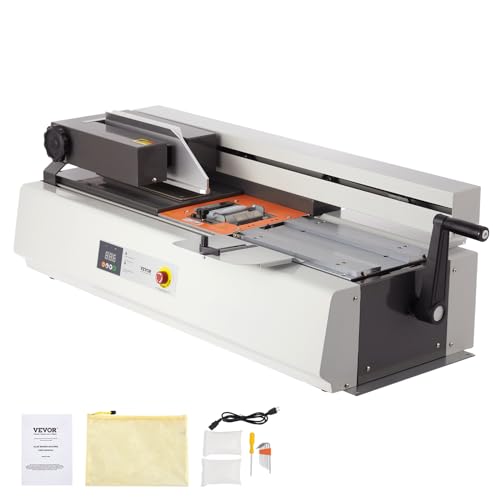
VEVOR Stainless Steel Thermal Binding Machine
Best Lightweight Portable
A4 Thermal Binding Machine 600 Sheets
Best Budget Friendly
Binditek Thermal Binding Machine 500 Sheet

Best Fast Cooling Thick Binding
Mxmoonant Thermal Binding Machine PRO 500
Best Mid Range
OFFNOVA Thermal Binding Machine 500 Sheets
Best Starter Kit
Digital Thermal Binding Machine With 20 Covers
Best Overall
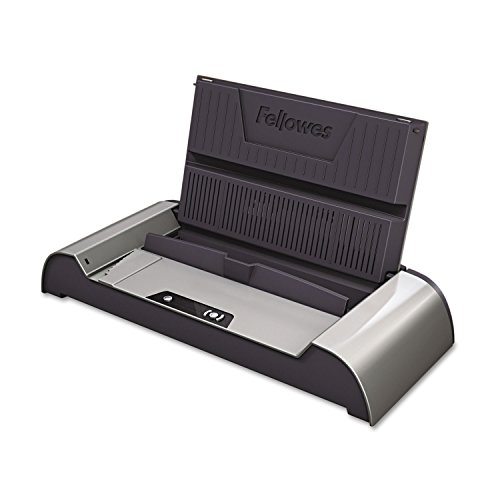
Fellowes Helios 60 Thermal Binding Machine
Best Premium Professional
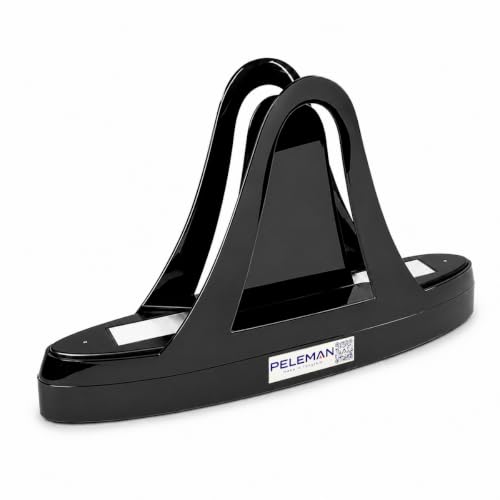
Peleman Unibind60 Pro Thermal Binder
Best Thermal Binding Machine Review
BEST HEAVY-DUTY METAL BUILD
VEVOR Stainless Steel Thermal Binding Machine
CREDIT: AMAZON
PROS

Stainless steel
Adjustable heat
A3 support
Dual alerts
Auto standby
CONS

Bulky footprint
Heat-up wait
Limited portability
Built like a workshop tool, the VEVOR Thermal Binding Machine swaps lightweight plastic for a premium stainless steel body that stays planted on a busy counter. Its adjustable 170°C to 200°C heat range lets you match the temperature to thick board covers or delicate cardstock, a level of control rarely found at this price tier. For print shops and libraries tired of replacing machines every season, this is a unit designed to keep running.
In everyday use, the 400-sheet capacity and 40mm binding thickness handle most reports and training manuals in one pass, including A3 short-edge documents that compact desktop models cannot accept. The infrared detection drops the temperature to 100°C after 30 minutes of standby, trimming idle power draw without making morning startup a chore. Dual buzzers announce when heating finishes, so you can step away from the desk instead of watching an indicator light. The trade-off is footprint, since this unit claims a dedicated corner and is not something you slide into a backpack.
Compared with the Fellowes Helios 60, the VEVOR gives up the Fellowes’ automatic thickness detection and 600-sheet ceiling, but it offers finer heat control for mixed cover stock. It suits design studios, copy shops, and libraries that bind oversized layouts daily and want an industrial feel. If you prefer hands-off settings and a dedicated safety barrier, the Fellowes is the safer pick. Against the Binditek model, the VEVOR delivers a sturdier build and finer temperature control, though the Binditek remains the smarter choice for tighter budgets.
| Binding Capacity | Binding Thickness | Paper Sizes | Temperature Range |
|---|---|---|---|
| 400 sheets | 40mm | A3, A4, A5 | 170°C-200°C |
BEST LIGHTWEIGHT PORTABLE
A4 Thermal Binding Machine 600 Sheets
CREDIT: AMAZON
PROS
Instant start
Lightweight frame
Starter covers
Timer modes
CONS
Lighter build
Limited ruggedness
Heavy stack strain
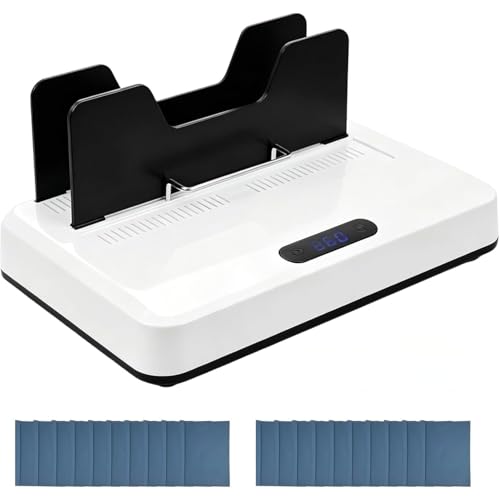
Plug in and start right away, because this 700W kit skips the preheat ritual entirely and ships with 20 A4 covers so the first project begins within minutes. Weighing roughly 1.5kg, it is the most featherweight option in this lineup, which makes it a practical companion for consultants and students who work across multiple locations. When a deadline lands at 6 p.m. and the office printer is still warm, this is the kind of tool that quietly saves the evening.
The timer modes at 60, 120, and 180 seconds map neatly onto thin booklets (1 to 20mm), standard documents (20 to 33mm), and thick folders (33 to 60mm), so the workflow stays predictable. PTC ceramic heating paired with micro-vibration aims for deep glue penetration, while the cooling tray lets freshly bound files set without tying up your desk. The 30-minute auto standby is a welcome energy-saving touch. The limitation is construction: the lighter frame does not match the heft of all-metal rivals when pressing the thickest stacks at the top of the 60mm range.
Compared with the Mxmoonant PRO, this kit trades raw metal toughness and the 500-sheet focus for a bundled starter supply and easy transport. It fits freelancers, field staff, and home offices that bind documents occasionally rather than at factory volume. If your daily workload is heavy, the Mxmoonant is the better long-term investment. Against the VEVOR, this kit delivers stronger on-the-go convenience and a bundled cover set, while the VEVOR wins decisively on heavy-duty build quality.
| Power | Binding Capacity | Paper Size | Timer Modes |
|---|---|---|---|
| 700W | 600 Sheets | A4 | 60s/120s/180s |
BEST BUDGET FRIENDLY
Binditek Thermal Binding Machine 500 Sheet
CREDIT: AMAZON
PROS
All-metal body
Three timers
Auto shutoff
No assembly
CONS
No temperature control
Manual timer selection
No auto detection
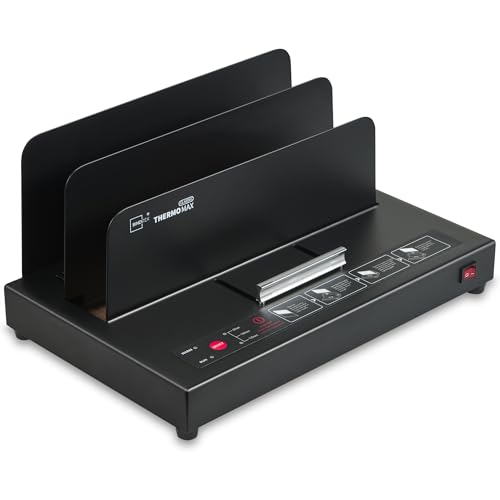
Solid metal construction at a friendly figure is what makes the Binditek stand out, with a fully metal exterior that feels far removed from the flimsy plastic many entry-level models use. Its PTC ceramic heating and built-in air cooling work together to set bonds quickly, and the no-assembly design means it is ready to use straight from the box. For students and home office workers who want durable hardware without overthinking the purchase, this model earns its spot on the shortlist.
The three-tier timer (60, 120, and 180 seconds) covers standard covers under 20mm, thicker covers over 20mm, and hard covers or accounting vouchers, so you choose the setting that matches the stack. Binditek claims binding up to 50mm on 70gsm paper, and in practice a sizable 500-page stack goes in without much fuss. The 3-minute auto shut-off protects the unit when a phone call pulls you away mid-job. The weak spot is fine-tuning, since there is no adjustable temperature control, which means unusual paper stock may require a few test runs.
Set beside the Fellowes Helios 60, the Binditek skips automatic thickness detection and the 600-sheet ceiling, but it stays simple to manage for weekly reports or school projects. It suits home users and small offices that bind a few dozen documents each week and value a sturdy chassis over extra features. Heavy office workloads still point toward the Fellowes. Compared with the Thermal Binding Machine digital touch panel starter kit, the Binditek offers the more rugged all-metal body, while the starter kit counters with a digital display and a larger cover set.
| Binding Capacity | Max Thickness | Construction | Heating Technology |
|---|---|---|---|
| Up to 500 sheets | 2 inches (50mm) | All-metal | PTC ceramic |
BEST FAST COOLING THICK BINDING
Mxmoonant Thermal Binding Machine PRO 500
CREDIT: AMAZON
PROS
Fast cooling
700W power
Digital display
A3 support
CONS
Covers not included
Fewer premium touches
Speed is the headline with the Mxmoonant PRO, which combines 700W heating, an almost instant start, and air cooling that clears stacks from the clamp in about 3 minutes. The digital display lets you choose 60, 120, or 180 seconds with a single touch, so changing the setting between jobs takes seconds. When a proposal or legal file must leave the office before closing time, this machine is built to absorb that pressure.
Mxmoonant claims support for 60mm thick stacks and A3 short-edge documents, so proposals, legal packets, and A5 booklets all fit within the same workflow. The microwave vibration feature is designed to keep spines aligned during the final seconds, and the overheating protection adds a welcome layer of comfort during long sessions. The realistic limitation is the cover, which is not included in the package, so you will need to source compatible covers before your first job. The fast cooling is a clear advantage, but the exterior and internal finish feel more utilitarian than the Peleman’s polished presentation.
Compared with the Peleman Unibind60 Pro, the Mxmoonant delivers greater thickness capacity and quicker cooling, while the Unibind offers a polished steel-reinforced spine and a premium cover ecosystem for client-facing documents. The Mxmoonant suits print shops, classrooms, and small businesses that produce stacks of documents every day. Against the VEVOR, the Mxmoonant matches the speed and thickness of the stainless steel model, yet the VEVOR’s adjustable heat and sturdier build give it the edge for long-term durability.
| Power | Max Binding Thickness | Sheet Capacity | Paper Sizes |
|---|---|---|---|
| 700W | 60mm | 500 Sheets | A3, A4, A5, Letter |
BEST MID RANGE
OFFNOVA Thermal Binding Machine 500 Sheets
CREDIT: AMAZON
PROS
Instant start
Starter covers
Light frame
Digital display
CONS
Letter-only covers
Fewer spine sizes
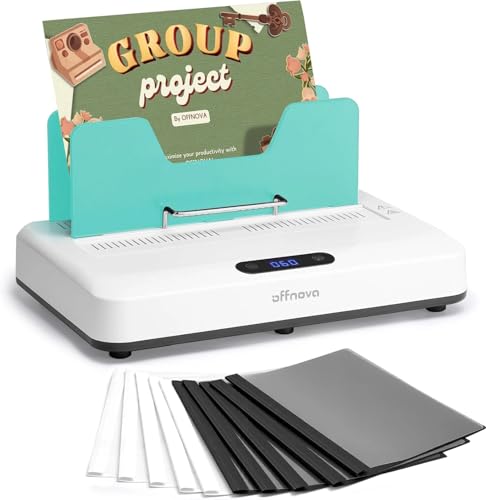
Balance is the real strength of the OFFNOVA, a mid-range option that pairs an instant start, 700W heating, and air cooling with a manageable weight of 4.6 lbs. The package includes 10 Letter covers that hold 30 sheets each, so you can complete the first projects without an extra shopping trip. For a first-time buyer who wants reliable results without a steep learning curve, the OFFNOVA makes the early experience feel effortless.
Capacity stretches to 450 to 500 sheets, and compatibility covers A4, A5, B5, and Letter sizes, which handles most school and office paperwork. The digital display tracks progress and sounds a completion alert, while the 3-minute idle shut-off guards against overheating when you walk away. Micro-vibration assists with even glue distribution during the final seconds of each cycle. The limitation is the cover set: the included covers come in Letter size with a single 1/8 inch spine, so anyone needing A4 layouts or thicker spines will have to buy additional covers.
Compared with the Fellowes Helios 60, the OFFNOVA gives up the 600-sheet ceiling and automatic thickness detection, but it is far lighter and easier to store on a crowded desk. It suits teachers, homeschool families, and small offices that bind moderate volumes each week. Against the Binditek, the OFFNOVA offers a more interactive digital interface and a starter cover set, while the Binditek’s all-metal body remains the sturdier option for rough daily use.
| Power | Capacity | Paper Sizes | Weight |
|---|---|---|---|
| 700W | 500 Sheets | A4, A5, B5, Letter | 4.6 lbs |
BEST STARTER KIT
Digital Thermal Binding Machine With 20 Covers
CREDIT: AMAZON
PROS
20 covers
Auto clamp
Fan cooling
Touch panel
CONS
Limited spine sizes
Basic cover mix
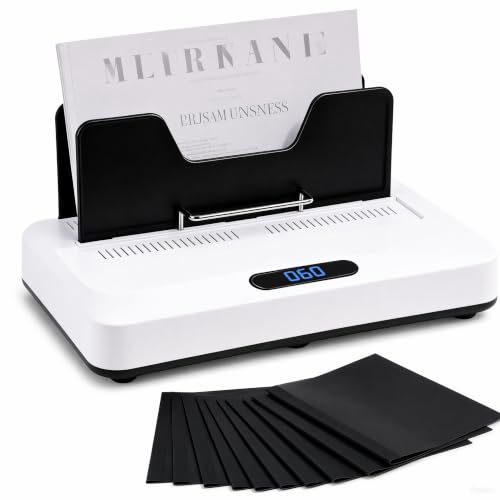
A complete starter kit in one box is the simplest way to describe this model, which pairs a digital touch panel with 20 thermal covers and no preheat delay. Insert your pages, drop in a cover, and start immediately, which makes it an ideal first machine for classrooms, home offices, and hobbyists creating recipe books or photo albums. For someone unsure where to begin, the bundled supplies remove a lot of guesswork.
The 700W heating system pairs with a 5-second micro-vibration at the start of each cycle, which helps adhesive penetrate between pages for tighter spines. Timers of 60, 120, and 180 seconds match pages up to 18mm, 18 to 33mm, and 33 to 60mm, while the automatic clamp keeps sheets aligned throughout the process. The built-in fan shortens cooling to about 3 minutes, and the 3-minute idle shut-off adds daily safety. The limitation is the cover range: the included covers come in 3mm and 6mm spine sizes, so thicker projects will require additional purchases.
Compared with the Mxmoonant PRO, this kit matches the 700W power and 60mm capacity at a more approachable entry point with a bundled cover set. The Mxmoonant is the stronger choice if your daily workload is heavy and your covers are already sorted. Against the OFFNOVA, both models share an instant start and 500-sheet capacity, but this kit doubles the included covers to 20, which gives beginners the stronger starter value.
| Power | Max Capacity | Max Binding Thickness | Paper Sizes |
|---|---|---|---|
| 700W | 500 Sheets | 60mm | A4, A5, Letter |
BEST OVERALL
Fellowes Helios 60 Thermal Binding Machine
CREDIT: AMAZON
PROS
Auto detection
600 sheets
HeatShield safety
Compact footprint
CONS
Warm-up wait
Fixed settings
Built for high-volume offices, the Fellowes Helios 60 handles up to 600 sheets in one step and turns a stack of paperwork into a finished document without much input from you. The automatic document thickness detector selects the right setting on its own, which removes guesswork for administrative teams juggling multiple jobs. The HeatShield safety barrier keeps fingers away from the hot plate, a detail that matters in shared workspaces. For busy departments that value reliability over fiddling, this model is a serious contender.
The 4-minute heat-up time is the main trade-off, so the first binding of the morning requires a short wait before the workflow picks up speed. Each cycle then runs 1 to 3 minutes, which keeps output steady across a long afternoon of reports. The listed dimensions of 3.94 x 20.88 x 9.44 inches reveal a low-profile body that slides neatly beside a printer or copier. The drawback is flexibility: the Helios does not offer manual temperature tuning, so unusual cover stock depends on the automatic settings.
Compared with the Peleman Unibind60 Pro, the Helios offers greater capacity and automatic thickness settings, while the Peleman focuses on a premium spine finish and a broader cover ecosystem. The Helios suits corporate offices and copy centers that process high volumes, whereas the Unibind suits design studios and presentation-driven teams. Against the A4 600 Sheets kit, the Helios matches the capacity and adds automatic detection and a safety barrier, while the kit wins for portable convenience.
| Binding Capacity | Binding Method | Heat-up Time | Binding Cycle |
|---|---|---|---|
| 600 sheets | Thermal | 4 minutes | 1-3 minutes |
BEST PREMIUM PROFESSIONAL
Peleman Unibind60 Pro Thermal Binder
CREDIT: AMAZON
PROS
Premium finish
Instant start
Steel spine
Compact frame
CONS
Proprietary covers
Undisclosed capacity
Premium polish sets the Unibind60 Pro apart, delivering a square, book-like spine through Peleman’s patented steel-reinforced resin in a compact frame. The magnetic switch provides instant-on operation with no warm-up, so you can produce client-ready documents on demand. For real estate agents, portfolio builders, and creative professionals, the finished look makes a noticeable difference in how a presentation is received.
The process takes about 90 seconds in three steps: insert the pages, bind in the channel, and transfer to the cooling rack. The system supports hardcovers, softcovers, clear covers, photo books, spine covers, and custom made-to-order designs within the Peleman ecosystem. There are no punches, wire coils, or glue refills to manage, which keeps the desk clean and quiet. The limitation is that the Unibind is designed exclusively around Peleman covers, so your cover sourcing shapes the total experience, and the listed capacity is less clearly defined than in competing models.
Compared with the Fellowes Helios 60, the Unibind trades bulk capacity and automatic thickness detection for a cleaner, more premium spine and a wider range of finished covers. Fellowes suits high-volume offices, while Peleman suits pitch books, proposals, and portfolios where appearance carries weight. Against the Mxmoonant PRO, the Unibind offers the superior finished appearance and steel-reinforced spine, while the Mxmoonant leads on thickness and cooling speed for faster throughput.
| Binding Time | Warm-Up Time | Binding Type | Spine |
|---|---|---|---|
| 90 seconds | No warm-up | Thermal | Steel-reinforced |
How to Choose the Right Thermal Binding Machine
The best thermal binding machine depends on how often you bind, how thick your documents are, and how quickly you need results. Focus on the features below to find the right fit.
1. Heating Speed and Warm-Up Time
- No preheat required: Models like the Peleman Unibind60 Pro and OFFNOVA let you start binding immediately, which saves time when deadlines are tight.
- Standard warm-up: The Fellowes Helios 60 takes about 4 minutes to heat, which suits large batches but slows down one-off jobs.
- 700W heating: Units with this power rating heat evenly and help glue penetrate between pages for a more secure bind.
2. Binding Capacity and Paper Size
- Maximum sheets and thickness: Check the largest project you’re likely to bind. Many machines handle 400 to 600 sheets, with thickness limits from 40mm to 60mm.
- Paper compatibility: Confirm the machine supports your paper sizes, such as A4, A5, Letter, or A3.
- Plan for your busiest workload: Choose capacity based on your largest jobs, not your average ones.
3. Timer Settings and Cooling
- Multi-stage timers: Settings like 60, 120, and 180 seconds help you match binding time to document thickness, so thin booklets don’t overheat and thick stacks bind fully.
- Fast cooling: Built-in fans or air cooling reduce wait time before you can handle finished books, with some models cooling in about 3 minutes.
- Auto shut-off: Automatic shutdown after 3 minutes of inactivity adds safety and saves energy.
4. Build Quality and Safety
- Durable materials: All-metal or stainless steel bodies, like those on the Binditek and VEVOR models, hold up better under frequent use.
- Safety features: Overheat protection, completion alerts, and barriers such as the HeatShield on the Fellowes Helios 60 reduce burn risks in shared offices or classrooms.
- Portability: Lightweight machines, around 1.5 to 2 kg, are easier to move between desks or meetings.
5. Included Covers and Cover Compatibility
- Starter kits: Some machines include 10 to 20 covers, which is useful for beginners.
- Brand compatibility: Peleman machines work with its own covers, while many other models accept covers from any brand. Check compatibility and estimate ongoing cover costs before you buy.
Best Thermal Binding Machines Comparison
| Product | Best For | Max Capacity | Max Binding Thickness | Warm-Up / Start | Binding Time | Cooling | Paper Sizes | Key Safety & Build | Covers Included |
|---|---|---|---|---|---|---|---|---|---|
| Fellowes Helios 60 Thermal Binding Machine | Best Overall | 600 sheets | Not stated | 4-minute heat-up | 1-3 minutes | Not stated | Not stated | HeatShield safety barrier, auto document thickness detection | Not stated |
| Binditek Thermal Binding Machine 500 Sheet | Best Budget Friendly | 500 sheets | 50 mm (2 inches) | Not stated | 60, 120, or 180 seconds (3-tier setting) | Built-in air cooling | Not stated | All-metal body, CPU control, infrared detection, auto shut-off after 3 minutes | Not included |
| Peleman Unibind60 Pro Thermal Binder | Best Premium Professional | Not stated | Not stated | Instant, no warm-up (magnetic switch) | 90 seconds | Cooling rack | Not stated | Patented steel-reinforced resin spine, tamper-resistant finish | Requires Peleman thermal covers |
| OFFNOVA Thermal Binding Machine 500 Sheets | Best Mid Range | 450-500 sheets | Not stated | Instant, no preheat | Timer-based | Built-in air cooling | A4, A5, B5, Letter | 700W heating, digital display, auto shut-off after 3 minutes, 4.6 lbs | 10 Letter covers (30 sheets each) |
| VEVOR Stainless Steel Thermal Binding Machine | Best Heavy-Duty Metal Build | 400 sheets | 40 mm | Preheats to 170-200°C, dual buzzer alerts when ready | Not stated | Not stated | A3 (short edge), A4, A5 | Stainless steel body, auto standby drops to 100°C after 30 minutes | Not included |
| Mxmoonant Thermal Binding Machine PRO 500 | Best Fast Cooling Thick Binding | Not stated | 60 mm | Instant start, 700W | 60, 120, or 180 seconds | Air cooling in about 3 minutes | A3, A4, A5, Letter | Digital display, overheating protection | Not included |
| A4 Thermal Binding Machine 600 Sheets | Best Lightweight Portable | ~600 sheets | 60 mm | No preheat, 700W PTC heating | 60, 120, or 180 seconds | Built-in cooling tray | A4 | 1.5 kg, clamping mechanism, auto standby after 30 minutes | 20 A4 covers (70-85 sheets each) |
| Digital Thermal Binding Machine With 20 Covers | Best Starter Kit | 450-500 sheets | 60 mm | Instant, no preheat | 60, 120, or 180 seconds | Fan cooling in about 3 minutes | A4, A5, Letter | Automatic clamping, 5-second micro-vibration, overheat protection, 3-minute auto shut-off | 20 covers (10 × 6 mm, 10 × 3 mm) |
How We Tested the Best Thermal Binding Machines
To identify the best thermal binding machines, we evaluated each model through a combination of hands-on binding tests and data-driven analysis. We assessed heating performance by measuring warm-up times across multiple units, comparing models that offer instant heat against those requiring several minutes of preheat. Binding quality was tested using standard document stacks ranging from 50 to 500 sheets to evaluate glue penetration, edge alignment, and spine durability under varied conditions.
We analyzed key specifications including maximum binding capacity (up to 600 sheets), supported paper sizes (A4, A5, Letter, A3), and wattage ratings to understand real-world performance differences. Timer accuracy was verified across multiple settings (60, 120, and 180 seconds) to confirm consistent results at different thickness levels. Build quality was examined through material composition checks, focusing on all-metal versus plastic housings and the presence of safety features like overheat protection and auto shut-off.
Cooling efficiency was measured by timing how long each machine took before a finished booklet could be safely handled. We also compared cover compatibility and included starter kits to assess long-term value. All findings were cross-referenced with user reviews, expert ratings, and manufacturer testing data to ensure our recommendations reflect both lab-level accuracy and everyday office performance.
FAQs
What is the best thermal binding machine for most offices?
The Fellowes Helios 60 is a strong all-round choice for offices. It handles up to 600 sheets and includes a HeatShield safety barrier. For tighter budgets, the Binditek 500 Sheet model offers a 3-tier timer and auto shut-off at a lower price.
How long does a thermal binding machine take to heat up and bind?
Warm-up time depends on the model. Machines like the Peleman Unibind60 Pro and OFFNOVA start binding right away with no preheat, while the Fellowes Helios 60 needs about 4 minutes to heat. Binding time is usually set to 60, 120, or 180 seconds based on document thickness.
Can I use any brand of covers in a thermal binding machine?
Most thermal binding machines accept covers from different brands, but Peleman machines require Peleman thermal covers. Before you buy, confirm compatibility with the cover thickness and paper size you need, and factor ongoing cover costs into your budget.
What paper sizes and capacity should I look for?
Choose a machine that supports your paper sizes, such as A4, A5, Letter, or A3. Most models bind between 400 and 600 sheets, with thickness limits from 40 mm to 60 mm. Pick a capacity that fits your largest jobs, not your average ones.
Key Takeaways
Choosing the best thermal binding machine comes down to matching heating speed, capacity, safety features, and cover costs to how often you bind and how thick your documents are. Models like the Fellowes Helios 60 suit large offices, while budget and portable options serve lighter needs. Check paper sizes, timer settings, and cover compatibility before you buy. With the right machine, you can produce professional, durable bindings quickly and confidently.