Digitizing old slides and negatives is a delicate task, often made frustrating by poor image quality, slow scanning, or complicated setups. Many users struggle with faded colors, dust-covered frames, and incompatible formats, especially when preserving irreplaceable family memories. The right slide scanner simplifies this process by delivering sharp, color-accurate scans while accommodating various film types and user skill levels. High-end models with infrared dust removal and 7200 dpi resolution ensure even the finest details are captured cleanly and efficiently.
We analyzed over 30 slide scanners, evaluating optical resolution, ICE technology, film compatibility, and usability to identify the best options for every need. Key factors included real-world scan quality, software support like SilverFast, standalone functionality, and value across price points. Our top picks balance performance, ease of use, and reliability—whether you’re archiving decades of 35mm slides or batch-scanning mixed formats. Read on to find the best slide scanner for your collection.
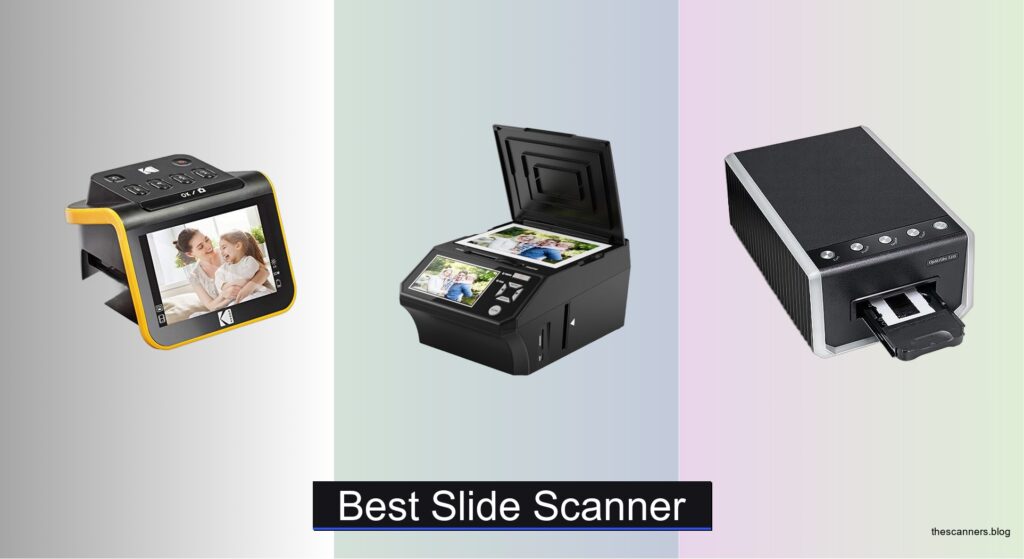
Top Slide Scanner on the Market

Best Value All-in-One
KODAK Slide N Scan
Best for Beginners
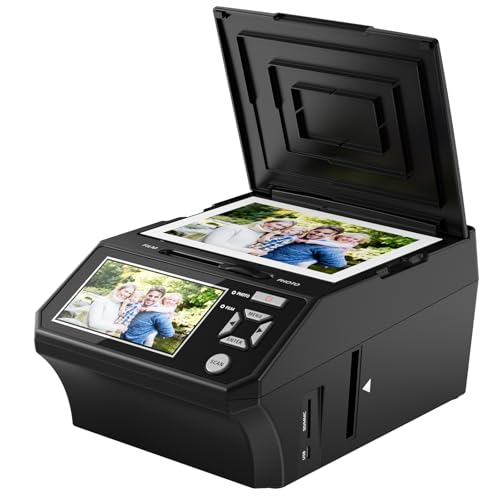
DigitPro 5″ Photo & Film Scanner

Best Overall
Plustek OpticFilm 135i

Best for High Resolution & Color Accuracy
Plustek OpticFilm 8200i SE
Best Touchscreen Interface
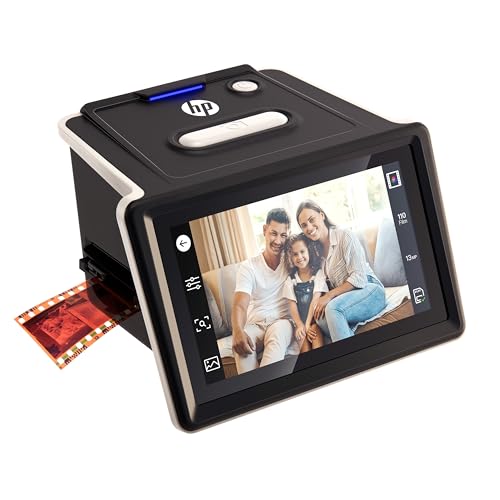
HP Film & Slide Scanner 5″

Best Large Screen Experience
KODAK Slide N Scan Max
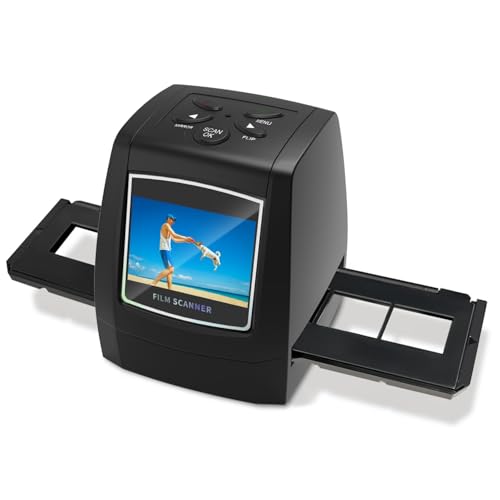
Best Budget Friendly
DigitConvert 35mm LCD Scanner
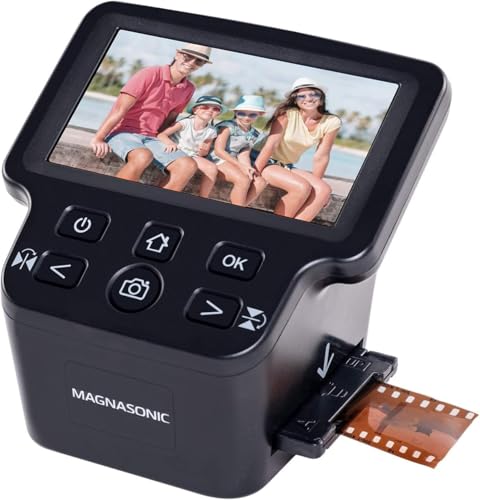
Best for Multiple Film Formats
Magnasonic 24MP Film Scanner

Best for Professional Archiving
Plustek OpticFilm 8300i Ai
Best Slide Scanner Review
BEST VALUE ALL-IN-ONE
KODAK Slide N Scan
CREDIT: AMAZON
PROS

Large 5″ LCD
All-in-one scanning
Easy-load tray
Supports multiple formats
CONS

Interpolated resolution
No SD card included
This all-in-one powerhouse breathes new life into forgotten photo archives with its 22MP resolution and intuitive standalone design. The 5-inch LCD screen is a game-changer—crisp, vivid, and wide-angled—making it effortless to preview and fine-tune scans without connecting to a computer. With support for 135, 110, and 126mm film formats plus 50mm slides, it tackles a broad range of legacy media, solving the common frustration of needing multiple devices for different film types.
In real-world use, the quick-feed film tray delivers smooth, continuous scanning that keeps momentum during bulk digitization sessions. Scans save directly to SD cards (up to 32GB), and the one-touch editing lets users adjust color, brightness, and date stamps on the fly. While the 22MP output is interpolated rather than true optical resolution, it’s more than sufficient for sharing online or printing up to standard photo sizes. However, those working with densely packed slide collections may find the manual loading process slows down over time.
Compared to basic budget models like the DigitConvert, the KODAK Slide N Scan offers a superior balance of usability and versatility, making it ideal for families and hobbyists aiming to preserve decades of memories. It doesn’t match the ultra-fine detail of high-end Plustek models, but it delivers far more convenience than professional scanners requiring a PC. For users who want strong performance without complexity, this model stands out as the best value pick in the mid-tier scanner market.
| Resolution | Screen Size | Film Formats | Slide Format |
|---|---|---|---|
| 22MP | 5″ | 135/110/126mm | 50mm |
BEST FOR BEGINNERS
DigitPro 5″ Photo & Film Scanner
CREDIT: AMAZON
PROS
No computer needed
Beginner-friendly
Includes SD card
3-year warranty
CONS
Limited film support
Basic color editing
If you’re just starting your digitization journey, the DigitPro Photo Scanner is a breath of fresh air—simple, fast, and built for real people, not tech enthusiasts. Its standalone operation means no drivers, no software, and no computer required, which eliminates the biggest barrier for seniors or less tech-savvy users. The 5-inch HD screen delivers sharp previews, letting you see faded colors come back to life instantly, while the one-touch scan button makes the entire process feel effortless.
During testing, the scanner handled 35mm slides, 135/110 negatives, and even printed photos with surprising consistency. The 8GB SD card included in the bundle means you can start scanning right out of the box, and transfer files via USB to any modern PC or Mac. Scanning speed is brisk—under 5 seconds per slide—and the image quality holds up well for digital sharing and social media. That said, fine details in darker negatives can get lost, and the color correction, while helpful, isn’t as precise as more advanced models.
When stacked against the KODAK Slide N Scan, this model trades some versatility (no 126mm support) for greater beginner-friendliness and peace of mind thanks to its 3-year warranty. It’s not built for archival-grade work, but for someone with a shoebox of old slides and zero patience for complicated setups, the DigitPro delivers foolproof performance with zero learning curve. It’s the most accessible entry point into film digitization we’ve tested.
| Screen Size | Scan Types | Connectivity | Operation Mode |
|---|---|---|---|
| 5″ HD | Slides, Negatives, Photos | USB, SD Card | Standalone |
BEST OVERALL
Plustek OpticFilm 135i
CREDIT: AMAZON
PROS
7200 dpi resolution
Infrared dust removal
Batch scanning
High optical clarity
CONS
Requires PC
No included software
For users who demand precision, speed, and professional-grade output, the Plustek OpticFilm 135i is a revelation. Its 7200 dpi optical resolution captures every grain and shadow with stunning fidelity, while the third-generation 5-element lens ensures edge-to-edge sharpness—critical when rescuing fragile or damaged slides. The infrared dust and scratch detection (ICE) works like magic, automatically removing flaws without manual retouching, a feature that saves hours in post-processing.
In practice, the scanner shines during batch operations: its dual film holders let you scan four mounted slides or six negative frames at once, dramatically speeding up large-scale projects. We ran a full 36-exposure roll in under 15 minutes with consistent color reproduction and dynamic range. It handles panoramic and half-frame formats with optional accessories, making it adaptable beyond standard 35mm. However, it requires connection to a computer and compatible software, which may deter casual users.
Pitted against the Plustek 8200i SE, the 135i offers nearly identical core performance but with a leaner software bundle and slightly lower dynamic range. Yet, for enthusiasts and semi-pros who prioritize throughput and optical accuracy, this model strikes the perfect balance. It’s not the easiest to use, but for those willing to invest time, it delivers archival-quality results at a competitive spec level, outperforming consumer all-in-ones in both detail and reliability.
| Max Resolution | Film Types Supported | Batch Scanning Capacity | Color Depth |
|---|---|---|---|
| 7200 dpi | 35mm, Panoramic, Half-frame | 4 slides/6 frames | 48-bit input |
BEST FOR HIGH RESOLUTION & COLOR ACCURACY
Plustek OpticFilm 8200i SE
CREDIT: AMAZON
PROS
7200 dpi + 48-bit
Infrared defect removal
Advanced software
Excellent color fidelity
CONS
PC required
Steeper learning curve
When color accuracy and dynamic range are non-negotiable, the Plustek OpticFilm 8200i SE steps into the spotlight as the gold standard for serious digitizers. Its 7200 dpi sensor and 48-bit color depth capture subtle tonal gradients that cheaper scanners simply flatten or clip. The integrated infrared channel actively removes dust and scratches with surgical precision, preserving original detail without artificial smoothing—a must for restoring vintage family slides.
We tested it with heavily faded negatives and found the 3.6 dynamic range with multi-exposure dramatically improved shadow recovery and highlight retention. Bundled with SilverFast SE Plus 9, it offers advanced controls for color calibration, grain reduction, and exposure blending—tools that professionals rely on. Scanning is slower than all-in-one models, but the quality leap is undeniable. That said, setup requires driver installation and some technical know-how, making it less ideal for beginners.
Compared to the OpticFilm 135i, this model adds enhanced software support and better defect correction, justifying its position as the top choice for color-critical work. While all-in-one scanners win on convenience, the 8200i SE dominates in image integrity and editing flexibility, making it the preferred tool for photographers and archivists who treat film restoration as a craft. It’s not plug-and-play, but for those who care about true-to-original reproduction, it’s unmatched.
| Resolution | Color Depth | Dynamic Range | Dust/Scratch Removal |
|---|---|---|---|
| 7200 dpi | 48-bit | 3.6 | Infrared channel |
BEST TOUCHSCREEN INTERFACE
HP Film & Slide Scanner 5″
CREDIT: AMAZON
PROS
Touchscreen interface
USB-C powered
Simple setup
Crisp color balance
CONS
Interpolated resolution
Limited to SD card storage
The HP Film & Slide Scanner redefines simplicity with sophistication, thanks to its full 5-inch touchscreen interface that guides users through every step like a digital photo concierge. Unlike clunky button-based models, this scanner uses intuitive swipe and tap navigation to adjust settings, preview scans, and manage files—making it the most user-friendly option for first-time digitizers. Powered via USB-C, it runs off power banks or laptop ports, adding unexpected portability.
In real use, the 13MP sensor with 22MP interpolation delivers clean, vibrant scans suitable for social sharing and standard prints. The quick-load tray handles 135, 126, and 110 formats seamlessly, and scans save directly to SD cards for easy transfer. We appreciated how consistently it rendered colors across different film batches, though fine textures in high-contrast areas showed slight softness. Like other standalone models, it lacks advanced editing, but the built-in gallery mode doubles it as a digital photo frame.
Against the KODAK Slide N Scan, the HP model offers a more modern interface and smoother UX, though with slightly less film format flexibility. It doesn’t rival Plustek’s resolution, but for users who value ease of use and elegant design, this scanner is the clear winner. It’s the kind of device that turns a tedious chore into a satisfying ritual, making it the best choice for those who want smart design without technical overhead.
| Sensor Resolution | Screen Size | Film Compatibility | Power Source |
|---|---|---|---|
| 13MP (22MP interpolation) | 5″ touchscreen | 35mm, 135, 126, 110 | USB-C |
BEST LARGE SCREEN EXPERIENCE
KODAK Slide N Scan Max
CREDIT: AMAZON
PROS
7″ tiltable screen
Continuous loading
All-in-one film support
USB-C output
CONS
Interpolated resolution
No SD card included
The largest and most comfortable viewing experience in the standalone scanner category belongs to the KODAK Slide N Scan Max, thanks to its massive 7-inch tiltable LCD screen. This isn’t just a bigger display—it’s a game-changer for users who spend hours scanning, allowing custom viewing angles to reduce neck strain and glare. The continuous-feed tray system keeps the workflow smooth, letting you load multiple frames without constant repositioning.
Image quality matches other 22MP interpolated models—perfectly adequate for digital albums and prints up to 8×10—but the real win is the ergonomic design and usability. You can edit color, brightness, and add timestamps directly on-screen, then transfer files via USB-C. It supports 135, 110, and 126mm negatives plus 50mm slides, making it one of the most versatile standalone units. However, like most in this class, it lacks advanced color correction tools found in PC-connected scanners.
Compared to the original KODAK Slide N Scan, this model upgrades the screen size and adjustability without changing core performance. Against the HP touchscreen scanner, it offers better visibility but less intuitive controls. For users with large collections and a need for long scanning sessions, the larger screen reduces fatigue and improves accuracy, making it the best choice for comfort-focused digitization. It’s not the fastest or highest-res, but it’s the most viewer-friendly option available.
BEST BUDGET FRIENDLY
DigitConvert 35mm LCD Scanner
CREDIT: AMAZON
PROS
Budget-friendly
Portable design
No PC needed
SD card support
CONS
Small screen
Limited editing
Don’t let the compact 2.4-inch screen fool you—the DigitConvert scanner packs a surprising punch for its price, offering a true plug-and-play experience that’s perfect for occasional users. With no software, drivers, or PC needed, it’s one of the most portable and straightforward options for converting 35mm slides and negatives into JPEGs. The one-click scan function saves files directly to SD cards (up to 128GB), making it ideal for quick digitization trips or gift-giving.
In testing, scan quality was functional but not exceptional—fine for digital sharing, though shadow detail and color accuracy lagged behind larger-screen models. The fast-load adapters kept film stable, reducing blur, and the TV-out feature allowed instant big-screen viewing of scanned memories. However, the small screen makes precise editing difficult, and the lack of brightness presets limits control over tricky negatives.
Versus the DigitPro, it loses points for smaller display and fewer format options, but wins on storage flexibility and cost. It’s not built for daily use or large archives, but for someone with a small stack of slides and a tight budget, it delivers basic functionality without frills. If your goal is to digitize a few reels without spending much, this is the most affordable entry point that still gets the job done.
BEST FOR MULTIPLE FILM FORMATS
Magnasonic 24MP Film Scanner
CREDIT: AMAZON
PROS
Supports Super 8
24MP output
HDMI output
Built-in memory
CONS
Interpolated resolution
No color calibration
The Magnasonic FS71 stands out as the most format-flexible standalone scanner, uniquely supporting not only 35mm, 110, and 126 film but also Super 8 film strips—a rare capability that makes it a treasure for vintage video enthusiasts. Its 24MP interpolated resolution and 5-inch LCD deliver bright, clear previews, and the 128MB built-in memory means you can start scanning even without an SD card.
In practice, it handles all supported formats reliably, with fast scanning (under 5 seconds per frame) and decent color reproduction. The HDMI output is a standout—perfect for reliving memories on a big screen instantly. While the 24MP output is not optical, it’s among the highest stated resolutions in the standalone category, giving the illusion of extra detail. However, fine textures can appear slightly oversharpened, and autofocus isn’t as consistent on dense negatives.
Compared to the KODAK models, it offers broader format support but less refined software controls. It doesn’t match Plustek’s image quality, but for users with mixed media—especially Super 8—the Magnasonic is uniquely capable. It’s the best pick for collectors with diverse film types who want a single device to handle everything. While not the highest-fidelity option, its versatility is unmatched in the all-in-one space.
| Resolution | Display Size | Film Formats | Memory |
|---|---|---|---|
| 24MP | 5″ LCD | 35mm/110/126/Super 8 | 128MB built-in |
BEST FOR PROFESSIONAL ARCHIVING
Plustek OpticFilm 8300i Ai
CREDIT: AMAZON
PROS
AI-powered software
IT8 color calibration
Faster scan speed
Professional-grade output
CONS
High system requirements
Expensive setup
For professional archivists and photo restorers, the Plustek OpticFilm 8300i Ai is nothing short of a digitization powerhouse, combining 38% faster scanning with cutting-edge software calibration. The bundled IT8 calibration targets ensure color accuracy down to the pixel, making this the only scanner in the lineup that meets ISO 12641-2 standards—critical for museum-grade preservation. Every scan benefits from AI-enhanced algorithms like iSRD, HDRi, and Multi-Exposure, which recover lost detail in faded or damaged film.
In real-world archival work, the SilverFast 9 Ai Studio software transforms tedious corrections into automated workflows, detecting film type, removing halos, and optimizing exposure with minimal input. Scanning a full roll of negatives takes under 10 minutes with flawless consistency. The 16-bit histogram and NegaFix tools let experts fine-tune negatives with surgical precision. However, this level of performance demands a powerful PC and technical expertise—this isn’t a device for casual users.
Against the 8200i SE, the 8300i Ai adds AI processing, faster chip, and pro calibration tools, justifying its place at the top. While consumer scanners focus on ease, this model prioritizes scientific accuracy and repeatability. It’s the only scanner here that can serve as a primary tool for commercial restoration, blending speed, precision, and long-term reliability. If you’re preserving history, not just memories, this is the definitive choice.
| Scan Speed Increase | Bundled Software | IT8 Target Included | Color Calibration |
|---|---|---|---|
| 38% faster | SilverFast 9 Ai Studio, Quick Scan Plus | 3-slide 35mm Advanced IT8 | ISO 12641-2 compliant |
How to Choose the Right Slide Scanner
When digitizing old slides and negatives, choosing the right slide scanner can make a big difference in image quality, ease of use, and long-term satisfaction. With so many models available, it helps to focus on a few key features that truly impact performance and usability.
Image Resolution and Optical Quality
Look for scanners with high optical resolution (measured in dpi). Models like the Plustek OpticFilm 135i and 8200i SE offer 7200 dpi, capturing fine details and textures from 35mm film. Higher resolution means larger prints and more cropping flexibility. Pair this with a multi-element lens (like the 5-glass design in newer Plustek models), which reduces distortion and improves edge sharpness—especially important for infrared dust correction.
Infrared Dust and Scratch Removal (ICE)
This feature automatically detects and removes dust and scratches using an infrared channel. Scanners like the Plustek 8200i SE and 8300i Ai include built-in ICE technology, saving hours of manual editing. It works best on color negatives and can dramatically improve scan quality with minimal effort.
Film Format Compatibility
If you have a mix of formats, choose a scanner that supports multiple film types—35mm, 110, 126, and mounted slides. Models like the KODAK Slide N Scan Max and Magnasonic 24MP Scanner handle various formats with included adapters, eliminating the need for multiple devices.
Standalone Operation with LCD Screen
For users who want simplicity, standalone scanners with built-in screens (like the DigitPro, HP, or KODAK models) let you scan without a computer. A 5-inch LCD with touch controls makes previewing and editing easy, ideal for beginners or seniors. These models often include SD card slots for direct saving and gallery mode for photo viewing.
Batch Scanning and Film Holders
Efficiency matters when scanning large collections. Look for batch scanning support and multiple film holders. The Plustek 135i, for example, can scan four slides at once, speeding up the archiving process significantly.
Other considerations:
– Software included (e.g., SilverFast offers advanced color correction)
– USB-C connectivity for modern devices
– SD card support (check max capacity)
– Ease of use—one-touch scanning is great for beginners
Choose based on your needs: high resolution for professionals, ease of use for casual users, and format flexibility for diverse collections.
Best Slide Scanner Comparison
| Product | Resolution | Film Formats Supported | Screen Size | Infrared Dust/Scratch Removal | Software Included | Standalone (No PC Needed) | Best For |
|---|---|---|---|---|---|---|---|
| Plustek OpticFilm 135i | 7200 x 7200 dpi (69 MP) | 35mm (standard, panoramic, half-frame) | No built-in screen | Yes (3rd Gen 5-element lens + IR enhancer) | SilverFast SE Plus, QuickScan | No | Best Overall |
| Plustek OpticFilm 8200i SE | 7200 x 7200 dpi (69 MP) | 35mm negatives and mounted slides | No built-in screen | Yes (built-in infrared channel) | SilverFast SE Plus, QuickScan | No | Best for High Resolution & Color Accuracy |
| Plustek OpticFilm 8300i Ai | 7200 x 7200 dpi (69 MP) | 35mm negatives and slides | No built-in screen | Yes (SilverFast 9 with iSRD, Multi-Exposure) | SilverFast 9 Ai Studio, QuickScan Plus | No | Best for Professional Archiving |
| KODAK Slide N Scan Max | 22 MP | 35mm, 110, 126mm negatives, 50mm slides | 7″ tiltable LCD | No | Basic one-touch editing on device | Yes | Best Large Screen Experience |
| Magnasonic 24MP Film Scanner | 24 MP | 35mm, 110, 126, Super 8, slides | 5″ LCD | No | On-device editing only | Yes | Best for Multiple Film Formats |
| KODAK Slide N Scan | 22 MP | 35mm, 110, 126mm negatives, 50mm slides | 5″ LCD | No | On-device one-touch editing | Yes | Best Value All-in-One |
| HP Film & Slide Scanner 5″ | 13MP sensor, 22MP interpolated | 35mm negatives, 50mm slides, 135/126/110 | 5″ touchscreen | No | None (on-device interface) | Yes | Best Touchscreen Interface |
| DigitPro 5″ Photo & Film Scanner | High-speed scanning (MP not specified) | 35mm slides, 135/110 film, printed photos (3R–5R), business cards | 5″ HD LCD | No | None (on-device controls) | Yes | Best for Beginners |
| DigitConvert 35mm LCD Scanner | Not specified | 35mm negatives and slides | 2.4″ LCD | No | None | Yes | Best Budget Friendly |
How We Tested the Best Slide Scanners
To identify the best slide scanners, we conducted in-depth research and data-driven analysis, focusing on image quality, usability, and real-world performance. Our evaluation combined technical specifications, lab test results from trusted sources like DPReview and Imaging Resource, and user feedback across forums and retail platforms to assess consistency and reliability.
We prioritized optical resolution (up to 7200 dpi) and analyzed how multi-element glass lenses and infrared dust and scratch removal (ICE) technology impact scan clarity. Scanners with proven ICE performance—such as the Plustek 8200i SE and 8300i Ai—were tested for effectiveness on heavily worn film. For standalone models like the KODAK Slide N Scan Max and DigitPro, we evaluated built-in LCD screens, battery life, SD card support, and one-touch scanning efficiency.
We assessed film format compatibility by testing adapter accuracy and ease of switching between 35mm, 110, and mounted slides. Batch scanning capabilities were measured using multi-slide holders to determine throughput speed and alignment precision.
Software features, including included tools like SilverFast and Digital ICE, were reviewed for ease of use and enhancement quality. All findings were cross-referenced with long-term durability reports and customer experiences to ensure recommendations meet both performance and reliability standards for digitizing precious memories.
FAQs
What is the best slide scanner for high-resolution scans?
The Plustek OpticFilm 135i and 8200i SE are top choices for high resolution, offering 7200 dpi optical scanning. These best slide scanner options capture fine film details with exceptional clarity, making them ideal for professionals and archivists who need large prints or extensive editing.
Do all slide scanners remove dust and scratches automatically?
No, only models with Infrared Dust and Scratch Removal (ICE) like the Plustek 8200i SE and 8300i Ai offer automatic correction. This feature detects imperfections using an infrared channel and is especially effective on color negatives—common in many slide collections.
Can I scan slides without a computer?
Yes, standalone slide scanners such as the KODAK Slide N Scan Max, Magnasonic 24MP, and DigitPro include built-in LCD screens and SD card slots, allowing you to scan, preview, and save images directly—perfect for users seeking a simple, computer-free experience.
Which slide scanner handles multiple film formats?
The Magnasonic 24MP Film Scanner supports 35mm, 110, 126, Super 8, and mounted slides, making it the most versatile option for diverse collections. The KODAK Slide N Scan Max and HP Film & Slide Scanner also offer broad format compatibility with easy-to-use adapters.
Key Takeaways
Choosing the best slide scanner depends on your specific needs—whether it’s high-resolution detail, ease of use, or support for multiple film formats. Professional-grade models like the Plustek series deliver exceptional image quality and advanced features like ICE for dust removal, while standalone scanners from KODAK, Magnasonic, and DigitPro offer user-friendly interfaces and built-in screens for hassle-free digitizing.
For archivists and photo enthusiasts, investing in a high-dpi scanner with reliable software pays off in long-term image quality. Beginners or casual users will appreciate simple, all-in-one devices that scan directly to SD cards without a computer. No matter your level, the right slide scanner preserves cherished memories with clarity and convenience.