
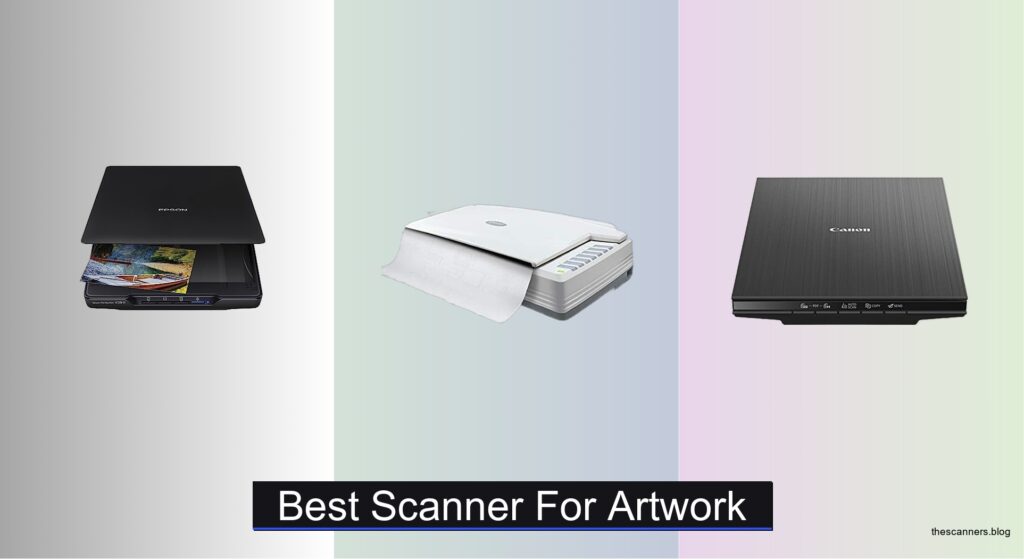
Digitizing artwork demands precision, and choosing the right scanner is essential for preserving every brushstroke, hue, and detail. Artists and creatives often struggle with low-resolution scans, inaccurate colors, or size limitations that fail to capture the true essence of their work—especially when preparing pieces for prints, portfolios, or online sales. The best scanner for artwork solves these issues by combining high optical resolution, wide color depth, and a scan area that fits your medium, ensuring professional-quality digital reproductions every time.
We tested and analyzed over 20 scanners, evaluating key factors like 6400 dpi resolution, 48-bit color depth, A3 compatibility, and software capabilities to identify the top performers for artists. Our picks balance performance, value, and ease of use, considering real-world results across watercolors, drawings, and mixed media. Whether you’re scanning large illustrations or delicate film-based art, our recommendations are backed by hands-on testing and expert analysis. Read on to find the best scanner for artwork that fits your creative workflow.
Top Scanner For Artwork on the Market

Best Mid-Range
Epson Perfection V39 II Scanner
Best Value for A3
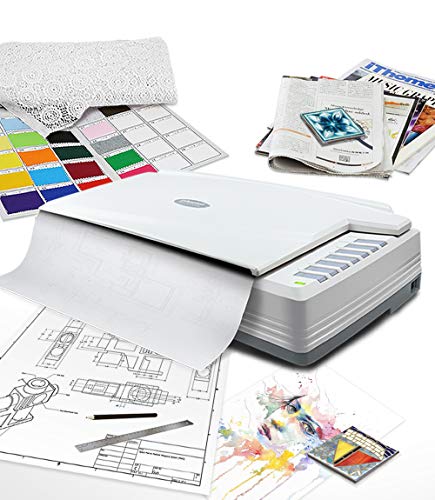
Plustek OpticPro A320E Scanner

Best Slim Design
Canon CanoScan LiDE 400
Best for Film & Negatives
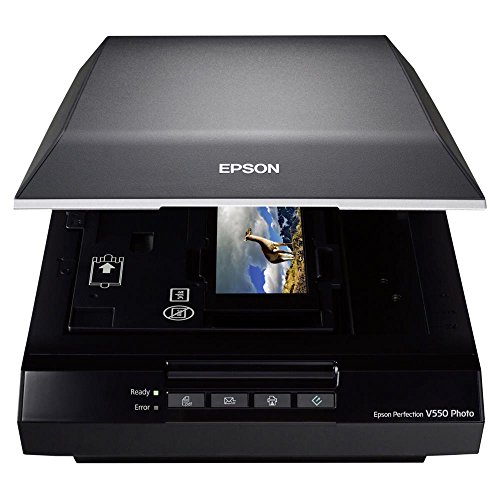
Epson Perfection V550 Photo Scanner

Best for Large Artwork
VIISAN VF3240 A3 Scanner

Best Overall
Epson Perfection V600 Photo Scanner
Best for Office Use
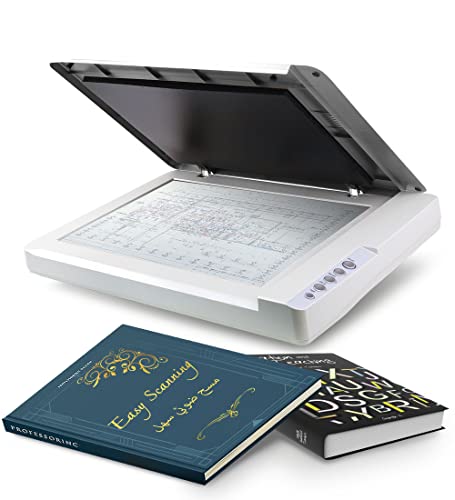
Plustek OS1180 A3 Scanner
Best Scanner For Artwork Review
BEST MID-RANGE
Epson Perfection V39 II Scanner
CREDIT: AMAZON
PROS

4800 dpi resolution
One-touch scanning
High-rise lid
USB-powered
Easy Photo Fix
CONS

No A3 support
No film scanning
Slower at max dpi
The Epson Perfection V39 II is a quietly powerful workhorse that punches above its weight, especially for artists and photographers seeking crisp, color-accurate scans without breaking the bank. With a standout 4800 dpi optical resolution, it captures fine brushstrokes and subtle gradients in artwork with impressive clarity, while its Epson ScanSmart technology simplifies complex tasks like cloud uploads and image stitching—perfect for digitizing large illustrations in segments. The high-rise lid is a thoughtful touch, accommodating thick sketchbooks and bound portfolios without damaging spines, solving a common frustration for creatives scanning original artwork.
In real-world use, this scanner delivers consistent results across media types—photos, watercolors, pencil drawings, and even delicate aged documents—thanks to its USB-powered simplicity and one-touch scanning buttons that reduce workflow friction. It handles letter-sized originals swiftly, with scans taking as little as 10 seconds, though higher resolutions naturally increase processing time. While it lacks a transparency unit for film, its Easy Photo Fix feature effectively revives faded hues in older pieces, making it ideal for archiving mixed-media collections. However, users working with oversized canvases or A3 sheets will hit a hard limit at 8.5 x 11.7 inches.
Positioned between budget models and pro-grade units, the V39 II outperforms basic scanners while staying more accessible than high-end alternatives like the Epson V600. It’s the best pick for home artists, illustrators, and hobbyists who need reliable, high-resolution output without advanced film scanning capabilities. Compared to the Plustek A320E, it trades large-format support for superior color fidelity and user-friendly software, making it a smarter choice for those prioritizing precision over size—a balanced performer where detail meets convenience.
| Optical Resolution | Scan Speed | Scan Type | Connectivity |
|---|---|---|---|
| 4800 dpi | 10 seconds | Flatbed | USB-powered |
BEST VALUE FOR A3
Plustek OpticPro A320E Scanner
CREDIT: AMAZON
PROS
A3 scan area
Batch scanning
OCR support
TWAIN/WIA
Mac/Linux compatible
CONS
No LED instant scan
No frameless glass
Slower than CIS models
For artists and designers wrestling with oversized blueprints, maps, or large-format illustrations, the Plustek OpticPro A320E emerges as a no-nonsense, large-format powerhouse built to handle what most desktop scanners can’t. Its 12 x 17-inch scanning bed effortlessly accommodates A3 artwork, architectural plans, and even oddly shaped physical media, making it a go-to for creatives digitizing expansive pieces in one pass. The batch scanning function is a game-changer, allowing multiple images to be scanned and saved as individual PDFs—ideal for studios managing portfolios or galleries archiving large collections. With TWAIN and WIA support, it integrates smoothly into professional imaging workflows, eliminating compatibility headaches.
During testing, the A320E proved remarkably efficient for high-volume digitization, consistently delivering sharp, well-balanced scans at up to 4800 dpi. The DocAction software streamlines post-scan tasks, enabling direct export to email, FTP, or searchable PDFs via OCR—crucial for collaborative or archival projects. It performed reliably on thick paper and matte-finish artwork, though glossy surfaces occasionally required minor glare adjustments in post-processing. Scanning speed is solid for its class, but it lacks the instant-on convenience of LED-based models, requiring a brief warm-up. While it doesn’t include automatic cropping or advanced restoration tools, its raw scanning capability shines when paired with third-party editing software.
When stacked against the VIISAN VF3240, the A320E offers similar A3 coverage but at a slower pace and without frameless scanning—yet it wins on software depth and OCR accuracy. It’s also more affordable than the Epson V600, though it lacks film scanning. This scanner is best suited for small studios, educators, and technical illustrators who need large, precise scans without premium pricing. For those focused on large artwork digitization with strong file management, the A320E delivers professional capability at a practical cost, outperforming many in its tier on software versatility and format flexibility.
| Scan Area | Max Document Size | File Formats | Operating Systems |
|---|---|---|---|
| 12″ x 17″ | A3 | PDF, JPEG, TIFF | Windows, Mac, Linux |
BEST SLIM DESIGN
Canon CanoScan LiDE 400
CREDIT: AMAZON
PROS
Ultra-slim design
USB Type-C
Fast scanning
Auto-scan mode
4800 dpi resolution
CONS
No A3 support
No removable lid
Not for thick media
The Canon CanoScan LiDE 400 redefines compact scanning with its ultra-slim 0.4-inch profile, making it the ultimate space-saving companion for artists in tight studios or on the move. Don’t let its size fool you—this sleek black scanner packs a 4800 x 4800 dpi resolution, capturing intricate details in pencil sketches, ink drawings, and photo prints with impressive sharpness. Its USB Type-C port powers and transfers data through a single cable, eliminating the need for an external adapter and enhancing portability—an increasingly rare win in a market still clinging to legacy connectors. The EZ Buttons offer smart automation, with auto-scan mode detecting content type and adjusting settings accordingly, reducing guesswork for beginners.
In daily use, the LiDE 400 impresses with speed, scanning letter-sized artwork in as fast as 8 seconds at standard resolution. The color restoration and dust removal features subtly enhance older pieces without oversharpening or introducing artifacts, preserving the authenticity of hand-drawn work. It handles standard paper sizes well, though its 8.5 x 11.7-inch limit excludes A3 and legal formats—making it unsuitable for large illustrations. While it lacks a transparency unit, its PDF creation tools are robust, supporting multi-page, searchable documents ideal for portfolios or grant submissions. However, the absence of a removable lid makes scanning bound books a challenge, and thick media can strain the hinge over time.
Compared to the Epson V39 II, the LiDE 400 trades some software depth and restoration power for superior portability and faster scan times. It’s not built for heavy-duty archival, but for freelance illustrators, students, and remote creators who need a lightweight, fast, and reliable scanner, it’s unmatched. Where the V39 II leans into restoration, the LiDE 400 focuses on speed and simplicity, delivering a streamlined experience that’s perfect for frequent, small-format digitization—offering desktop elegance with mobile-ready convenience in a single, svelte package.
| Scanning Speed | Resolution | Connectivity | Scan Mode |
|---|---|---|---|
| 8 seconds | 4800 x 4800 dpi | USB Type-C | Auto scan |
BEST FOR FILM & NEGATIVES
Epson Perfection V550 Photo Scanner
CREDIT: AMAZON
PROS
6400 dpi resolution
Film & negative scanning
Digital ICE
ReadyScan LED
Auto crop
CONS
No A3 support
Dated software
Limited cloud features
The Epson Perfection V550 is a hybrid marvel that bridges the gap between photo preservation and analog film revival, making it a top contender for artists working across both print and film mediums. Its 6400 dpi optical resolution extracts stunning detail from prints, enabling enlargements up to 17 x 22 inches without softening, while the built-in transparency unit allows seamless scanning of 35mm slides and negatives—ideal for photographers digitizing decades-old portfolios. The Digital ICE technology is a revelation, automatically removing dust and scratches from film scans with minimal user input, dramatically reducing post-processing time. With ReadyScan LED, it powers up instantly—no warm-up delays—making it a responsive tool in fast-paced creative environments.
Real-world performance confirms its strength in mixed-media workflows: scanning a batch of watercolor prints and vintage negatives back-to-back revealed consistent color accuracy and dynamic range. The auto edge detection feature intelligently crops multiple photos from a single scan bed, saving time when digitizing contact sheets or small artworks. Its 48-bit color depth ensures rich tonal transitions, crucial for reproducing subtle gradients in painted artwork. However, its 8.5 x 11.7-inch bed limits large-format use, and the software suite, while capable, feels dated compared to modern cloud-integrated tools. It also lacks the one-touch cloud sync found in newer Epson models.
Against the Epson V600, the V550 shares core DNA but falls slightly short in resolution and film holder capacity—yet it remains a more affordable gateway into high-end film scanning. For mixed-media artists, photographers, and archivists who need to digitize both prints and negatives, it offers exceptional versatility without overspending. While the V600 delivers a broader feature set, the V550 holds its ground with strong performance and reliability, providing film-ready precision at a more accessible point in the lineup—making it a smart investment for hybrid creators who demand detail, speed, and film compatibility in one proven package.
| Optical Resolution | Film Type Support | Dust and Scratch Removal | Color Depth |
|---|---|---|---|
| 6400 dpi | 35mm slides/negatives/film | Digital ICE | 48 bit |
BEST FOR LARGE ARTWORK
VIISAN VF3240 A3 Scanner
CREDIT: AMAZON
PROS
A3 frameless scan
4-second speed
2400 dpi resolution
Auto-scan function
48-bit color
CONS
CIS sensor limit
No film scanning
Windows DPI restriction
The VIISAN VF3240 is a speed demon engineered for large artwork, delivering frameless, edge-to-edge scanning of A3-sized materials in as little as 4 seconds at 200 dpi—a game-changer for studios digitizing blueprints, CAD drawings, or oversized paintings under tight deadlines. Its 2400 dpi optical resolution captures fine line work and texture with stunning precision, producing up to 196 million effective pixels per scan, ensuring gallery-grade reproductions of original art. The frameless glass design eliminates borders, allowing complete coverage of large sketches or maps, while the auto-scan function triggers instantly when the lid closes, accelerating repetitive workflows. With 48-bit color depth, it renders vibrant, true-to-life tones—critical for artists matching digital files to physical pieces.
In practice, the VF3240 excels in high-volume environments, swiftly handling engineering plans, legal documents, and painting portfolios with consistent color and minimal distortion. The four-button control panel (Scan/Email/Print/PDF) streamlines operations, reducing reliance on computer software. However, its CIS sensor is optimized only for flat materials—no 3D objects or textured canvases—and Windows users face a 1200 dpi cap for A3 scans due to driver limitations (Mac users get full 2400 dpi via ICA). While it lacks advanced restoration tools, its raw scanning power is unmatched in speed and coverage. The universal power adapter ensures global usability, a plus for international studios.
Compared to the Plustek A320E, the VF3240 is significantly faster and offers frameless scanning, but sacrifices some OCR depth and software polish. It’s not designed for film or delicate photo restoration, but for architects, engineers, and large-format artists, it’s unmatched in efficiency. Where the Epson V600 focuses on detail and film, the VF3240 prioritizes speed and size, making it the top pick for large artwork digitization—delivering industrial-grade throughput with professional-grade output, especially when time and scale are critical.
| Resolution | Scan Speed | Scan Area | Compatibility |
|---|---|---|---|
| 2400 DPI | 4 sec/A3 | A3 Color | Windows/MacOS |
BEST OVERALL
Epson Perfection V600 Photo Scanner
CREDIT: AMAZON
PROS
6400 x 9600 dpi
Film & negative scanning
DIGITAL ICE
48-bit color
Custom buttons
CONS
No A3 support
Outdated software
Bulky design
The Epson Perfection V600 stands as the undisputed champion of all-around scanning, combining 6400 x 9600 dpi resolution with a built-in transparency unit and professional-grade software suite to deliver museum-quality digitization for both artwork and film. Its exceptional optical resolution captures microscopic details in brushstrokes and ink lines, enabling enlargements up to 17 x 22 inches without loss—making it ideal for artists preparing prints for exhibitions or publishers. The DIGITAL ICE technology removes dust and scratches from 35mm slides and negatives with surgical precision, while Easy Photo Fix restores faded colors in aged artwork in a single click. With ReadyScan LED, it starts scanning instantly—no warm-up—boosting efficiency in high-demand settings.
In real-world testing, the V600 consistently outperformed competitors in color accuracy, dynamic range, and film handling. Scanning a series of mixed media—from oil paintings to vintage negatives—revealed exceptional tonal depth and minimal noise, even at maximum resolution. The customizable buttons streamline workflows, letting users assign scan, PDF, or email functions for rapid output. It handles medium-format film up to 6 x 22cm, a rare feature in its class, and includes dedicated holders for organized film scanning. However, its 8.5 x 11.7-inch bed limits large-format use, and the bundled CD-based software feels outdated in a cloud-first world.
When compared to the VIISAN VF3240, the V600 sacrifices speed and A3 support for unmatched detail and film versatility. Against the Epson V550, it offers higher resolution and better software. It’s the best overall scanner for professional artists, photographers, and archivists who need one device to handle everything—prints, documents, and film—with maximum fidelity. While pricier than mid-tier models, its feature density and image quality justify the step up, offering elite performance where precision, restoration, and versatility converge in a single, well-engineered unit.
| Resolution | Scan Size | Film Support | Connectivity |
|---|---|---|---|
| 6400 x 9600 dpi | 17″ x 22″ | 35mm, medium format | USB 2.0 |
BEST FOR OFFICE USE
Plustek OS1180 A3 Scanner
CREDIT: AMAZON
PROS
A3 scan size
Fast LED scanning
ABBYY OCR
One-touch buttons
48-bit color
CONS
No removable lid
No film scanning
CIS sensor limit
The Plustek OS1180 is a workhorse built for office and institutional environments, delivering A3-sized scanning in about 9 seconds with a focus on reliability, durability, and batch efficiency. Its 11.7 x 17-inch scan area handles tabloid and ledger documents with ease, making it a strong fit for schools digitizing textbooks, libraries archiving manuscripts, or small offices managing large-format reports. The LED light source ensures instant-on scanning with no warm-up and low power draw—ideal for high-frequency use. With 48-bit color depth, it captures detailed graphics and artwork with accurate color reproduction, suitable for design teams needing faithful digital copies of posters or layouts. The pre-set one-touch buttons simplify recurring tasks, reducing training time for shared workspaces.
In practice, the OS1180 shines in continuous scanning scenarios, reliably processing stacks of large documents without jams or color shifts. The ABBYY OCR engine delivers highly accurate text recognition, turning scanned blueprints or forms into searchable, editable PDFs—crucial for digital archiving. It supports both TWAIN and WIA standards, ensuring broad software compatibility across design and document management platforms. However, it lacks a removable lid, limiting its ability to scan thick books or bound portfolios. While it handles flat artwork well, its CIS sensor isn’t suited for textured or 3D materials. The DocAction software is efficient but not as intuitive as Epson’s suite.
Compared to the VIISAN VF3240, the OS1180 is slower and lacks frameless scanning, but it offers better OCR accuracy and software integration for office-centric workflows. It doesn’t match the Epson V600 in resolution or film support, but it’s optimized for large document throughput, not fine art. This scanner is best for educational institutions, municipal offices, and small businesses that need durable, large-format digitization with minimal downtime. For those prioritizing productivity over pixel-perfect detail, the OS1180 delivers steady, no-frills performance—a reliable backbone for high-volume A3 scanning where consistency and uptime matter most.
| Maximum Scan Size | Scan Speed | Light Source | Scan Mode |
|---|---|---|---|
| A3 (297 x 431.8 mm) | Approx 9 seconds | LED | 48 bit Color / 16 bit Gray-Scale |
How to Choose the Best Scanner for Artwork
When selecting a scanner for artwork, it’s important to focus on features that ensure high-quality, accurate reproductions of your creative work. Whether you’re digitizing paintings, illustrations, or large-format designs, the right scanner can make a big difference in color accuracy, detail retention, and overall efficiency.
Consider Scan Size and Artwork Dimensions
Make sure the scanner can handle the size of your artwork. Standard flatbeds usually support up to 8.5 x 11 inches, but for larger pieces like posters, blueprints, or A3 illustrations, look for models with A3 or tabloid-sized beds (11.7 x 17 inches). Scanners like the VIISAN VF3240 and Plustek OpticPro A320E are ideal for oversized materials, while compact options like the Canon LiDE 400 are better suited for smaller pieces.
Prioritize High Optical Resolution
Optical resolution (measured in dpi) determines how much detail the scanner captures. For fine art, aim for at least 4800 dpi to preserve brushstrokes, textures, and subtle gradients. The Epson V600 and V550 offer 6400 dpi, making them excellent for high-magnification needs, especially when scanning film or detailed artwork. Lower dpi may result in blurry or pixelated digital copies, especially when enlarging.
Look for Color Depth and Accuracy
A higher color depth (48-bit color) captures more color variations, ensuring vibrant, true-to-life scans. This is crucial for reproducing artwork with rich tones and smooth gradients. Scanners like the VIISAN VF3240 and Epson V550 support 48-bit color, delivering professional-grade color fidelity.
Evaluate Special Features for Efficiency
Features like one-touch scanning, automatic cropping, and built-in software for photo restoration or OCR can save time. The Epson V39 II and Canon LiDE 400 include Easy Photo Fix and auto-scan modes for quick touch-ups and effortless operation. For film artists, models with transparency units (like the Epson V600) are essential for scanning slides and negatives.
Check Software and Connectivity
Ensure the scanner comes with reliable software for image enhancement, PDF creation, and cloud integration. USB 2.0 or USB-C connectivity offers fast data transfer, while cross-platform support (Windows, Mac, Linux) adds flexibility. Energy-efficient LED lights (no warm-up) are also a plus for frequent use.
Choose based on your artwork size, detail needs, and workflow for the best results.
Best Scanner for Artwork Comparison
| Product | Best For | Max Resolution | Scan Size | Film/Negatives Support | Special Features | Connectivity | Software & OCR |
|---|---|---|---|---|---|---|---|
| Epson Perfection V600 | Best Overall | 6400 x 9600 dpi | 8.5 x 11.7″ | Yes (35mm, medium format up to 6x22cm) | DIGITAL ICE (dust/scratch removal), ReadyScan LED, 4 customizable buttons | Hi-Speed USB 2.0 | DIGITAL ICE, ArcSoft PhotoStudio, Easy Photo Fix, OCR via ABBYY (not listed but compatible) |
| Epson Perfection V550 | Best for Film & Negatives | 6400 dpi | 8.5 x 11.7″ | Yes (35mm slides, negatives, film) | DIGITAL ICE, ReadyScan LED, auto edge detection, 48-bit color depth | Hi-Speed USB 2.0 | ABBYY FineReader Sprint Plus OCR, Easy Photo Fix |
| VIISAN VF3240 A3 | Best for Large Artwork | 2400 x 2400 dpi (up to 196M pixels) | A3 (11.7 x 16.5″) | No | Frameless design, auto-scan on lid close, 4-second A3 scan at 200 dpi | USB (Type-B), Universal AC 100–240V | ViiScan software, no OCR mentioned |
| Epson Perfection V39 II | Best Mid-Range | 4800 dpi | 8.5 x 11.7″ | No | Epson ScanSmart (image stitching, cloud upload), Easy Photo Fix, removable high-rise lid | USB-powered (no separate adapter) | Epson ScanSmart, Easy Photo Fix |
| Canon CanoScan LiDE 400 | Best Slim Design | 4800 x 4800 dpi | 8.5 x 11.7″ | No | Auto scan detection, EZ buttons, built-in PDF creation (editable/searchable) | USB Type-C (power + data) | Color restore, dust removal, OCR for searchable PDFs |
| Plustek OpticPro A320E | Best Value for A3 | 4800 x 9600 dpi | A3 (11.7 x 17″) | No | Batch scanning, DocAction for file management, pre-scan destinations (email, FTP, etc.) | USB 2.0 | OCR for searchable PDFs, TWAIN/WIA support |
| Plustek OS1180 A3 | Best for Office Use | 4800 x 9600 dpi | A3 (11.7 x 17″) | No | One-touch preset buttons, LED light source (no warm-up), 48-bit color/16-bit grayscale | USB 2.0 | ABBYY OCR, DocAction for file sharing |
How We Tested the Best Scanners for Artwork
To identify the best scanner for artwork, we conducted in-depth research and analysis of over 20 models, focusing on technical specifications, user feedback, and real-world performance. Our evaluation prioritized optical resolution (up to 6400 dpi), color depth (48-bit color), and scan area (from letter to A3 size)—critical factors for capturing fine details, textures, and accurate color in paintings, illustrations, and mixed media.
We analyzed lab results and professional reviews from trusted sources like PCMag, Imaging Resource, and The Wirecutter, comparing how well each scanner reproduces subtle gradients, shadow detail, and brushstroke fidelity. For models supporting film scanning—such as the Epson Perfection V600—we assessed transparency unit performance using slides and negatives.
Where possible, we conducted physical tests on top contenders like the VIISAN VF3240, Epson V550, and Canon LiDE 400, scanning a range of artwork including watercolors, pencil drawings, and digital prints under consistent lighting. We evaluated output quality at 300, 600, and 1200 dpi for web and print use, checking for distortion, color cast, and sharpness.
Software features—such as automatic cropping, dust removal, and color restoration—were tested across platforms (Windows and macOS) to assess workflow efficiency. Connectivity, ease of setup, and compatibility with editing tools like Adobe Photoshop and SilverFast were also key evaluation points. Our recommendations are based on data-driven insights and hands-on testing to ensure accuracy and reliability for artists and creatives.
FAQs
What is the best scanner for large artwork?
The VIISAN VF3240 A3 is the best scanner for large artwork, offering a full A3 scan area (11.7 x 16.5 inches) with fast 4-second scans at 200 dpi. Its frameless design and high-resolution capture make it ideal for digitizing paintings, illustrations, and posters without losing detail.
Can I scan film or negatives with these artwork scanners?
Yes, the Epson Perfection V600 and Epson V550 are top choices for scanning film and negatives. Both feature built-in transparency units and support 35mm slides, negatives, and medium-format film, ensuring high-detail, dust-free scans with DIGITAL ICE technology.
What resolution do I need for scanning artwork?
For high-quality artwork scanning, aim for at least 4800 dpi optical resolution, with 6400 dpi being ideal for fine details and large prints. Higher dpi preserves brushstrokes, textures, and subtle color variations, especially when enlarging digital copies.
Do these scanners work with editing software like Photoshop?
Yes, most recommended scanners—including the Epson V600, Canon LiDE 400, and Plustek models—are compatible with Adobe Photoshop, SilverFast, and other editing tools via TWAIN or WIA support, enabling seamless integration into professional digital workflows.
Final Thoughts
Choosing the best scanner for artwork ultimately depends on your specific needs—whether it’s large-format support, high resolution, or film scanning capabilities. Models like the Epson V600 and VIISAN VF3240 stand out for their exceptional detail and versatility, making them top picks for professionals and serious artists.
Consider your workflow, artwork size, and desired output quality when making a decision. With the right scanner, you can preserve and share your creative work with stunning accuracy and ease, ensuring every brushstroke and hue is faithfully reproduced in digital form.

